Tag: cybersecurity

  • October is National CyberSecurity Awareness Month, Our Checklist Will Get You Started

    October is National CyberSecurity Awareness Month, Our Checklist Will Get You Started

    Every October the CyberSecurity & Infrastructure Security Agency (CISA) releases a list of resources and tips for National CyberSecurity Awareness Month – which is now in its 18th year.

    This year’s theme is “Do Your Part. #BeCyberSmart”. There has been an onslaught of news worthy ransomware attacks, DDoS attacks and data breaches (up 38% this year compared to last) in 2021 and there has never been a better time to address what the average person or business can do so they don’t end up as part of these statistics.

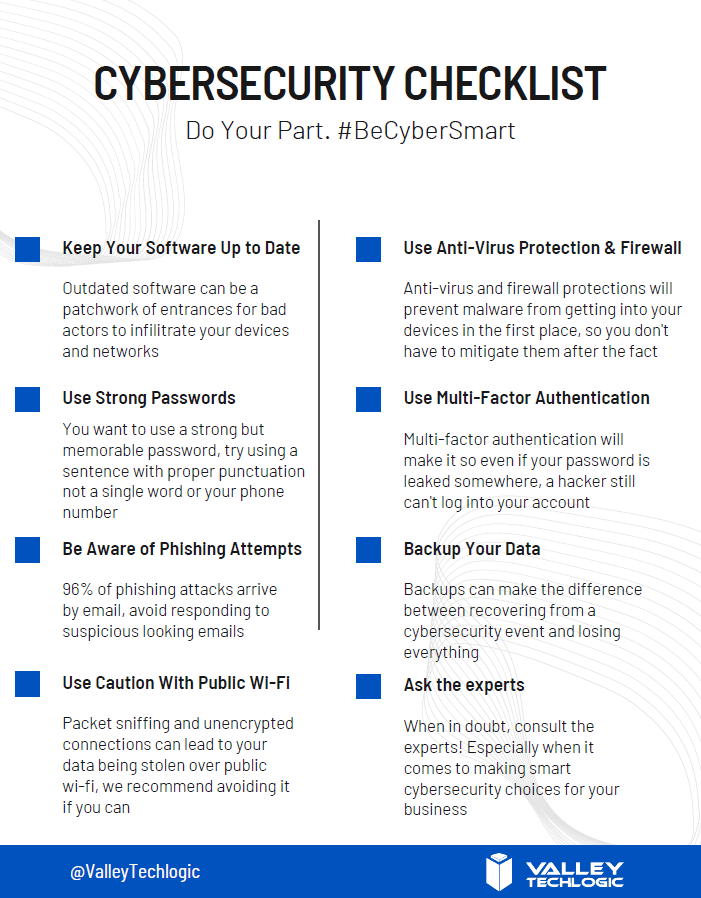
    We’ve created this checklist so you can see if you’re following the right path to keep your business safe from outside intruders.

    Click to download the online capable version.

    Cybersecurity requires ongoing maintenance to succeed. Following simple safety steps will help but it’s important not to disregard active threats to your business from the outside.

    Ongoing employee training is one way to combat those threats, cybersecurity training has evolved to include bite size doses of good advice for your employees that could make the difference between inadvertently falling for a phishing scam or attack attempt and reporting it to your IT team as they should. 95% of data breaches involve human error.

    It can also be important to have a team behind you making sure all of your company devices are maintained and updated, even if that outdated Windows 7 computer that sits in a corner is barely used it can still be a threat to your business. Older devices with outdated software can act as a gateway to allow bad actors into your business.

    More advanced maintenance such as enabling two-factor or multi-factor authentication on company accounts can be another important step to keeping threats out. If someone gets your password from another company’s data breach (which happens all the time) that phone pop up could prevent you from being hacked.

    Finally, having a comprehensive backup program for your businesses data is the final shield against cyber threats. We’re unique in that we offer not only active backups but archival backups as well. The archival backup is “Write once, Read many” which means you can look at the data as often as you like but it can’t be edited or deleted.

    A bad actor may find your unbacked up data, and they may gain access to your active backups, but that archival data is virtually bullet proof. For your important files, the ones that must not be deleted at any cost, having that backup there and ready if you need it is the peace of mind most of us would not want to be without (learn more about our backup program here).

    If this article has gotten you thinking about what you can do to improve your cybersecurity processes or even that you need to create a plan to get there, we’d love to help. Schedule a discovery call with us to learn more about how Valley Techlogic can help you be #CyberSmart.

    Looking for more to read? We suggest these other articles from our site.

    This article was powered by Valley TechLogic, adns, n IT service provider in Atwater, CA. You can find more information at https://www.valleytechlogic.com/ or on Facebook at https://www.facebook.com/valleytechlogic/ . Follow us on Twitter at https://x.com/valleytechlogic.

  • Can you spot the phishing clues? And 10 tips to avoid falling for a phishing scam

    Can you spot the phishing clues? And 10 tips to avoid falling for a phishing scam

    If you’re not aware, phishing is another word for scams perpetrated over email. It was coined in 1996 and was first associated with hackers attempts to steal America Online (AOL) accounts, and it has not slowed down since then.

    As of 2021 most hacking attempts are phishing scams, the phrase is meant to evoke the image of a hacker literally fishing for their victims by baiting a hook which in this case is a credible looking email from a place you might actually do business from, a colleague or a family member. 94% of malware attempts originate from an email sent to the victim.

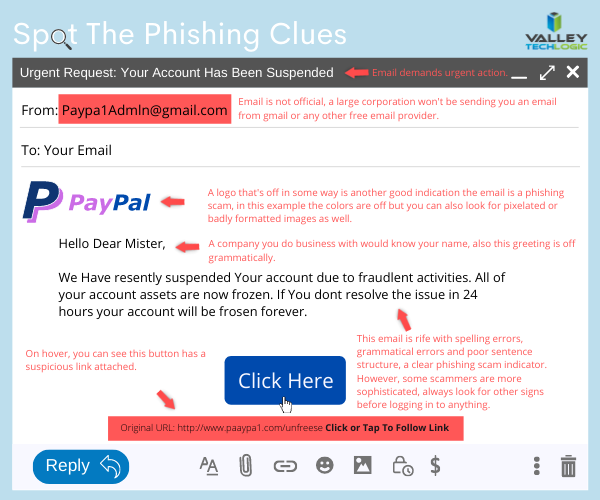
    Well as credible as they can manage, many phishing attempts are poorly worded and grammatically incorrect as the senders are from another country from the victim. In the image below we showcase a phishing email you might receive, click to reveal the answers.

    Spot the phishing clues
    Click to reveal the clues.

    Not all phishing attempts will be so obvious though, here are our 10 tips to avoid falling for a phishing scam.

    1. You are asked to reply with sensitive details. A legitimate business will never ask for your private details via email, if you’re unsure contact the business directly to ask.
    2. The message says you must respond urgently or face dire consequences. Legitimate businesses such as the financial institution you bank with won’t relay an important message over email alone, and they’ll never threaten you.
    3. The email contains a non-standard email attachment. While even standard email attachments can contain malware, a non-standard email attachment is a clear sign something is amiss.
    4. The senders email address doesn’t match the contents. As in our example, a legitimate business (especially a large one) won’t be using a gmail address. You also want to watch out for slight misspellings, such as an email coming from admin@paypa1.com
    5. The email contains an unusual request. You receive an email that looks like it’s from your boss, and he’s saying he wants to reward some key players in your company by gifting them gift cards from a popular big box store. He says not to give them to the players directly, simply reply with the gift card numbers and he’ll handle it. This is just one example of a scam we have unfortunately heard of happening. If the email is requesting large amounts of money be spent in unusual way or private details be sent over email, even if the email looks legitimate you should verify with the supposed sender first.
    6. It has an attachment you weren’t expecting. If receive an email with an attachment and the body suggests you requested information, but you don’t remember doing so, it’s probably a phishing scam.
    7. The email says you won a prize, but you must enter your banking information to claim it. Prizes are a common phishing scam trope; they may also try to get you to download a suspicious attachment.
    8. The URL in the email doesn’t match the business it claims to come from. As in our example, phishing attempts often involve a similar but not quite right URL. Many scammers will try to gain the victims trust by sending them to an “official” looking website where they will login with their legitimate credentials, allowing the scammer to gain access.
    9. The content is canned. Many phishing scammers reuse the materials of others. One example is you receive a suspicious sounding email, such as someone saying you have stolen their copyright images and you must visit a website to confirm. If you Google the email you may find examples of others online who have received that same
    10. The greeting doesn’t match the content. This is a simple one, if you receive an email supposedly from your boss but the greeting starts with “Dear” or another out of character greeting, it’s probably a phishing attempt.

    This is only a start, many phishing attempts are highly sophisticated and difficult to spot but knowing some of the signs will help you be more attentive to things that may be wrong with an email you receive. We also have found for our clients, randomized simulated phishing attempts can help them with training their staff to keep an eye out for phishing attempts.

    Most successful hacking attempts involve a human element, training is your only first line of defense. If you would like to increase your defense against phishing attempts, malware, ransomware and more, Valley Techlogic can help. Schedule an appointment with us today to learn about our comprehensive cyber security packages for businesses.

    Looking for more to read? We suggest these tech articles from the last week.

    This article was powered by Valley TechLogic, an IT service provider in Atwater, CA. You can find more information at https://www.valleytechlogic.com/ or on Facebook at https://www.facebook.com/valleytechlogic/ . Follow us on Twitter at https://x.com/valleytechlogic.

  • Cyber Security Training Is More Accessible Than You Think

    Cyber Security Training Is More Accessible Than You Think

    It can be a hard pitch getting your employees to commit to cyber security training, and you yourself may wonder if it’s worth the time spent on it.

    It’s a simple fact, when it comes to cyber security breaches humans are the weakest link. There is no software measure that can preempt the human element when it comes to bad actors getting into your business’s systems and accessing your sensitive data.

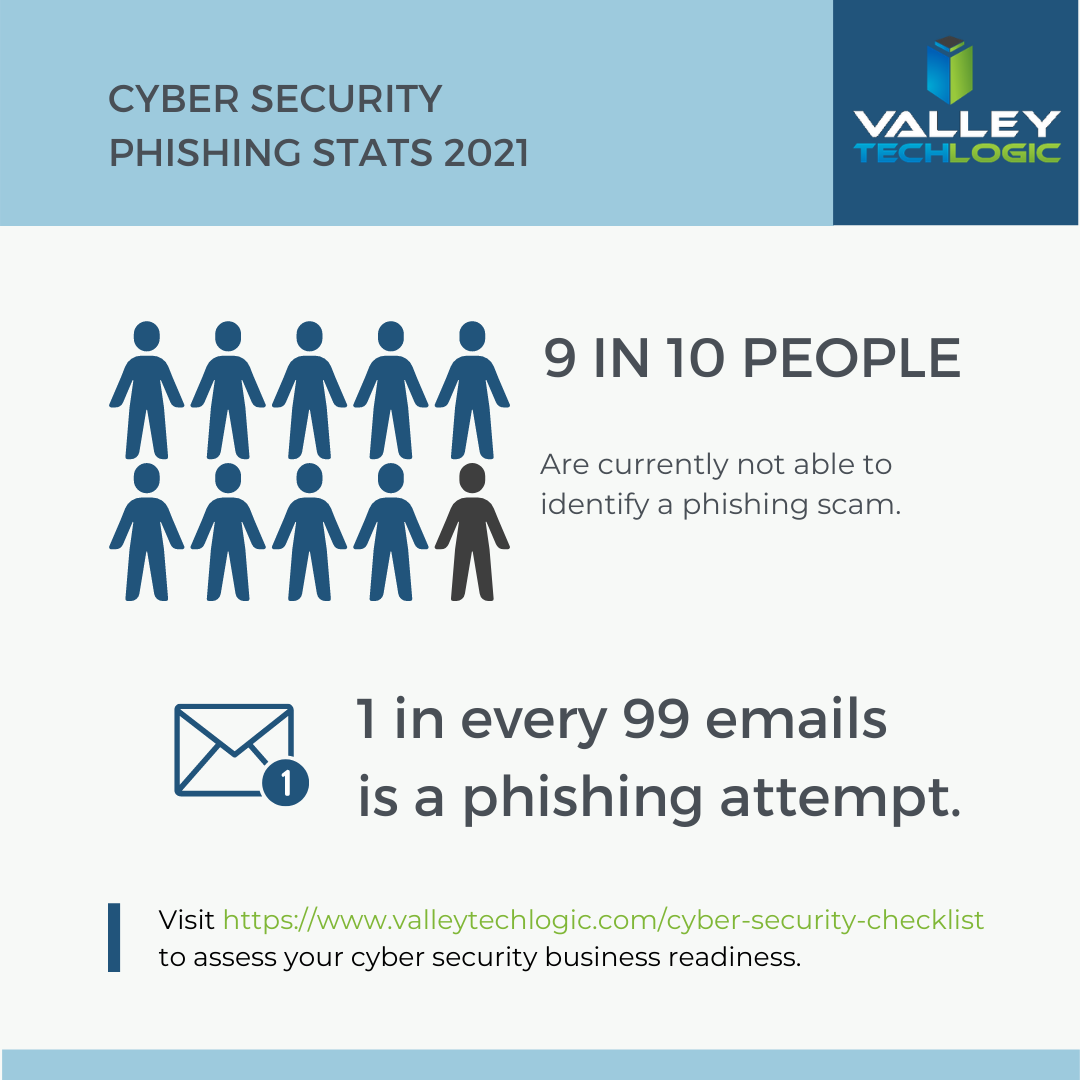
    It’s not your employees’ fault, hackers are constantly devising new ways to breach your systems. They spend countless hours on it and they’re very, very good at it. Just look at these eye-opening statistics.

    Statistics on Phishing

    When many people think cyber security training, they think of something they’ll have to spend hours on. Long form videos with wordy explanations in tech-speak that doesn’t resonate or get absorbed by the intended audience.

    However, cyber security training has come a long way past that. Like most of our internet consumption activities, it can be delivered in quick bites that drive the point home in a way that speaks to your employees and many offer micro quizzes that quickly evaluate whether the information provided was understood.

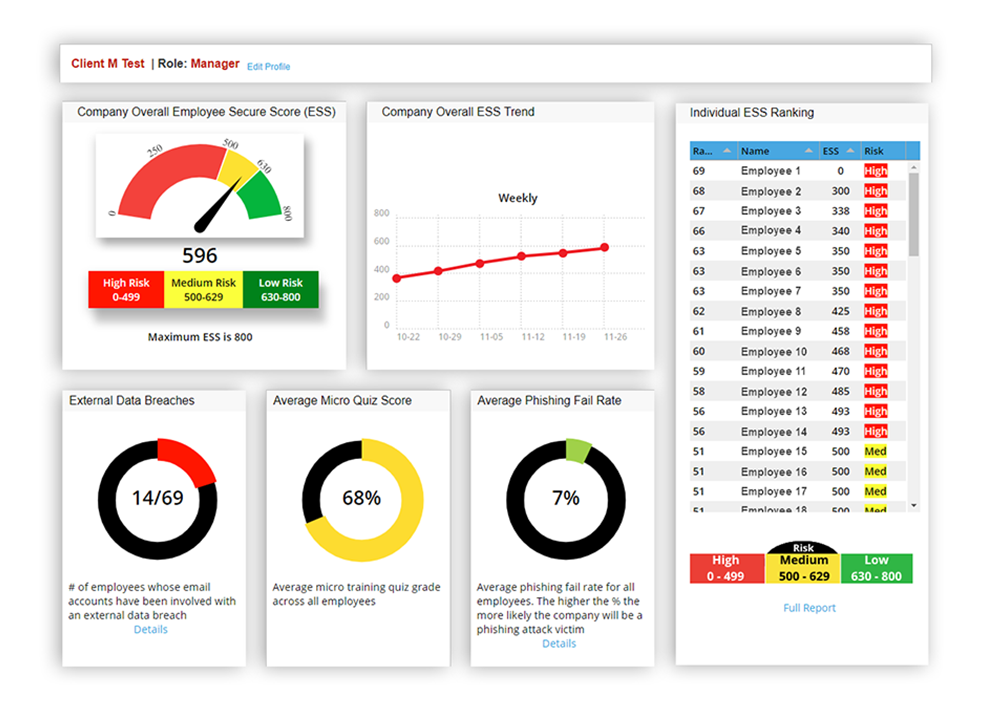
    The systems we have used have management and owner portals so you can continuously monitor the results of these quizzes as well as the results of simulated phishing exercises.

    Web Training Portal

    Phishing remains a top threat to companies across the country, of breaches that have occurred in 2021, 22% involved phishing (45% involved hacking and 17% involved malware).

    Simulated phishing exercises allow you to randomly test your employees in a safe environment. The results are confidential and if you find this is a regular problem with your organization it lets you know you need to step up your efforts in regard to email safety training and have more stringent policies in place.

    There is even cyber security training that can be delivered directly via your email client, the short form videos will appear on the right-hand side and the micro quizzes can be taken immediately after viewing. making it highly accessible since there’s no need to navigate to a website.

    An additional benefit is you can inform your clients and vendors that you are conducting cyber security training within your organization.

    Also, if you access cyber security training through your IT service provider it can be highly affordable or even free. At Valley Techlogic we believe in the benefit of not only providing IT and support and service to our clients, but also making tools and information available to allow them to be completely informed in their IT choices. This includes offering cyber security training as an option for the businesses we provide services for.

    Cyber security is best implemented through a package effort of passive prevention and active prevention, passive prevention is the software we employ that prevents and mitigates cyber security threats. Active prevention is the training we offer that allows  employees to safeguard their own systems and prevents potential threats from occurring at all.

    If you’d like more information on cyber security training and/or other cyber security prevention services, you can reach out to us here. We also offer a free cyber security training kit you can get started with here.

    Looking for more to read? We suggest these tech articles from the last week.

    This article was powered by Valley TechLogic, an IT provider in Atwater, CA. You can find more information at https://www.valleytechlogic.com/ or on Facebook at https://www.facebook.com/valleytechlogic/ . Follow us on Twitter at https://x.com/valleytechlogic.
  • It’s Not Your Imagination, Ramsonware is On the Rise

    It’s Not Your Imagination, Ramsonware is On the Rise

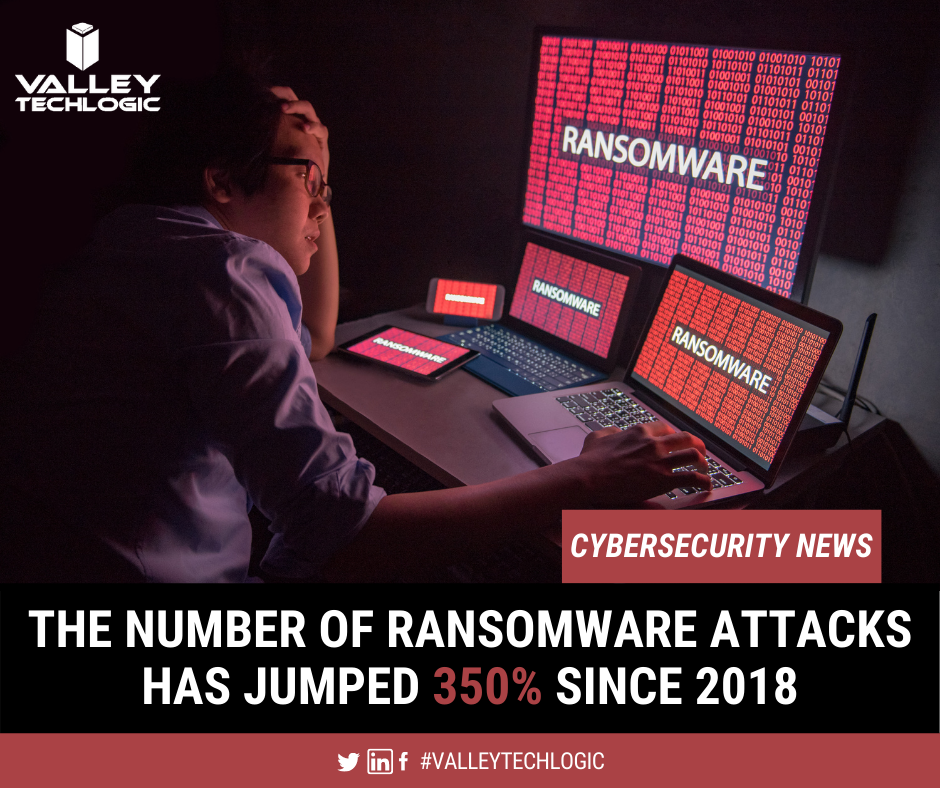
    We have talked about several major ransomware events over the past year, but these were far from unique. Ransomware and cyber security events have been on the rise lately and it’s been made abundantly apparent that NO ONE is immune to them.

    From the yet to be officially validated Kia Motors attack, to the narrowly avoided disaster with a Florida Water Plant. No attack had more widespread coverage for a while (including by us) than the SolarWinds breach that seems to go deeper and deeper. These are just a few in a massive list of growing ransomware events that have happened to companies of all sizes. If you think your business is too small to be a target think again.

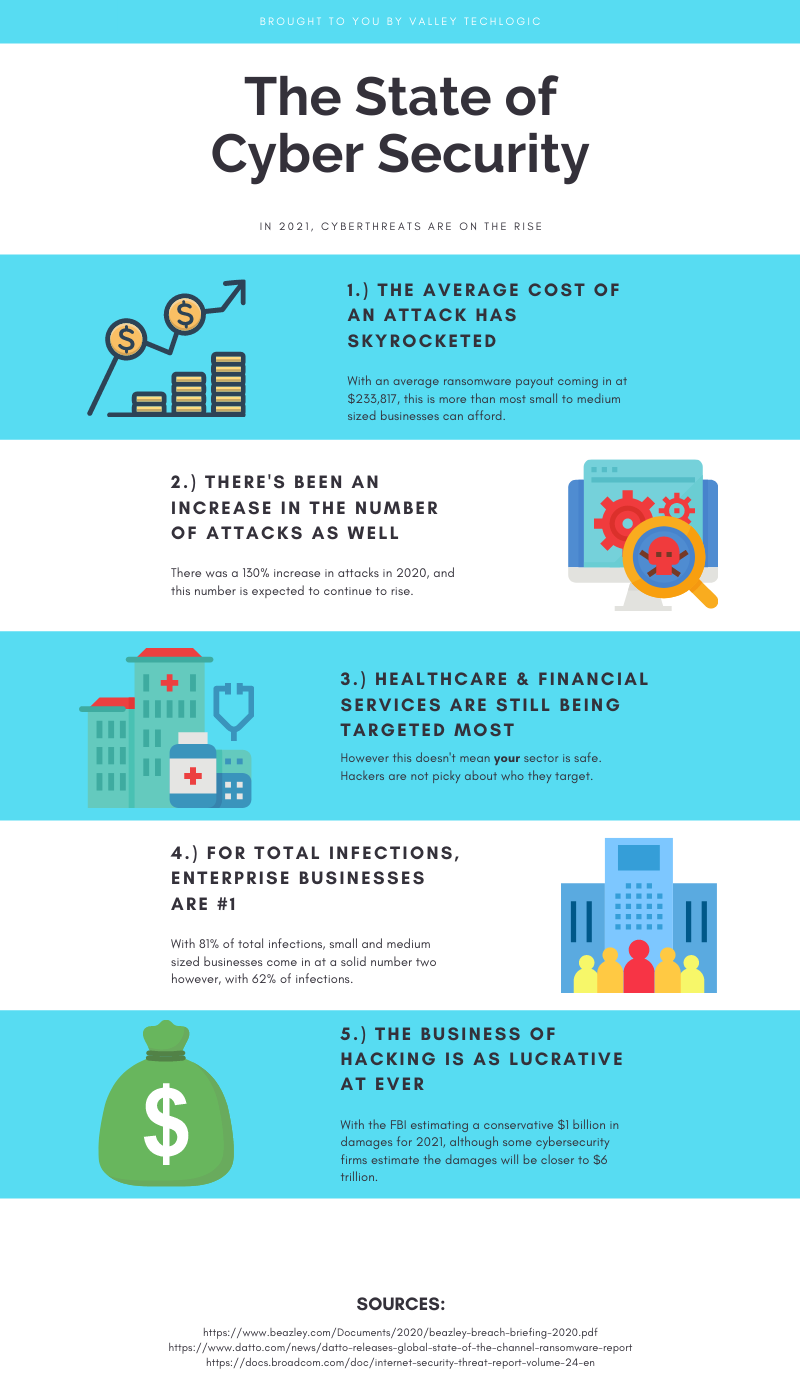
    According to this Datto report, one in five small businesses will experience a ransomware event. While larger businesses may be eyed as prized targets by hackers, most of the time they also have the staff and resources to put up a better defense against cyber security threats. This makes them much harder for hackers to infiltrate.

    A lackadaisical attitude towards being hit by a ransomware can cost your business big time. Ransomware extortion amounts continue to skyrocket, with the average demand in Q3 2020 being $233,817 according to the cybersecurity firm Coveware.

    If you’re thinking a demand like that could bankrupt your business, you’d be correct in that fear. 60% of small businesses will go out of business within 6 months of a cyber security attack.

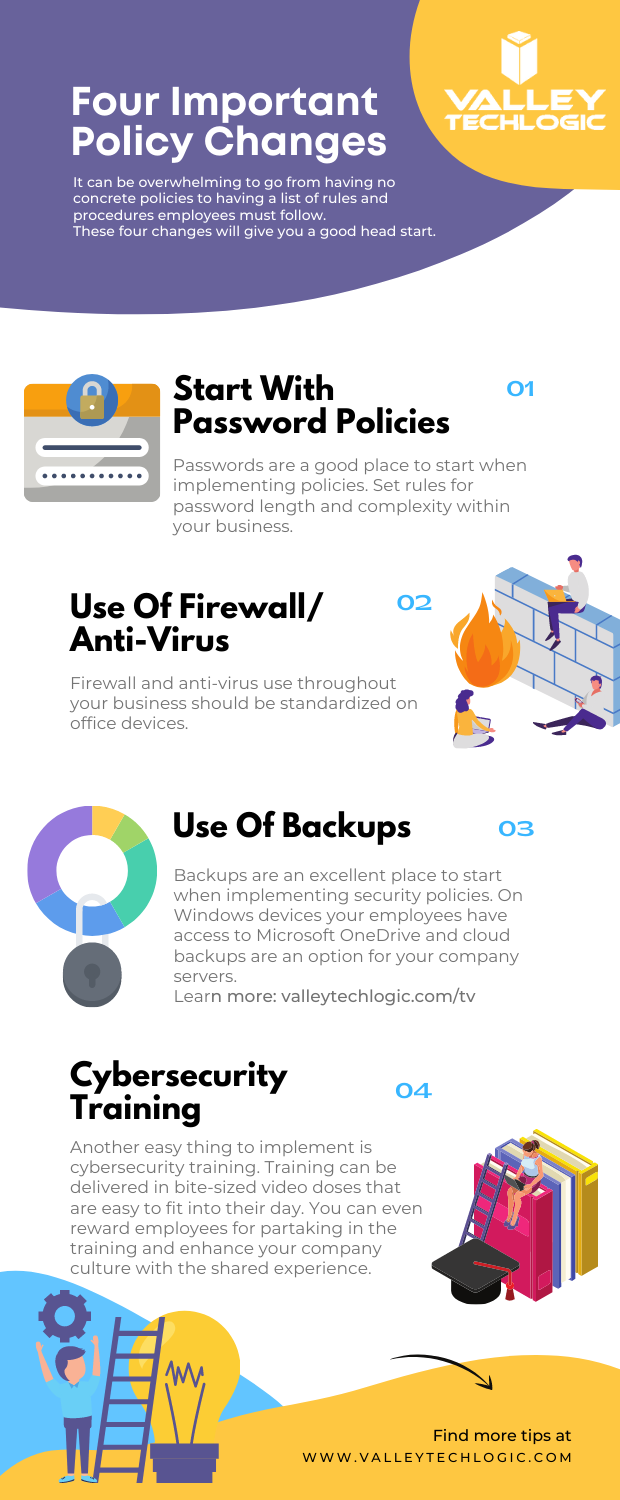
    We have made an infographic with statistics on cyber security threats in 2021 so far.

    Infographic on Cyber Security

    We’re not presenting this facts to you in an effort to make you feel hopeless, there is a way to prevent an attack from hitting your business in the first place. The ONLY way to avoid a serious cyber security threat is to have proactive cyber security prevents in place. Many business owners cannot achieve this on their own.

    Cyber security prevention is an ongoing process, it’s not just installing a virus scanning software and configuring a firewall and calling it good. Business level cyber security protections can be complex to configure and manage.

    Your business has more hardware, more data and more assets to protect. Comparing it to what’s needed to protect a home PC network is apples and oranges. If you’ve just been crossing your fingers that it won’t happen to you that’s NOT a good idea, because statistically there’s a good chance that it will.

    If your business needs assistance in a cyber security plan that’s not just about checking boxes or relying on hope but actually protecting all of the valuable systems you need to run your day-to-day operations, reach out to Valley Techlogic today.

    Looking for more to read? We suggest these tech articles from the last week.

    This article was powered by Valley TechLogic, an IT provider in Atwater, CA. You can find more information at https://www.valleytechlogic.com/ or on Facebook at https://www.facebook.com/valleytechlogic/ . Follow us on Twitter at https://x.com/valleytechlogic.
  • The Solar Winds Rabbit Hole: What’s happened and what’s next?

    The Solar Winds Rabbit Hole: What’s happened and what’s next?

    In most situations where a massive hack or breach has occurred, trying to get a handle on what has been compromised or even what is still compromised can be a challenge.

    It’s unfortunately been our experience that in most cases things almost end up being worse than they initially look. Hackers are smart and if they can remain in your systems for a long time, they can get more to either use against you in a ransomware attempt or even leave breadcrumb behind to get back in your systems and hit you again.

    This is why we will always say prevention is key, but sometimes despite your very best efforts a breach occurs. We think this is certainly what has happened in the case of the massive Solar Winds breach that is still being unraveled weeks later.

    CyberSecurity NewsEven detection’s put in place by the NSA failed to detect this hack in time, and as of this week Microsoft was even included in it as it’s been exposed that some of their source code was revealed in the breach.

    Hackers grow more and more sophisticated by the day and it requires a full-scale team effort to prevent your business from either an attack aimed at it specifically, or as the case has been with Microsoft, being looped into a breach that’s occurring to a vendor you may use.

    Attacks from foreign bodies aren’t even very rare, international hacker networks are taking a growing lead in cyberwarfare. While most of these attacks are acts of espionage, if the payoff is lucrative enough hackers will strike anywhere.

    It’s unknown what the real damage from the Solar Winds hack will end up being, or what if anything will come from the exposure of Microsoft source code, but we think this should serve as a wakeup call to anyone who doesn’t take the topic of cybersecurity seriously.

    Here are some things you can begin to do to make your business more secure in 2021.

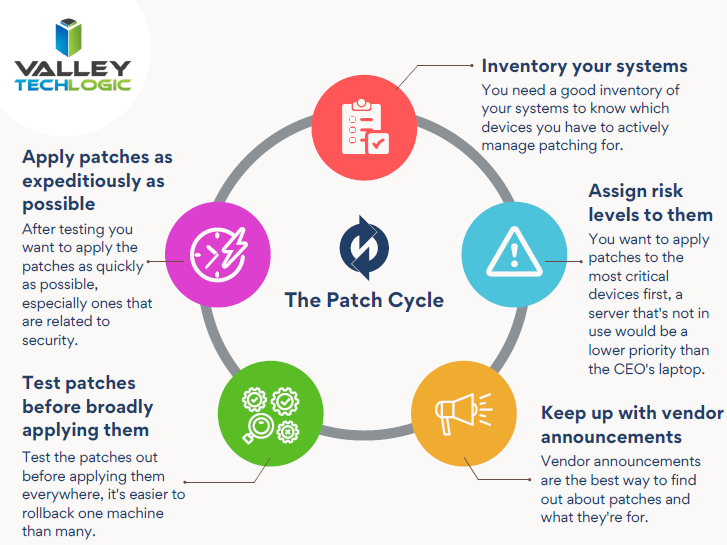
    1. Have a Hardware Firewall like SonicWall. A hardware firewall makes it easier to have universal rules for your whole network versus having to configure rules for each device.
    2. Enable Core Isolation and Trusted Platform Module (TPM) on your Windows 10 Devices. These protocols will work in tandem to help stop malware and ransomware on your Windows 10 Devices.
    3. Also Enable Group Policy Settings with the Group Policy Editor. With group policy settings you can stop employees from doing things like opening attachments or random .exe files. You can also use group policy to prevent unknown USB devices from being used on work devices. Basically, group policy can prevent a lot of the activities that lead to ransomware or malware in the first place.
    4. Use Next Level Multi-Factor Authentication with a Hardware Key. We believe strongly in Multi-Factor Authentication (MFA) and the next step to that could be introducing the use of hardware keys to your business, a hardware key is a token that won’t allow you to unlock a device without it. Most hardware keys will also work in conjunction with software MFA like LastPass.
    5. You should Vet your Vendors, Even the “Bigger” Ones. As this Solar Winds breach has shown us, big or small a breach can happen to anyone. While you’re working on handling cybersecurity on your end you should also question the vendors you use as to what their cybersecurity policies are and what their plan is if a breach were to occur.

    This is by no means an exhaustive list but like we usually say, starting is a great first step. If you’d like an information packet of the Cyber Security services Valley Techlogic can provide, reach out to us today! Our comprehensive Cyber Security plan addresses all these topics and many more.

    Looking for more to read? We suggest these tech articles from the last week.

    This article was powered by Valley TechLogic, an IT provider in Atwater, CA. You can find more information at https://www.valleytechlogic.com/ or on Facebook at https://www.facebook.com/valleytechlogic/ . Follow us on Twitter at https://x.com/valleytechlogic.
    Looking for IT Services in Fresno, Modesto, Stockton, Ceres, Atwater, Merced, Visalia or Lodi? We cover all these areas and more!

  • The ransomware attack crippling a major repair firm that no one’s talking about

    The ransomware attack crippling a major repair firm that no one’s talking about

    Dell, Lenovo, even Apple brand computer and device repairs might be seeing major repair delays at the moment as a top repair firm they use was hit by a ransomware attack that ground their operations to a complete halt.

    This has been seemingly squashed as a news worthy event for the moment but we think customers should be made aware that if they send their desktop or laptop in for a repair at this time they face major delays in getting it back. In fact, there may be a delay in even getting a box to send the machine back in as even shipping has also been affected by this ransomware.

    Reported briefly by ItWire, this attack aimed at the security firm Symantec has taken down a number of systems across the country. From the attackers’ view point they were able to disable one of the end point protections allowing access, and to make matters worse the software was up to date at the time, leading to major questions as to how this was able to occur at all.

    CSAT, used by Dell, Lenovo, Apple and more was hit just over a week ago and customers have been facing problems ever since.

    We haven’t been able to confirm that any customer data was leaked, however, according to the ItWire article a number of screenshots of computer directories were placed online.

    If the General Data Protection Regulation (GDPR) that governs in the UK applied in this case, these companies should have reported any exposed customer data within 72 hours. It’s possible no customer data was leaked but the scope of this apparent ransomware has us questioning whether that’s true.

    We’re uncertain if business support class customers are facing the same delays as home users however as with most things there may be a trickle-down effect.

    The ransomware that allowed this to occur was called NetWalker and it’s been responsible for 10 major breaches just this year. It’s clear to us ransomware as a service is not going anywhere soon when the payouts are so lucrative.

    Released in April 2019, the average payout on a NetWalker attack is $175,000 in bitcoin following each successful campaign. One of the highest payouts was $1.14 million from the University of California. It’s estimated the NetWalker ransomware gang has made $25 million in all.

    This latest attack shows that it’s not only a loss of data and having to pay a hefty sum that come as side effects from being hit with ransomware, the affected security firm and repair firm are also experiencing a major loss of credibility with customers that they may never fully recover from.

    You may think your business is too small to be hit with a ransomware attack, but the fact is ransomware as a service has made orchestrating these attacks easier than ever. Even a small payout of a few thousand dollars may be worth it to some individuals with low moral standing just looking for some quick cash.

    Or maybe they’re not interested in your money at all, maybe they’re interested in your data which may be more lucrative for them. Also, many hackers commit their attacks just for the thrill of it and will think nothing of dismantling your technology operations and leaving you stranded.

    We don’t think this should happen to anyone; we can help businesses located in the Central Valley beef up their cyber security provisions to stop ransomware gangs in their tracks.

    VTL Cyber Security

    Looking for more to read? We suggest these tech articles from the last week.

    This article was powered by Valley TechLogic, an IT provider in Atwater, CA. You can find more information at https://www.valleytechlogic.com/ or on Facebook at https://www.facebook.com/valleytechlogic/ . Follow us on Twitter at https://x.com/valleytechlogic.

    Looking for IT Services in Fresno, Modesto, Stockton, Ceres, Atwater, Merced, Visalia or Lodi? We cover all these areas and more!


  • Distance Learning and The Ways We as a Technology Leader Think It Can Be Improved

    Distance Learning and The Ways We as a Technology Leader Think It Can Be Improved

    For many of us back to school has arrived, although it’s in a way that is drastically different than we’re used to. Technology is making it possible for schools and colleges across the country to teach children and adults from their homes as the global pandemic continues to .

    Primary schools and colleges have some of the same hurdles and v some that are drastically different, but this article will be mostly aimed at parents finding themselves in the position of navigating virtual learning with their children.

    The success of distance learning is intricately tied to both having access to the technology required and being instructed on how to use it properly.

    Access to the technology needed has been woefully inadequate thus far for many schools. Chromebooks, often the computer of choice for schools both for their ease or use and because they’re inexpensive, have been in high demand and production has not been able to keep up.

    However, if you’re a parent waiting on a Chromebook from your school and you have access to other technology such as a laptop you no longer use, know that it will work just fine for distance learning. The device of choice does not HAVE to be a Chromebook and forgoing receiving a device in a time when many schools don’t have adequate stock may help free one up for a family who will otherwise not have access to a computer.

    If you have the means to purchase a new device for your student(s) the following minimum specifications are what we’re recommending.

    • 250 GB hard drive or higher
    • 4 GB RAM or higher
    • 2.0 GHz Intel or AMD processor
    • Windows 10 or MAC OS 10.10 or later
    • Microsoft Edge, Firefox 48 or later
    • Safari 11 or later
    • Anti-virus program (updated regularly)
    • Computer microphone and speakers
    • Web Camera

    Once you have your device it’s time to begin preparing it for the distance learning school year ahead. Every state and district will have their own suite of software and websites they’re recommending and using to conduct classes. One constant we’ve seen so far is in the continued use of Zoom as the meeting software du jour.

    We’ve written a few times on the safety of Zoom (you can view those articles here & ), general good password hygiene is still at the forefront of operating all the accounts you may have to juggle during a distance learning situation.

    I think we’ll find it’s up to schools and local governments to close the divide on distance learning, making it as accessible as possible across the board and providing the flexibility needed for families.

    “Teachers in two separate surveys estimated that only about 60% of their students were regularly participating or engaging in distance learning. (Individual district reports of daily “attendance” varied widely, as districts defined the term so differently.)

    Two-thirds to three-quarters of teachers said their students were less engaged during remote instruction than before the pandemic, and that engagement declined even further over the course of the semester.

    A survey of teenagers in late March found that most were in contact with their teachers less than daily, with a quarter saying they were in contact less than once a week.” –  Chalkbeat.

    Engagement will be a challenging hurdle for most schools and it’s one technology can address if tackled in the right way. As this quote illustrates attendance is a sore point and many parents are finding it difficult to impossible to juggle both work and the complexities that come with distance learning. Improvements in the technologies used to deliver the educational experience to students as well as flexible options for parents is crucial for beginning to solve this dilemma.

    We all have a desire for a time when we can get back to normal and kids can get back to school, but by not preparing ahead of time for a lasting remote learning situation many districts are left cobbling together different technologies in the hope of providing a cohesive learning experience.

    We need educational programs that are custom tailored to a remote learning situation, and these may not resemble the traditional in school paradigm we’re so used to as much as we want it to.

    Moving forward it will be imperative that we find the right ratio of both serving the educational needs of the children in our country during this immensely difficult time and allowing for grace when things do not go as we plan.

    Looking for more to read? We suggest these tech articles from the last week.

    This article was powered by Valley TechLogic, an IT provider in Atwater, CA. You can find more information at https://www.valleytechlogic.com/ or on Facebook at https://www.facebook.com/valleytechlogic/ . Follow us on Twitter at https://x.com/valleytechlogic.
    Looking for IT Services in Fresno, Modesto, Stockton, Ceres, Atwater, Merced, Visalia or Lodi? We cover all these areas and more!

  • This Malware is on Fire – Literally

    This Malware is on Fire – Literally

    There is a new malware out there that can trick your phones power brick into catching on fire.

    Cellphones and fires are not a new phenomenon, we all remember the debacle that was the Samsung Note 7. Due to the so called “aggressive” battery design, phones worldwide were exploding. This led to a swift recall and caused quite a dent in their public image.

    However, the fires being started right now are at no fault to the manufacturers and not tied to a single brand. A recently discovered malware being called by the lab that discovered it “BadPower” is causing cellphone power bricks across various brands to start on fire.

    Melted Cellphone
    An example of one of the affected phones. Attribution Nathanial Stern via Flickr

    It works by tricking the adapter into sending more electricity to the phone then it can handle, which over time will melt the internal components and start a fire. Xuanwu labs tested the BadPower malware with 35 different power bricks and they discovered 18 of those were vulnerable to the attack.

    What’s even worse, if your phone fell victim to this attack there would be no external signs that it was happening, your power brick would just start on fire.

    As with many things the solution to this problem is a firmware update provided by your cellphone manufacturer and this is yet another solid reminder to always keep the software on your devices updated.

    Cellphones are not the only things vulnerable to attacks that may damage hardware. While most malware on computers is directed at stealing information, it’s technically possible for a malware to cause your personal computer to overheat, thereby damaging its CPU.

    We may be entering a new age of malicious malware that’s aimed purely at destruction and not of the financial kind that we’re accustomed to.

    In this case the best defense is a good offense, and if you’re a business located in the Central Valley, Valley Techlogic would love to be your strategic partner in protecting your business. Reach out today for a free cyber security assessment, in less than 30 minutes over the phone we can give you a place to start.

    If you’re not ready for the assessment, we also have our free one-page cyber security checklist that was recently updated for 2020. We think it’s a great resource for your business.

    Looking for more to read? We suggest these tech articles from the last week.

    This article was powered by Valley TechLogic, an IT provider in Atwater, CA. You can find more information at https://www.valleytechlogic.com/ or on Facebook at https://www.facebook.com/valleytechlogic/ . Follow us on Twitter at https://x.com/valleytechlogic.

    Looking for IT Services in Fresno, Modesto, Stockton, Ceres, Atwater, Merced, Visalia or Lodi? We cover all these areas and more!


  • Our Top 3 Picks for Password Managers

    Our Top 3 Picks for Password Managers

    The topic of 2 factor authentication (2FA) comes up A LOT. You’re probably already aware a password manager is the easiest place to start and will even make using your devices more convenient. However, this space is so loaded with choices now you may not know where to start.

    We’ve written a lot about what makes for a good password but what should you look for in a password manager?

    It depends on what your goal is. All password managers will help you with password safety, things like not re-using passwords and having stronger passwords because you won’t have dozens to remember.

    Some password managers only store your database locally, meaning it’s only on your own machine. The benefit of this is you’re in charge of your own security. The downside is if the device is lost or compromised, your database may be lost as well.

    There are also cloud storage password managers, meaning the password manager company will store your password database for you. We think for most users this is the better choice, however you are trusting your data to that company.

    So, what are our picks for password managers that are convenient to use but also have a good track record?

    1. LastPassThis is no brainer; we use this one! It’s free, straightforward, and compatible with many different browsers – even across Mac, Windows and Linux. They also offer 1 GB of secure document storage, meaning everything you need securely store will also be conveniently at your fingertips.
    2. 1Password1Password is a great mobile option. It began as an Apple centric product but has since branched out to include iOS, Android, Windows and ChromeOS. An extra bonus feature is it can act as an authentication app for programs like Google Authenticator. We also like its travel mode option, which allows you to delete sensitive data with one click while you travel and then restore it when you’re back home.
    3. DashlaneOur final pick is Dashlane. Dashlane is the newest of this bunch but they have a lot of slick features, including Dark Web reporting. The free version is somewhat limited but if you pay a low cost of $4.99 a month you unlock a host of features, including a free VPN and the ability to sync between devices. They also let you choose whether you want to store your database on your device or locally.

    One more thing, while your browser can somewhat perform as a password manager, that’s really not what it’s meant for. Browsers focus most of their development on being a better browser, not being a better password manager. Also the passwords they generate are not much better than “password” or “123456” (the most popular passwords 7 years running).

    Storing your passwords in a secure password manager is one of the best and easiest ways to improve your security online, so no matter which password manager you go with you’re making the smart choice.

    Looking for more to read? We suggest these tech articles from the last week.

    This article was powered by Valley TechLogic, an IT provider in Atwater, CA. You can find more information at https://www.valleytechlogic.com/ or on Facebook at https://www.facebook.com/valleytechlogic/ . Follow us on Twitter at https://x.com/valleytechlogic.
    Looking for IT Services in Fresno, Modesto, Stockton, Ceres, Atwater, Merced, Visalia or Lodi? We cover all these areas and more!

  • DDoS Attack or Not? Yesterday’s Outage Left Many Systems Down for Hours

    DDoS Attack or Not? Yesterday’s Outage Left Many Systems Down for Hours

    Yesterday, an outage stemming from T-Mobile left many major systems down. Affected websites included T-Mobile itself, Instagram, Comcast, Sprint and Chase Bank. Was it a massive DDoS attack or just a server misconfiguration as they’re claiming?

    First, it’s probably a good idea to explain what a DDoS attack or Distributed Denial-of-Service attack is and what it aims to do.

    A DDoS attack is a cyber attack where the perpetrator or group of perpetrators seeks to make a server or network unavailable by attacking its connection to the internet. They typically do this by flooding the affected systems with traffic, overloading them and causing them to go down.

    These attacks can happen to a single computer, an office, or even on a global scale. The website https://digitalattackmap.com/ attempts to track these DDoS attacks on a global level, however it’s somewhat controversial among cyber security experts as they question the veracity of it’s data.

    Many time these outages are made apparent by the website https://downdetector.com/ which accurately tracked the cascading wave of websites that went down in yesterdays event.

    Down Detector is a reliable source for tracking whether the connection issues you’re having are stemming from your network or the website or service you’re trying to access is truly down.

    So, was yesterday’s event a DDoS attack or just an error? The public will probably never know. However as cyber crime continues to ramp up – purported to be a $6 trillion dollar industry by 2021 – it’s a good idea to have the best protections in place so you and your business don’t fall victim.

    A DDoS attack aimed at your systems may expose other vulnerabilities, and the downtime alone can be costly. If your IT team isn’t adequately prepared to defend against this or any of the other varieties of cyber attacks plaguing the technology market, it might be time for a new team.

    This article was powered by Valley TechLogic, an IT provider in Atwater, CA. You can find more information at https://www.valleytechlogic.com/ or on Facebook at https://www.facebook.com/valleytechlogic/ . Follow us on Twitter at https://x.com/valleytechlogic.
    Looking for IT Services in Fresno, Modesto, Stockton, Ceres, Atwater, Merced, Visalia or Lodi? We cover all these areas and more!