
Tag: cybersecurity

  • New malware dubbed “NoVoice” infiltrates the Google Play Store and infects 2.3 million devices

    New malware dubbed “NoVoice” infiltrates the Google Play Store and infects 2.3 million devices

    If you’ve downloaded anything new from the Google Play Store recently you might want to be wary of the extra “features” that may have come along with it. It’s being reported that a new malware dubbed “NoVoice” has infected a number of Apps across the Google Play store.

    The apps it was discovered in were not limited to one genre, the malware was found in cleaners, games, image galleries and more. At launch the apps didn’t request any additional suspicious permissions and worked as intended.

    Longtime cybersecurity behemoth McAfee discovered the malware but it’s not currently being linked to any specific malware group or threat actor, and no one has claimed credit for the attack as of writing. After installation the malware tries to gain root access to your device by utilizing vulnerabilities found in unpatched devices (most of these exploits have been patched between 2016 and 2021) highlighting the importance of keeping your devices up to date on firmware.

    According to the researchers at McAfee the infected payload hitched a ride on what looked like legitimate Facebook SDK classes, which then deployed an encrypted payload hidden inside a PNG before system wiping all traces of itself. If this sounds like a less delightful matryoshka doll in malware form that’s because it is.

    It was also noted by researchers that the malware had built in capacity to avoid certain regions in China if the original app was given permission to detect location. All-in-all researchers noted that the malware would attempt to try 22 known vulnerabilities on the infected device in order to gain root access. It was also discovered the primary goal once it had access was to then steal data from WhatsApp specifically, although it should be noted due to the flexible design of this malware it could have been used to steal other data (this just wasn’t noted during discovery).

    All affected apps have now been removed from the Google Play Store, and a Google representative issued a statement:
    “As an added layer of defense, Google Play Protect automatically removes these apps and blocks new installs. Users should always install the latest security updates available for their device.”

    As NoVoice specifically targeted security flaws that were fixed before 2021, any device that has been updated since that time would be safe from this exploit. Regular patching and security updates are a core feature on every Valley Techlogic plan, we believe this helps:

    • Fix known vulnerabilities before attackers can exploit them
    • Reduce the risk of malware, ransomware, and unauthorized access
    • Keep systems compatible with current security tools and protections
    • Help maintain compliance with security standards and insurance requirements

    Protect your business from threats today with a technology plan from Valley Techlogic, you can learn more about our services and get started here.

    This article was powered by Valley Techlogic, leading provider of trouble free IT services for businesses in California including Merced, Fresno, Stockton & More. You can find more information at https://www.valleytechlogic.com/ or on Facebook at https://www.facebook.com/valleytechlogic/ . Follow us on X at https://x.com/valleytechlogic and LinkedIn at https://www.linkedin.com/company/valley-techlogic-inc/.

  • .corn or .com? Domain scams are getting trickier, here’s how you spot them

    .corn or .com? Domain scams are getting trickier, here’s how you spot them

    It starts with a single typo. You glance at a URL, it looks right, and you click. But what loaded in your browser wasn’t your bank, your HR portal, or your company’s file-sharing platform. It was a meticulously engineered trap, and the people behind it had been waiting for exactly this moment.

    Domain-based deception isn’t new. But the tactics have grown sharper, faster, and far more difficult to spot with the naked eye. With over 300 million registered domain names in the world and new top-level domains being approved at a pace that can be hard to follow, scammers have more raw material than ever to work with.

    Understanding their methods is the first step toward protecting yourself and your organization.

    The anatomy of a fake domain

    Before diving into specific tactics, it helps to understand what scammers are actually trying to do. Their goal is to create a web address that is visually close enough to a legitimate one that a busy, distracted reader won’t notice the difference. They then use that domain to host phishing pages, deliver malware, or intercept credentials.

    The deception typically targets three things: the domain name itself, the top-level domain (the part after the final dot), and the subdomain structure. Sometimes all three are manipulated at once.

    “The goal isn’t to fool careful readers. It’s to exploit the moments when no one is being careful.”

    Typosquatting is the practice of registering domains that are one small error away from a well-known name. A missing letter, a transposed pair, a repeated character. The domains are cheap to register and the potential return is enormous.

    Classic examples include swapping an “i” for an “l,” doubling a letter, or inserting a hyphen where none belongs. More recently, scammers have been exploiting the similarity between certain characters in different scripts, a technique sometimes called homograph or homoglyph spoofing.

    • Legitimate
    • microsoft.com
    • Typosquat
    • rnicros0ft.com
    • Legitimate
    • paypal.com
    • Typosquat
    • paypa1.com

    At normal reading speed, on a small screen, or while skimming an email on your phone, these are nearly indistinguishable. That’s precisely the point.

    The new TLD problem: .corn, .рaypal, and beyond

    For decades, the internet ran on a handful of top-level domains: .com, .net, .org, .gov. Users learned to treat those suffixes as rough signals of legitimacy. That mental shortcut is now being exploited.

    The Internet Corporation for Assigned Names and Numbers (ICANN) has approved hundreds of new generic top-level domains in recent years, including .app, .store, .finance, .cloud, and many more. Alongside these legitimate expansions, bad actors have been quick to spot and abuse visual lookalikes. The domain suffix .corn, for example, is close enough to .com that it has been used in phishing campaigns targeting users who click without examining the full address. Similarly, .co is a legitimate country-code domain for Colombia that has long been used, sometimes legitimately and sometimes deceptively, as a shorthand imitation of .com.

    Watch out for

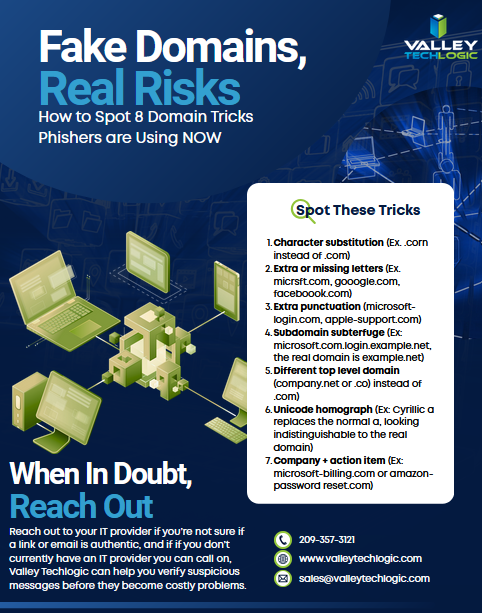
    .corn instead of .com — a real top-level domain that reads as familiar at a glance.

    .co instead of .com — widely used in legitimate startups, but also a common phishing suffix.

    Internationalized domain names that use Cyrillic or Greek characters which render identically to Latin letters in many fonts.

    Subdomain manipulation, such as paypal.com.account-verify.net, where the real domain is the one after the final dot, not the one you recognize.

    One of the most effective and underappreciated techniques involves manipulating subdomains. Browsers display the full URL, but users have been trained to look for the familiar brand name, not to parse which part of the address actually controls the destination.

    A URL structured as amazon.com.account-secure.xyz places a recognizable brand in what looks like the domain, but the authoritative domain is account-secure.xyz. The scammer owns that, not Amazon.

    This technique is particularly effective in SMS phishing (smishing) attacks, where the entire URL is often truncated and users tap links quickly without examining them.

    Modern browsers support internationalized domain names, which means a domain can be registered using characters from non-Latin scripts. The problem arises when those characters are visually identical, or nearly so, to their Latin counterparts.

    The Cyrillic lowercase “а” and the Latin lowercase “a” look the same in most fonts. The Greek omicron “ο” is visually identical to the Latin “o.” By combining these characters, a scammer can register a domain that renders as “apple.com” in your browser’s address bar but resolves to an entirely different server.

    Browser vendors have implemented some defenses against the most obvious abuses of this technique, but protection remains inconsistent across platforms and character combinations.

    “When it comes down to it, you’re not reading the domain. You’re pattern-matching against a mental image of what it should look like.”

    What’s changed in the last two years is not just the cleverness of individual attacks but the speed and scale at which they can be deployed. Generative AI tools have made it substantially easier for even low-skill operators to spin up convincing phishing pages, generate personalized lure emails, and register dozens of lookalike domains simultaneously.

    So what can you do about it? Security researchers have observed campaigns where hundreds of typosquatted domains are registered in a single day, each pointing to a slightly different variant of a phishing page tailored to a specific target sector. Financial institutions, healthcare providers, and enterprise software platforms are the most frequent targets, but no industry is immune.

    The threat landscape is complicated, but the protective behaviors that matter most are straightforward. Most successful domain spoofing attacks succeed not because the victim was foolish but because the conditions for clicking without thinking were carefully engineered.

    Practical checklist

    • Hover over links before clicking to see the full destination URL, and read it from right to left, starting after the final dot.
    • Use a password manager that matches credentials to specific domains. If the URL is wrong, the manager won’t fill, which is your first warning.
    • Enable multi-factor authentication everywhere. A stolen password is far less useful when a second factor is required.
    • Treat any link sent via SMS, messaging apps, or email as suspect by default. Navigate to sensitive sites by typing the address directly or using bookmarks.
    • Report suspicious domains to your IT or security team. Early detection of a campaign targeting your organization can protect colleagues who haven’t seen it yet.

    Domain-based attacks are successful because they exploit something deeply human: the tendency to use heuristics rather than careful analysis when under time pressure or cognitive load. Scammers are not usually trying to outsmart technically sophisticated users in their most alert moments. They’re engineering the conditions under which even careful people make mistakes.

    The defensive answer is partly technical, partly procedural, and partly cultural. Security-aware organizations train people to slow down at the moment of a click, not just to use the right tools. That pause, the habit of looking twice at a URL before entering credentials, is often the difference between a near miss and a breach.

    The next time a link looks almost right, trust that instinct. Almost right is how these attacks work, and education on this topic is the best way to stop scammers in their tracks. Below is a free resource on this topic to share with your team:

    For specific guidance on protecting your organization, consult a qualified cybersecurity professional. If you need assistance in administering cyber security services (including Security Awareness Training) within your organization, Valley Techlogic can help. Learn more today through a consultation.

  • Hacking group Scattered Spider is making waves for disrupting retailers and corporate America despite recent arrests

    Hacking group Scattered Spider is making waves for disrupting retailers and corporate America despite recent arrests

    Scattered Spider, otherwise known as UNC3944 gained notoriety during the infamous attack on MGM (which we reported in in 2023) which was estimated to have cost the company around $100 million dollars. The group has kept up its momentum while targeting financial institutions in particular such as PNC Financial Group, Synchrony Financial, Truist Bank and more.

    It’s estimated the cost of cyber crime has risen to $793 billion per month with groups like Scattered Spider contributing to this bottom line. The group has also been in the news for its unusual makeup, with most arrests being teenagers to young adults. This is not the hardened group of long-time professional hackers most people think of when they think of breaches on this scale.

    A set of recent arrests were made of two 19-year-old men, a 17-year-old boy and a 20-year-old woman in the UK, with the bad actors being charged with blackmail, money laundering and ties to a criminal organization as of writing. One of the alleged leaders of the group, 23-year-old Tyler Buchanan, was also arrested in May of this year and has been extradited to California to face charges where he faces up to 47 years behind bars.

    Ransomware/Malware-as-a-service (RAAS/MAAS) becoming more ubiquitous means that someone doesn’t even have to be extremely tech savvy to pull a cyber attack, expanding the reach of bad actors looking for financial gain from attacks on anyone convenient. It has never been more true than it is now in 2025 that no one is safe from cyber threats. Your business Isn’t too small or too remote to be a target.

    The group has also focused on tactics that are more social engineering than directly technical, with phishing being a primary driver as we saw in the MGM attack. Here are 5 ways hacking groups like Scattered Spider are pulling off cyber attacks:

    1. Social Engineering and Impersonation

    Scattered Spider is notorious for tricking employees into giving up credentials. They often:

    • Impersonate IT or help desk personnel
    • Call or message employees to reset passwords or approve MFA prompts
    • Use public info (like LinkedIn profiles) to craft believable stories
    1. SIM Swapping

    They hijack a victim’s mobile number by convincing the phone carrier to transfer it to a SIM card they control. Once they do this, they can:

    • Bypass MFA (multi-factor authentication)
    • Receive SMS-based codes for password resets
    1. Exploiting Identity & Access Management (IAM) Systems

    They target systems like Okta or Microsoft Azure AD to escalate privileges and gain access across an organization. Once inside:

    • They move laterally across systems
    • Create persistent backdoors
    1. Abusing Remote Access Tools

    Scattered Spider leverages legitimate tools like:

    • Remote desktop software
    • VPNs and virtual desktop infrastructure (VDI)
      They often enter using stolen credentials and hide in plain sight by mimicking normal user activity.
    1. Ransomware Deployment & Data Theft

    After gaining sufficient access, they:

    • Exfiltrate sensitive data
    • Deploy ransomware (often in partnership with ransomware-as-a-service groups like ALPHV/BlackCat)
    • Threaten double extortion: demanding payment to both unlock systems and not leak data

    At Valley Techlogic, we help businesses of all sizes stay protected against advanced threats from hacking groups like Scattered Spider by combining proactive cybersecurity strategies with enterprise-grade tools. Our team monitors for suspicious activity, implements strong identity and access controls, and trains your staff to recognize social engineering attempts, closing the gaps these groups exploit. With layered protection and rapid response capabilities, we keep your systems secure and your data safe. Get started with a Valley Techlogic service plan today to protect your business from future threats.

    Looking for more to read? We suggest these other articles from our site.

    This article was powered by Valley Techlogic, leading provider of trouble free IT services for businesses in California including Merced, Fresno, Stockton & More. You can find more information at https://www.valleytechlogic.com/ or on Facebook at https://www.facebook.com/valleytechlogic/ . Follow us on X at https://x.com/valleytechlogic and LinkedIn at https://www.linkedin.com/company/valley-techlogic-inc/.
  • Staying secure on the 4th, why phishing attacks increase during holiday weekends

    Staying secure on the 4th, why phishing attacks increase during holiday weekends

    We’ve touched on this topic before, but we thought a reminder as we approach the Fourth of July weekend couldn’t hurt, hackers don’t take the holidays off.

    This includes summer holidays such as Memorial Day and the 4th of July in addition to the typical winter festivities. Bad actors know that the holidays can be a boon for their nefarious activities, employees may be less on guard as they look forward to the extra time off and routines are thrown off with a disruption to the normal M-F patterned workweek.

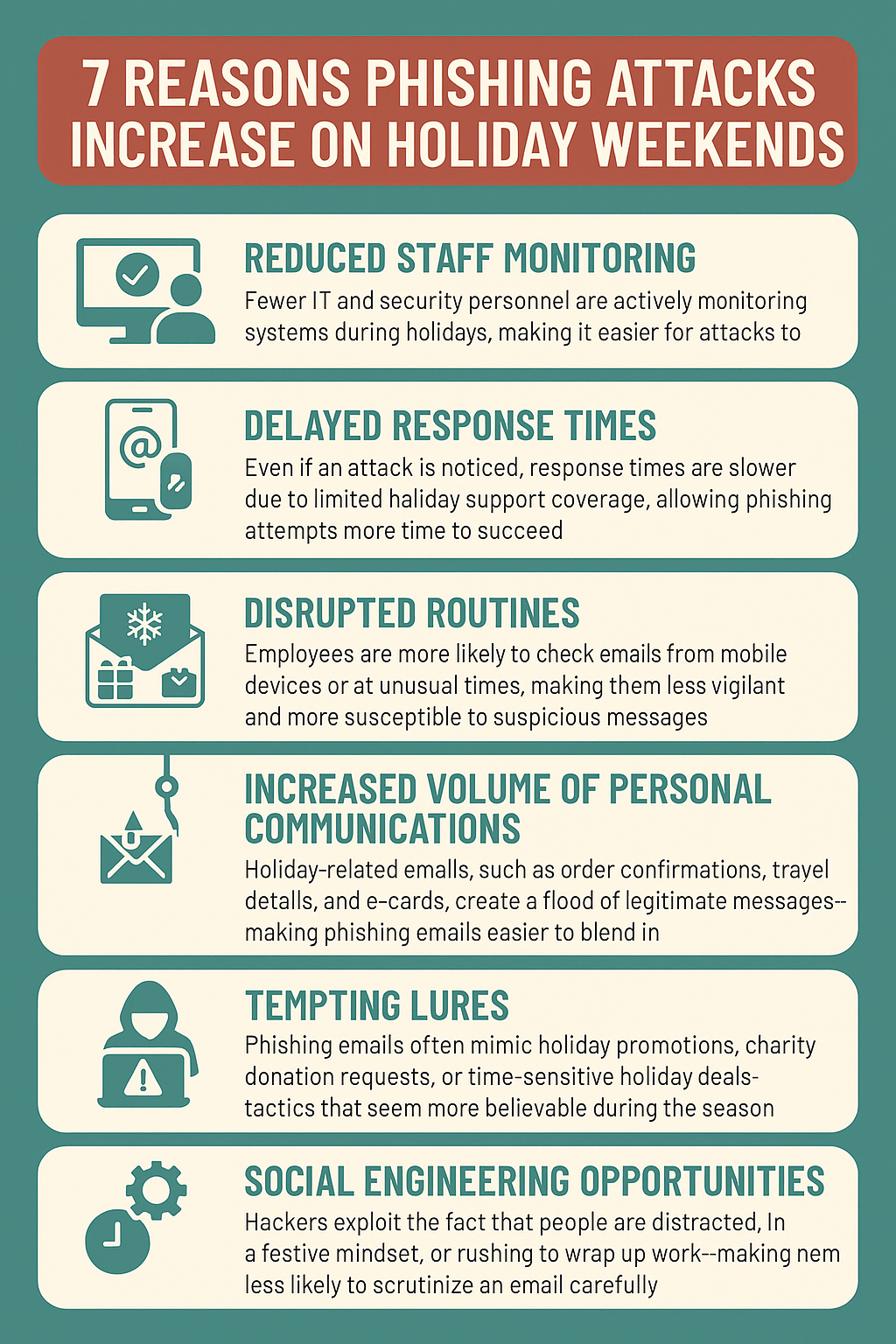
    Here are 7 ways the holidays lead to a higher risk of phishing attacks:

    • Reduced Staff Monitoring
      Fewer IT and security personnel are actively monitoring systems during holidays, making it easier for attacks to go undetected.
    • Delayed Response Times
      Even if an attack is noticed, response times are slower due to limited holiday support coverage, allowing phishing attempts more time to succeed.
    • Disrupted Routines
      Employees are more likely to check emails from mobile devices or at unusual times, making them less vigilant and more susceptible to suspicious messages.
    • Increased Volume of Personal Communications
      Holiday-related emails, such as order confirmations, travel details, and e-cards, create a flood of legitimate messages—making phishing emails easier to blend in.
    • Tempting Lures
      Phishing emails often mimic holiday promotions, charity donation requests, or time-sensitive holiday deals—tactics that seem more believable during the season.
    • Social Engineering Opportunities
      Hackers exploit the fact that people are distracted, in a festive mindset, or rushing to wrap up work—making them less likely to scrutinize an email carefully.
    • Gaps in System Updates
      Routine maintenance and updates might be paused during holidays, leaving systems more vulnerable to phishing-based exploits that rely on unpatched software.

    (Download these tips as an Infographic below.)

    Phishing attacks are one of the most common—and costly—cyber threats facing small businesses today. At Valley Techlogic, we help protect your business by implementing robust email security solutions, conducting employee phishing awareness training, and monitoring for suspicious activity around the clock. Our proactive approach ensures you’re not just reacting to threats but preventing them before they reach your inbox. Reach out today for more information.

    Looking for more to read? We suggest these other articles from our site.

    This article was powered by Valley Techlogic, leading provider of trouble free IT services for businesses in California including Merced, Fresno, Stockton & More. You can find more information at https://www.valleytechlogic.com/ or on Facebook at https://www.facebook.com/valleytechlogic/ . Follow us on X at https://x.com/valleytechlogic and LinkedIn at https://www.linkedin.com/company/valley-techlogic-inc/.
  • We’re halfway through 2025, our top 10 blogs of the year so far

    We’re halfway through 2025, our top 10 blogs of the year so far

    June marks the halfway mark through the year, and what a year it’s been so far – with the innovations in AI to major changes to the global economy via tariffs and more, these are our top 10 blogs of the year so far.

    1. Are you all in on AI or approaching it more moderately? The perils of not strategizing your AI roll out (May 23, 2025)
      Examines the pros and cons of diving straight into AI vs. a cautious approach, highlighting the risks of rolling out AI without a solid business strategy.
      🔗 https://www.valleytechlogic.com/2025/05/are-you-all-in-on-ai-or-approaching-it-more-moderately-the-perils-of-not-strategizing-your-ai-roll-out/
    2. 5 Ways A Managed Service Provider Helps You Predict Future Technology Spending** (May 16, 2025)
      Explores how MSPs help businesses plan proactively by forecasting growth, mapping lifecycles, and avoiding surprise vendor costs.
      🔗 https://www.valleytechlogic.com/2025/05/title-5-ways-a-managed-service-provider-helps-you-predict-future-technology-spending/
    3. Best of Cybersecurity: 5 Must‑Read Blogs to Protect Your Business (May 9, 2025)
      A curated roundup of their top cybersecurity posts, offering actionable advice on phishing, disaster recovery, and more.
      🔗 https://www.valleytechlogic.com/2025/05/best-of-cybersecurity-5-must-read-blogs-to-protect-your-business/
    4. 5 Signs It’s Time to Switch Your IT Provider (And How to Choose the Right One) (May 2, 2025)
      Identifies inside signs you might be outgrowing your current provider and gives practical tips for selecting a better fit.
      🔗 https://www.valleytechlogic.com/2025/05/5-signs-its-time-to-switch-your-it-provider-and-how-to-choose-the-right-one/
    5. Out of file space? 8 space saving tips for your PC or laptop (April 25, 2025)
      A concise how‑to guide with actionable steps to clear disk space and boost device performance.
      🔗 https://www.valleytechlogic.com/2025/04/out-of-file-space-8-space-saving-tips-for-your-pc-or-laptop/
    6. Received a Facebook copyright infringement email or message? You’re not alone… (April 17, 2025)
      Breaks down a fake Facebook scam aiming to harvest information and explains how to spot and avoid it.
      🔗 https://www.valleytechlogic.com/2025/04/received-a-facebook-copyright-infringement-email-or-message-youre-not-alone-the-evolution-of-the-facebook-copyright-scam-and-how-to-avoid-falling-for-it/
    7. Make the Most of Your Microsoft 365 Subscriptions: 7 Productivity Hacks You Might Be Missing (April 11, 2025)
      Introduces under‑the‑radar features in Microsoft 365 to elevate productivity and streamline team collaboration.
      🔗 https://www.valleytechlogic.com/2025/04/make-the-most-of-your-microsoft-365-subscriptions-7-productivity-hacks-you-might-be-missing/
    8. The 7 most common network issues and how to fix them (September 2024)
      Lists key connectivity issues—from slow Wi-Fi to firewall misconfigurations—and offers diagnostic and repair steps.
      🔗 https://www.valleytechlogic.com/2024/09/7-common-network-issues-and-fixes/
    9. Windows 10 reaches EOL October 2025, and those who don’t upgrade may have to pay (January 3, 2025)
      Highlights Windows 10’s EOL in October 2025 and explains Microsoft’s new fee-based Extended Security Updates program.
      🔗 https://www.valleytechlogic.com/2025/01/windows-10-reaches-eol-october-2025-and-those-who-dont-upgrade-may-have-to-pay/
    10. Is Starlink still the best choice for rural or remote internet? We discuss your options for internet in 2025 (May 30, 2025)
      Evaluates Starlink alongside DSL, fixed wireless, cellular, and cable, covering speed, cost, and suitability for remote businesses.
      🔗 https://www.valleytechlogic.com/2025/05/is-starlink-still-the-best-choice-for-rural-or-remote-internet-we-discuss-your-options-for-internet-in-2025/

    At Valley Techlogic, we cover a wide range of topics on our blog just like we cover a wide range of support topics for our clients through our IT managed service plans. If you’re in the market for IT support for your business – why not learn what Valley Techlogic can do for you?

    Looking for more to read? We suggest these other articles from our site.

    This article was powered by Valley Techlogic, leading provider of trouble free IT services for businesses in California including Merced, Fresno, Stockton & More. You can find more information at https://www.valleytechlogic.com/ or on Facebook at https://www.facebook.com/valleytechlogic/ . Follow us on X at https://x.com/valleytechlogic and LinkedIn at https://www.linkedin.com/company/valley-techlogic-inc/.

  • Six Ways Continuous Monitoring Keeps You a Step Ahead in Your Cyber Security Efforts

    Six Ways Continuous Monitoring Keeps You a Step Ahead in Your Cyber Security Efforts

    In today’s digital age, businesses face an ever-increasing number of cyber threats. As cybercriminals become more sophisticated, the need for robust and proactive security measures has never been greater. One of the most effective strategies for safeguarding business assets and sensitive information is continuous monitoring. Here are six ways continuous monitoring benefits businesses when seeking comprehensive cyber security solutions.

    1. Real-Time Threat Detection

    Continuous monitoring provides businesses with real-time visibility into their network activities. Traditional security measures, which often rely on periodic scans and updates, can leave gaps in protection. Continuous monitoring, on the other hand, ensures that potential threats are identified and addressed as they occur. This real-time threat detection is crucial in minimizing the window of opportunity for cybercriminals, significantly reducing the risk of data breaches and other security incidents.

    1. Proactive Risk Management

    By constantly monitoring systems and networks, businesses can proactively manage risks. Continuous monitoring tools can identify vulnerabilities and weaknesses before they are exploited by attackers. This proactive approach allows businesses to implement timely patches, updates, and security measures to fortify their defenses. Instead of reacting to incidents after they happen, businesses can stay ahead of potential threats, creating a more secure and resilient environment.

    1. Enhanced Compliance

    Regulatory compliance is a critical concern for many industries. Continuous monitoring helps businesses maintain compliance with various standards and regulations, such as GDPR, HIPAA, and PCI DSS. These regulations often require ongoing monitoring and reporting of security measures. By integrating continuous monitoring into their security strategy, businesses can ensure they meet compliance requirements, avoid hefty fines, and protect their reputation.

    1. Improved Incident Response

    When a security incident occurs, the speed and effectiveness of the response are crucial in mitigating damage. Continuous monitoring equips businesses with the necessary tools and information to respond swiftly to incidents. Detailed logs and real-time alerts provide valuable insights into the nature and scope of the threat, enabling security teams to isolate affected systems, contain the breach, and implement remediation measures. This rapid response capability minimizes downtime, reduces financial losses, and preserves customer trust.

    1. Cost Efficiency

    While investing in continuous monitoring may seem like a significant expense, it can actually lead to substantial cost savings in the long run. By preventing data breaches and minimizing the impact of security incidents, businesses can avoid the financial consequences of lost data, legal liabilities, and reputational damage. Additionally, continuous monitoring can streamline security operations, reducing the need for manual interventions and allowing IT teams to focus on strategic initiatives rather than constant firefighting.

    1. Increased Business Agility

    In today’s fast-paced business environment, agility is a key competitive advantage. Continuous monitoring provides businesses with the flexibility to adapt to evolving threats and changing security landscapes. With real-time insights and up-to-date threat intelligence, businesses can make informed decisions and adjust their security strategies as needed. This agility ensures that businesses remain resilient in the face of emerging threats and can quickly pivot to address new challenges.

    Continuous monitoring is a vital component of a robust cyber security strategy. By providing real-time threat detection, proactive risk management, enhanced compliance, improved incident response, cost efficiency, and increased business agility, continuous monitoring empowers businesses to safeguard their digital assets and maintain a strong security posture. As cyber threats continue to evolve, businesses that invest in continuous monitoring will be better equipped to protect their operations, data, and reputation.

    Embrace continuous monitoring today and take a proactive stance in securing your business against the ever-present cyber threats of tomorrow by partnering with Valley Techlogic. Our plans include cyber security protections like continuous monitoring, advanced threat detection and end point security by default. Learn more today by scheduling a consultation with us today.

    This article was powered by Valley Techlogic, leading provider of trouble free IT services for businesses in California including Merced, Fresno, Stockton & More. You can find more information at https://www.valleytechlogic.com/ or on Facebook at https://www.facebook.com/valleytechlogic/ . Follow us on Twitter at https://x.com/valleytechlogic and LinkedIn at https://www.linkedin.com/company/valley-techlogic-inc/.

  • Have you heard of zero trust security? Why it should be the standard for small businesses and 3 ways to implement it

    Have you heard of zero trust security? Why it should be the standard for small businesses and 3 ways to implement it

    Explaining cyber security in 2024 means navigating all sorts of buzz words – cybersecurity awareness, data breach, ransomware and malware, endpoint security, threat detection, two-factor and multi-factor authentication, and yes zero trust just to name a very small portion of them.

    We know users feel burnt out on the number of phrases that do represent actual security threats that are thrown at them day to day, as an IT service provider it can be difficult to translate this phrasing into a tangible concern for our clients.

    For example, whose data hasn’t been leaked in a data breach in 2024? Our personal data has become a commodity that most of us have accepted may end up on the internet in ways we can’t anticipate or prevent.

    But that’s not exactly true, with a zero trust environment you can make your business much more resilient to threats and data breaches and it’s not as difficult as you may think.

    What is Zero Trust? Zero Trust abandons the idea that everything connected to your work network is safe and instead treats everything as a potential threat, you might be thinking now, why would I want that? It is a more rigorous approach but extremely beneficial, if every device must be individually verified then none of them can act as a trojan horse to your business.

    The key pillars of Zero Trust are:

    • Least Privilege: Users get enough access to do their job, no more no less. We can’t tell you how many situations we’ve encountered where everyone’s computer has admin level privileges, and in a data breach situation that would make any one of those devices an extreme threat to your business.
    • Continuous Verification: It might be kind of irritating at first to check your two-factor application or your phone for a texted code – but the benefits will come in spades should any of your passwords be leaked (only around 50% of users are aware of good password hygiene).
    • Network Segmentation: This one is not too difficult to implement, and your users won’t even notice it, this is just segmenting your network so that say your work computers and other devices are on one network and outside devices (like a visitor’s cellphone) are on something like a guest network. This zero cost fix will mean you have greatly reduced exposure to threats from outside devices.

    Within the pillars it’s easy to see the three steps we would recommend someone start with when setting up a zero trust environment, that is reducing users to having only the level of access tey need, enforcing two factor or multi-factor authentication, and setting up at the very least a guest network.

    When it comes to implementing cyber security standards, the sky is the limit. All of the settings we recommend above really only cost time, but they will benefit your business greatly in the event any kind of breach occurs.

    Limiting the damage that can be done is always the goal when it comes to cyber security, hackers will constantly push at boundaries and find ways to access your systems (yes even if you’re a small business) and with minor improvements you can protect yourself from most major threats.

    Cyber security protection is a cornerstone of our service plans, and whether you’re interested in evolving your cyber security standards to include zero trust strategies or in receiving the benefits of a comprehensive cyber security stack without having to assemble it yourself, Valley Techlogic has you covered. Book a meeting with us today to learn more.

    Looking for more to read? We suggest these other articles from our site.

    This article was powered by Valley Techlogic, leading provider of trouble free IT services for businesses in California including Merced, Fresno, Stockton & More. You can find more information at https://www.valleytechlogic.com/ or on Facebook at https://www.facebook.com/valleytechlogic/ . Follow us on Twitter at https://x.com/valleytechlogic and LinkedIn at https://www.linkedin.com/company/valley-techlogic-inc/.

  • Toothbrush or threat vector? Turns out it was both for 3 million smart toothbrushes utilized in a recent DDoS attack

    Toothbrush or threat vector? Turns out it was both for 3 million smart toothbrushes utilized in a recent DDoS attack

    When it comes to cyber attacks it seems like anything can be utilized (see Amazon Fire Stick on the recent attack on Rockstar Games) but even our toothbrushes?

    It’s true, while details are still coming out it’s been reported that 3 million malware infected toothbrushes were used to bring down a Swiss company’s website at the cost of millions of Euros.

    No details have emerged yet on either the brand of toothbrush or the specific company that was targeted but we know the toothbrushes were running on Java which is a popular operating system for IoTs (Internet of Things) devices.

    It highlights the point that any device connected to the internet can be used for malicious intent. We’ve all probably heard about threat actors utilizing home security cameras or baby monitors to gain unwanted access to our homes or to just be creeps. Or how about the study on smart fridges that found out they were collecting a lot of your data unknowingly.

    With so many of us having smart devices scattered throughout our homes it’s long overdue that we think about what security needs to be in place to prevent these devices from being a danger to us or others. That includes both the obvious devices like our computers and the less obvious devices like our internet connected home gadgets.

    In a recent study by the SANS Internet Storm Center they tested how long it would take for an unprotected, unpatched PC to become infected with malware when exposed to the internet. Their calculations came back that it would only take 20 minutes on average for that PC to be infected, this is down from 40 minutes back in 2003.

    Even if you consider yourself tech savvy and “careful”, attackers are relentless when it comes to looking for the latest exploits and staying ahead of the curve. It’s the unfortunate truth that they can put more time into their nefarious activities than you as a business owner can dedicate to outsmarting them.

    For them it’s a numbers game and the more nets they cast and the more avenues they look for to gain access the more likely they are to be successful, and even items such as a toothbrush are not safe.

    That is, unless you follow these steps when securing your network and IoT devices.

    On top of these simple steps to secure your network and maintain your devices, you can also work with a provider like Valley Techlogic.

    We utilize best in class tools that prevent cyber attacks from occurring in the first place. Our partners have the resources to stay on top of and mitigate threats (even zero-day attacks) and with ongoing maintenance included in our service plans we can prevent your devices from becoming a threat vector to you or to another business.

    Schedule a meeting with us today to learn more.

    Looking for more to read? We suggest these other articles from our site.

    This article was powered by Valley Techlogic, an IT service provider in Atwater, CA. You can find more information at https://www.valleytechlogic.com/ or on Facebook at https://www.facebook.com/valleytechlogic/ . Follow us on Twitter at https://x.com/valleytechlogic.

  • 7 Gadgets you shouldn’t leave home without this Holiday Season

    7 Gadgets you shouldn’t leave home without this Holiday Season

    The holidays are truly upon us and for many of us that means traveling to friends and family and enjoying some time spent away from work and in our loved one’s company.

    However, for business owners being on the go doesn’t mean the work stops and we often carry our work devices with us to keep a watchful eye on things even from afar. We have 7 gadget recommendations that can facilitate working on the go or keeping in touch with those you’ve left in charge as you try to unwind a bit this holiday season.

    Our 7 tech gadget recommendations will make traveling with your tech easier on the go.

    1. Luggage trackers: The first step is making sure your tech makes it to your target destination, and luggage trackers will help you keep track of your belongings while you’re on the go. We recommend Tile Pro for Android users and AirTags for Apple. These trackers use Bluetooth to communicate to other devices in the area and will pinpoint the location of your luggage should you lose track of it. Our Recommendation: Airtag and Tile Pro.
    2. Battery banks: Another way to make working on the go easier is having additional battery power at your fingertips, battery banks are inexpensive and can power multiple devices simultaneously. Our Recommendation: Anker Magnetic Battery 5,000 mAH
    3. Portable monitors: Portable monitors have come a long way, for $200 or less you can get a decent secondary monitor that will make working away from your home office much more convenient. Our Recommendation: UPERFECT Portable Monitor
    4. Cord organizing case: We have all pulled out a knot of cables we then have to untangle before we can begin charging our travel depleted devices, there is a better way. Our Recommendation: MATEIN Cable Organizer Bag
    5. Laptop stand: In another effort to bring the comforts of home with you we recommend a good quality laptop stand that will make working on whatever open surface you can find much more pleasant. Our Recommendation: OMOTON Ergonomic Laptop Riser
    6. Privacy screen: If you’re planning to work in any public spaces this holiday season you might want to consider a privacy screen, this will make it so passersby’s can’t take a peek at what you’re doing and most of them reduce blue light as well. Our Recommendation: Acer 2-Way Privacy Filter
    7. Portable door lock: If your travel plans involve a hotel or shared AirBNB we recommend adding additional protection with a portable door lock. This will keep out unexpected and uninvited guests and leave any belongings you might have in your room (such as your laptop) more protected. Our Recommendation: Winchy Portable Door Lock

    Tech advice like this is just one of the services we provide to our customers, and right now we’re offering $100 just for meeting with us and hearing about our services. Time is running out on this offer, click this link or on the image below to get started.

    Looking for more to read? We suggest these other articles from our site.

    This article was powered by Valley Techlogic, an IT service provider in Atwater, CA. You can find more information at https://www.valleytechlogic.com/ or on Facebook at https://www.facebook.com/valleytechlogic/ . Follow us on Twitter at https://x.com/valleytechlogic.

  • Leave the World Behind features alleged cyber warfare as the main movie villain, how realistic was it?

    Leave the World Behind features alleged cyber warfare as the main movie villain, how realistic was it?

    The cyber attacks we typically report on are localized or contained to a specific sector or even business entity.

    In Netflix’s new movie “Leave the World Behind” characters are confronted with what looked like a global cyber attack causing mass destruction and chaos, including self-driving cars crashing into each other with no driver present and planes crashing into the ocean into land with GPS absent.

    The movie features an all-star cast and is the first movie we’ve seen take on the apocalypse narrative with a unique technology twist – not to besmirch the Terminator legacy, but killer robots are found fairly frequently in pop culture.

    Originally adapted from Rumaan Alam’s book of the same name, the movie actually takes liberty in specifically calling out the cyber attack in the movie where in the book the nature of what’s going on is left a lot more ambiguous.

    The movie even received feedback from former President Barack Obama to make sure the cyber warfare elements were realistic instead of fantastic which left us with an eerie feeling after viewing the film, because the truth is some of the elements of it could be replicated in real life.

    Venturing into spoiler territory now, at several points in the movie the characters are subjected to an ear-piercing noise that stops them in their tracks. It’s alluded to that these attacks might be “sonic booms” and are the reason one of the characters begins having physical symptoms as a response (odontophobia folks beware). This attack in the movie mirrored an alleged event in Cuba where directed energy waves, in this case microwave instead of sound, caused physical harm to locals.

    In another scene one of the main characters attempts to check her phone for news and is instead confronted with several news articles, seemingly normal messages at first then devolving on red paper are dropped from a drone in the sky on a character driving down an empty road – this is several hours after the characters have been cut off from the outside world by the technology we all rely on for news and information.

    By sheer coincidence these scenes are again mirrored by a real-life news event that happened just this month, where Iran-located hackers took over a water authority in Pennsylvania because their devices were Iran made, screens of these electronics found in the facility displayed a message in red with “YOU HAVE BEEN HACKED” featured prominently.

    It’s unlikely that an attack could take out an entire nation easily, but it is worrying for us as a technology provider when we encounter lackadaisical responses to very serious cyber threats. The whole world does not need to be hacked for a hack to affect your whole world.

    If after watching this new blockbuster you’re thinking it might be time to evaluate your cyber preparedness, Valley Techlogic has you covered.

    If you book a consultation with us this month you will even receive a $100 cash for your time just for hearing us out. Click here or on the image below to get started.


    Looking for more to read? We suggest these other articles from our site.

    This article was powered by Valley Techlogic, an IT service provider in Atwater, CA. You can find more information at https://www.valleytechlogic.com/ or on Facebook at https://www.facebook.com/valleytechlogic/ . Follow us on Twitter at https://x.com/valleytechlogic.