
If you’ve downloaded anything new from the Google Play Store recently you might want to be wary of the extra “features” that may have come along with it. It’s being reported that a new malware dubbed “NoVoice” has infected a number of Apps across the Google Play store.
The apps it was discovered in were not limited to one genre, the malware was found in cleaners, games, image galleries and more. At launch the apps didn’t request any additional suspicious permissions and worked as intended.
Longtime cybersecurity behemoth McAfee discovered the malware but it’s not currently being linked to any specific malware group or threat actor, and no one has claimed credit for the attack as of writing. After installation the malware tries to gain root access to your device by utilizing vulnerabilities found in unpatched devices (most of these exploits have been patched between 2016 and 2021) highlighting the importance of keeping your devices up to date on firmware.
According to the researchers at McAfee the infected payload hitched a ride on what looked like legitimate Facebook SDK classes, which then deployed an encrypted payload hidden inside a PNG before system wiping all traces of itself. If this sounds like a less delightful matryoshka doll in malware form that’s because it is.
It was also noted by researchers that the malware had built in capacity to avoid certain regions in China if the original app was given permission to detect location. All-in-all researchers noted that the malware would attempt to try 22 known vulnerabilities on the infected device in order to gain root access. It was also discovered the primary goal once it had access was to then steal data from WhatsApp specifically, although it should be noted due to the flexible design of this malware it could have been used to steal other data (this just wasn’t noted during discovery).
All affected apps have now been removed from the Google Play Store, and a Google representative issued a statement: “As an added layer of defense, Google Play Protect automatically removes these apps and blocks new installs. Users should always install the latest security updates available for their device.”
As NoVoice specifically targeted security flaws that were fixed before 2021, any device that has been updated since that time would be safe from this exploit. Regular patching and security updates are a core feature on every Valley Techlogic plan, we believe this helps:
Fix known vulnerabilities before attackers can exploit them
Reduce the risk of malware, ransomware, and unauthorized access
Keep systems compatible with current security tools and protections
Help maintain compliance with security standards and insurance requirements
Protect your business from threats today with a technology plan from Valley Techlogic, you can learn more about our services and get started here.
It starts with a single typo. You glance at a URL, it looks right, and you click. But what loaded in your browser wasn’t your bank, your HR portal, or your company’s file-sharing platform. It was a meticulously engineered trap, and the people behind it had been waiting for exactly this moment.
Domain-based deception isn’t new. But the tactics have grown sharper, faster, and far more difficult to spot with the naked eye. With over 300 million registered domain names in the world and new top-level domains being approved at a pace that can be hard to follow, scammers have more raw material than ever to work with.
Understanding their methods is the first step toward protecting yourself and your organization.
The anatomy of a fake domain
Before diving into specific tactics, it helps to understand what scammers are actually trying to do. Their goal is to create a web address that is visually close enough to a legitimate one that a busy, distracted reader won’t notice the difference. They then use that domain to host phishing pages, deliver malware, or intercept credentials.
The deception typically targets three things: the domain name itself, the top-level domain (the part after the final dot), and the subdomain structure. Sometimes all three are manipulated at once.
“The goal isn’t to fool careful readers. It’s to exploit the moments when no one is being careful.”
Typosquatting is the practice of registering domains that are one small error away from a well-known name. A missing letter, a transposed pair, a repeated character. The domains are cheap to register and the potential return is enormous.
Classic examples include swapping an “i” for an “l,” doubling a letter, or inserting a hyphen where none belongs. More recently, scammers have been exploiting the similarity between certain characters in different scripts, a technique sometimes called homograph or homoglyph spoofing.
Legitimate
microsoft.com
Typosquat
rnicros0ft.com
Legitimate
paypal.com
Typosquat
paypa1.com
At normal reading speed, on a small screen, or while skimming an email on your phone, these are nearly indistinguishable. That’s precisely the point.
The new TLD problem: .corn, .рaypal, and beyond
For decades, the internet ran on a handful of top-level domains: .com, .net, .org, .gov. Users learned to treat those suffixes as rough signals of legitimacy. That mental shortcut is now being exploited.
The Internet Corporation for Assigned Names and Numbers (ICANN) has approved hundreds of new generic top-level domains in recent years, including .app, .store, .finance, .cloud, and many more. Alongside these legitimate expansions, bad actors have been quick to spot and abuse visual lookalikes. The domain suffix .corn, for example, is close enough to .com that it has been used in phishing campaigns targeting users who click without examining the full address. Similarly, .co is a legitimate country-code domain for Colombia that has long been used, sometimes legitimately and sometimes deceptively, as a shorthand imitation of .com.
Watch out for
.corn instead of .com — a real top-level domain that reads as familiar at a glance.
.co instead of .com — widely used in legitimate startups, but also a common phishing suffix.
Internationalized domain names that use Cyrillic or Greek characters which render identically to Latin letters in many fonts.
Subdomain manipulation, such as paypal.com.account-verify.net, where the real domain is the one after the final dot, not the one you recognize.
One of the most effective and underappreciated techniques involves manipulating subdomains. Browsers display the full URL, but users have been trained to look for the familiar brand name, not to parse which part of the address actually controls the destination.
A URL structured as amazon.com.account-secure.xyz places a recognizable brand in what looks like the domain, but the authoritative domain is account-secure.xyz. The scammer owns that, not Amazon.
This technique is particularly effective in SMS phishing (smishing) attacks, where the entire URL is often truncated and users tap links quickly without examining them.
Modern browsers support internationalized domain names, which means a domain can be registered using characters from non-Latin scripts. The problem arises when those characters are visually identical, or nearly so, to their Latin counterparts.
The Cyrillic lowercase “а” and the Latin lowercase “a” look the same in most fonts. The Greek omicron “ο” is visually identical to the Latin “o.” By combining these characters, a scammer can register a domain that renders as “apple.com” in your browser’s address bar but resolves to an entirely different server.
Browser vendors have implemented some defenses against the most obvious abuses of this technique, but protection remains inconsistent across platforms and character combinations.
“When it comes down to it, you’re not reading the domain. You’re pattern-matching against a mental image of what it should look like.”
What’s changed in the last two years is not just the cleverness of individual attacks but the speed and scale at which they can be deployed. Generative AI tools have made it substantially easier for even low-skill operators to spin up convincing phishing pages, generate personalized lure emails, and register dozens of lookalike domains simultaneously.
So what can you do about it? Security researchers have observed campaigns where hundreds of typosquatted domains are registered in a single day, each pointing to a slightly different variant of a phishing page tailored to a specific target sector. Financial institutions, healthcare providers, and enterprise software platforms are the most frequent targets, but no industry is immune.
The threat landscape is complicated, but the protective behaviors that matter most are straightforward. Most successful domain spoofing attacks succeed not because the victim was foolish but because the conditions for clicking without thinking were carefully engineered.
Practical checklist
Hover over links before clicking to see the full destination URL, and read it from right to left, starting after the final dot.
Use a password manager that matches credentials to specific domains. If the URL is wrong, the manager won’t fill, which is your first warning.
Enable multi-factor authentication everywhere. A stolen password is far less useful when a second factor is required.
Treat any link sent via SMS, messaging apps, or email as suspect by default. Navigate to sensitive sites by typing the address directly or using bookmarks.
Report suspicious domains to your IT or security team. Early detection of a campaign targeting your organization can protect colleagues who haven’t seen it yet.
Domain-based attacks are successful because they exploit something deeply human: the tendency to use heuristics rather than careful analysis when under time pressure or cognitive load. Scammers are not usually trying to outsmart technically sophisticated users in their most alert moments. They’re engineering the conditions under which even careful people make mistakes.
The defensive answer is partly technical, partly procedural, and partly cultural. Security-aware organizations train people to slow down at the moment of a click, not just to use the right tools. That pause, the habit of looking twice at a URL before entering credentials, is often the difference between a near miss and a breach.
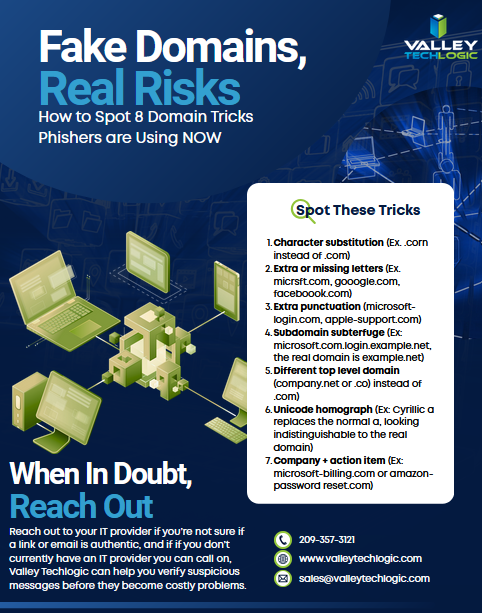
The next time a link looks almost right, trust that instinct. Almost right is how these attacks work, and education on this topic is the best way to stop scammers in their tracks. Below is a free resource on this topic to share with your team:
For specific guidance on protecting your organization, consult a qualified cybersecurity professional. If you need assistance in administering cyber security services (including Security Awareness Training) within your organization, Valley Techlogic can help. Learn more today through a consultation.

We’ve touched on this topic before, but we thought a reminder as we approach the Fourth of July weekend couldn’t hurt, hackers don’t take the holidays off.
This includes summer holidays such as Memorial Day and the 4th of July in addition to the typical winter festivities. Bad actors know that the holidays can be a boon for their nefarious activities, employees may be less on guard as they look forward to the extra time off and routines are thrown off with a disruption to the normal M-F patterned workweek.
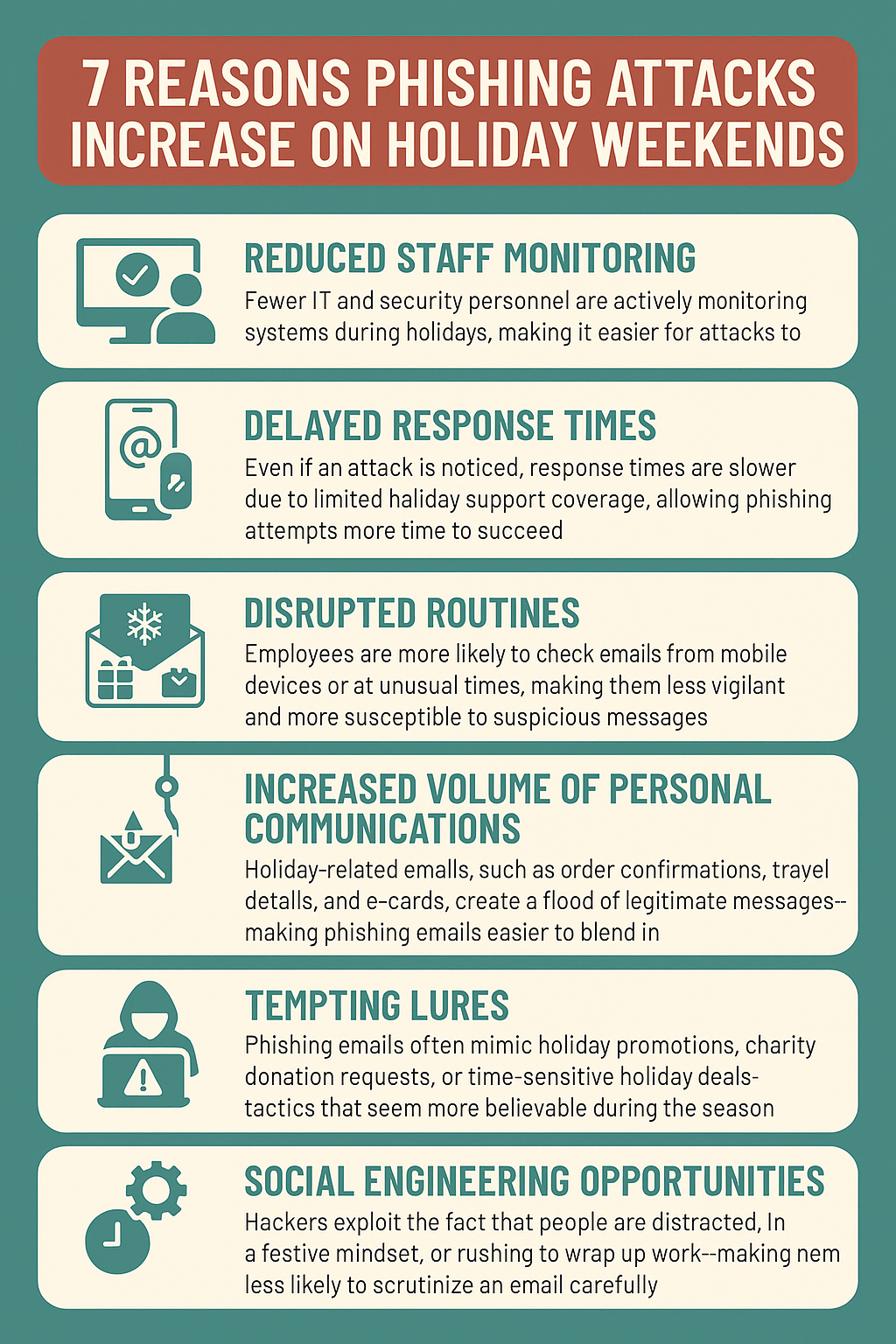
Here are 7 ways the holidays lead to a higher risk of phishing attacks:
Reduced Staff Monitoring
Fewer IT and security personnel are actively monitoring systems during holidays, making it easier for attacks to go undetected.
Delayed Response Times
Even if an attack is noticed, response times are slower due to limited holiday support coverage, allowing phishing attempts more time to succeed.
Disrupted Routines
Employees are more likely to check emails from mobile devices or at unusual times, making them less vigilant and more susceptible to suspicious messages.
Increased Volume of Personal Communications
Holiday-related emails, such as order confirmations, travel details, and e-cards, create a flood of legitimate messages—making phishing emails easier to blend in.
Tempting Lures
Phishing emails often mimic holiday promotions, charity donation requests, or time-sensitive holiday deals—tactics that seem more believable during the season.
Social Engineering Opportunities
Hackers exploit the fact that people are distracted, in a festive mindset, or rushing to wrap up work—making them less likely to scrutinize an email carefully.
Gaps in System Updates
Routine maintenance and updates might be paused during holidays, leaving systems more vulnerable to phishing-based exploits that rely on unpatched software.
(Download these tips as an Infographic below.)
Phishing attacks are one of the most common—and costly—cyber threats facing small businesses today. At Valley Techlogic, we help protect your business by implementing robust email security solutions, conducting employee phishing awareness training, and monitoring for suspicious activity around the clock. Our proactive approach ensures you’re not just reacting to threats but preventing them before they reach your inbox. Reach out today for more information.
Looking for more to read? We suggest these other articles from our site.
In today’s digital world, staying informed about cybersecurity is crucial for every organization. We’ve rounded up five of our top cybersecurity blogs that offer actionable insights, expert advice, and practical steps to strengthen your defenses.
Whether you’re a small business owner or an IT leader, these articles cover everything from phishing prevention to disaster recovery. Dive in and level up your cybersecurity knowledge:
Six Ways Continuous Monitoring Keeps You a Step Ahead in Your Cyber Security Efforts
5 Ways “Tribal Knowledge” Sabotages Your Cybersecurity Efforts
Tribal knowledge is anything in your workplace that is common knowledge and is not documented. If the rules are posted somewhere it goes from being tribal knowledge to policy, and when it comes to the technology in your business, it is much more secure to rely on policy than tribal knowledge. Read it here: https://www.valleytechlogic.com/2021/10/5-ways-tribal-knowledge-sabotages-your-cybersecurity-efforts/
Want more cybersecurity insights? Our cybersecurity kit found here has the latest strategies, tools, and trends to help keep your business safe. Not sure how to act on this advice in your business? Valley Techlogic has supported businesses in their endeavors to increase cybersecurity protection and offer coverage and solutions for complex challenges such as security awareness with employees, disaster recovery planning, regulatory compliance and more. Reach out today for more information
Looking for more to read? We suggest these other articles from our site.
We all know about good hygiene practices for ourselves and our homes, but what about practicing good cybersecurity hygiene? What does the word hygiene mean when applied to a digital context?
When we think of hygiene for cybersecurity it’s the essential items needed to practice the bare minimum in cyber threat prevention, we’re strong advocates for advanced cybersecurity threat prevention and believe you can never be too protected – however these 8 items will in many cases prevent the vast majority of outside threats. As a bonus? The only thing you’ll need to spend to enact these in your business today is a little time.
Use Strong and Unique Passwords
Implement complex passwords and enable multi-factor authentication (MFA) for added security. We have a guide for what a strong password looks like and how to utilize MFA here.
Regularly Update Software and Systems
Keep your operating systems, applications, and antivirus software up to date to patch vulnerabilities.
Educate Employees on Cybersecurity Best Practices
Train staff on recognizing phishing scams, suspicious emails, and safe browsing habits. Interested in cybersecurity training for your business? Valley Techlogic includes it (at no additional cost) in all of our plans.
Limit Access to Sensitive Data
Implement role-based access controls and grant permissions only to those who need them.
Enable Firewalls and Antivirus Protection
Use firewalls, antivirus programs, and other security tools to prevent unauthorized access.
Backup Data Regularly
Perform frequent backups and store them in secure, off-site locations to prevent data loss from ransomware attacks.
Monitor Network Activity
Use intrusion detection systems and regularly review logs for unusual activity.
Implement Secure Wi-Fi and VPN Usage
Use encrypted Wi-Fi networks and require VPN usage for remote employees to protect data transmission.
Implementing these 8 cybersecurity threat preventions will protect your business from most attacks, but if you’re looking to go a little further below are 4 cybersecurity benefits included with all Valley Techlogic service plans:
In what is truly the 11th hour (inauguration day for President Trump is January 20th, 3 days from now at the time of writing), the Biden administration announced an executive order that looks to strengthen US cyber defenses against outside influence, particularly from Russia and China.
Described as a “sweeping” move, the executive order covers topics from cyber threat vulnerabilities to guidance on consumer electronics and even outer space.
The order gives enhanced authority to CISA (Cybersecurity and Infrastructure Security Agency) to hunt for threats on federal networks, likely a response to the recent news that President Trumps communication with Vice President JD Vance may have been compromised by Chinese hackers.
The order also covers additional protections for Federal agencies, including implementing end-to-end encryption for all video and email communication and stating that by 2027 any internet connected devices purchased for federal use must have a “cyber trust mark” indicating they meet current cyber standards. Internet connected devices have a wide range of criteria in 2025, everything from home security systems to our appliances has an internet connected option in our modern world.
The order also covers requiring enhanced cybersecurity measures for our space systems, likely in response to Russia targeting Ukraine’s satellite systems in the ongoing invasion.
The order even takes aim at Microsoft specifically, citing a host of errors that allowed Chinese attackers to breach their networks in 2023 which had downstream consequences for our federal government (senior US officials email accounts were allegedly breached in the aftermath of the attack).
Trump’s team has not yet responded to the new executive order so it’s unclear how much follow through will be had on it once he regains office next week, however the Biden team is optimistic on its longevity as bolstering US cyber defense was also a goal during the initial Trump administration (CISA was created in 2018 under Trump’s first term).
As our government looks to shore up their cybersecurity practices in 2025, what are you doing to ensure your business is protected from ongoing threats?
Cyberthreats are not limited to large scale attacks on larger businesses, small businesses are often seen as “easy targets” and can also be swept up in the aftermath of an attack aimed at someone else.
Implementing strong cybersecurity measures, such as secure passwords, regular software updates, employee training, and robust data encryption, not only protects the business but also builds trust with customers. It is clear, in 2025 cybersecurity is no longer a topic that can be pushed off until a later time. The threats are here now and the time to act is before your business is compromised, because afterward it might be too late.
As you’re going about your day-to-day activities online, thinking of how a hacker might take advantage of even mundane aspects of your routine probably doesn’t enter into the equation.
We all sign on to work for the day, check our emails, maybe post an update on social media and chat with our colleagues before getting into the grind of our daily activities. Already when you first log in, you’re potentially being exposed to potential threat activity.
Here are five ways you can “think like a hacker” and protect your business and yourself from falling victim to scams, malware attempts and more:
As we mentioned, the first thing almost everyone does is check their emails but how closely are you scrutinizing the items in your inbox? Phishing is still the number one-way attackers gain access to personally identifying information and systems in your business. Here’s some advice on spotting phishing emails and how to avoid falling for them.
Sharing on social media? You’re volunteering personal information that anyone can read and take advantage of. It might be nice to post that lunch selfie you took with your colleagues but maybe wait until you’re back at your desk, especially if you’re a business owner as you’re more likely to be targeted by something called spear fishing. By posting that selfie during lunch you’re letting anyone who may be watching know your office computer is unattended.
In the same vein, the more details you post online the more information can be gleaned to target you. If you post that your Aunt Kathy Isn’t feeling well Aunt Kathy’s “friend” may send you a message offering sympathy and describing their own woes and tribulations while perhaps trying to gain your trust. However, when you go to confirm with Aunt Kathy later on you find out she’s never heard of this so called “friend”. Social engineering is a large part of long-term scams, always confirm with your friends and relatives directly before giving credence to any messages you receive online.
Sending something important? Always encrypt! You cannot account for the security awareness of others; by encrypting important files being sent via email you’re at least protecting your side of equation.
Speaking of security awareness, being up to date on the latest threats is exactly what a hacker would do. With security awareness training, you can “think like a hacker” and avoid many of the traps they try and set up to gain access to your business.
Security awareness training is just one of the features we include with all of our service plans. On top of that you will also gain access to:
24/7 Endpoint Detection and Threat Monitoring
Automatic Daily Backups
Disaster Recovery Planning
Consistent Patching & Updates
Ticket Response Times in Under 15 Minutes
With a Valley Techlogic plan you don’t need to think like a hacker to protect your business, learn more today with a free consultation.
Looking for more to read? We suggest these other articles from our site.
The cyber attacks we typically report on are localized or contained to a specific sector or even business entity.
In Netflix’s new movie “Leave the World Behind” characters are confronted with what looked like a global cyber attack causing mass destruction and chaos, including self-driving cars crashing into each other with no driver present and planes crashing into the ocean into land with GPS absent.
The movie features an all-star cast and is the first movie we’ve seen take on the apocalypse narrative with a unique technology twist – not to besmirch the Terminator legacy, but killer robots are found fairly frequently in pop culture.
Originally adapted from Rumaan Alam’s book of the same name, the movie actually takes liberty in specifically calling out the cyber attack in the movie where in the book the nature of what’s going on is left a lot more ambiguous.
The movie even received feedback from former President Barack Obama to make sure the cyber warfare elements were realistic instead of fantastic which left us with an eerie feeling after viewing the film, because the truth is some of the elements of it could be replicated in real life.
Venturing into spoiler territory now, at several points in the movie the characters are subjected to an ear-piercing noise that stops them in their tracks. It’s alluded to that these attacks might be “sonic booms” and are the reason one of the characters begins having physical symptoms as a response (odontophobia folks beware). This attack in the movie mirrored an alleged event in Cuba where directed energy waves, in this case microwave instead of sound, caused physical harm to locals.
In another scene one of the main characters attempts to check her phone for news and is instead confronted with several news articles, seemingly normal messages at first then devolving on red paper are dropped from a drone in the sky on a character driving down an empty road – this is several hours after the characters have been cut off from the outside world by the technology we all rely on for news and information.
By sheer coincidence these scenes are again mirrored by a real-life news event that happened just this month, where Iran-located hackers took over a water authority in Pennsylvania because their devices were Iran made, screens of these electronics found in the facility displayed a message in red with “YOU HAVE BEEN HACKED” featured prominently.
It’s unlikely that an attack could take out an entire nation easily, but it is worrying for us as a technology provider when we encounter lackadaisical responses to very serious cyber threats. The whole world does not need to be hacked for a hack to affect your whole world.
If after watching this new blockbuster you’re thinking it might be time to evaluate your cyber preparedness, Valley Techlogic has you covered.
If you book a consultation with us this month you will even receive a $100 cash for your time just for hearing us out. Click here or on the image below to get started.
Looking for more to read? We suggest these other articles from our site.
What about emerging cyber security threats? These are threats that are not well known and in fact may use improvements in technology such as AI (artificial intelligence) to their advantage for nefarious gain.
Bad actors are continuously looking for new ways to subjugate your devices and gain access to your systems and data to exploit it for their own gain, and unfortunately in 2024 we don’t believe things will be any different.
Knowledge is power, so by being aware of these emerging threats you can learn to avoid them or learn what protections you need to put in place to prevent yourself and your business from becoming a victim.
Here are five emerging threats that we believe will grow in popularity in 2024:
Supply Chain Attacks: Cyber criminals have learned targeting vulnerable systems that supply the things we need day to day (for example the Colonial Pipeline attack that occurred in 2021) can result in lucrative payouts as the vendor(s) scramble to get things back up and running again. We’re expecting these types of attacks to continue to increase in 2024.bio
Biometric Data Threats: As more biometric data is used to confirm your identity for accessing your accounts or making payments, more regulations need to be put in place to protect that data. Facial recognition and fingerprint scans can often give someone access to your personal devices (such as a cellphone) and those devices can be the keys to the kingdom when it comes to accessing your accounts. Attacks in 2024 may escalate not just to the theft of data but also physical theft in unison on high value targets (think CEOs, Presidents and other C-Suite users).
Artificial Intelligence (AI) Manipulation: As more and more people explore using AI in their business or to provide solutions to common problems, there will be more and more bad actors trying to exploit it. We’ll see increased attacks using AI including data manipulation (feeding AI erroneous results so that users are receiving incorrect information) and attacks on systems using AI or powered by AI.
5G Network Vulnerabilities: As 4G continues to be phased out and 5G becomes more common place we’ll see increased attacks aimed at these networks, especially as more and more businesses in rural locations utilize 5G as a solution to spotty or absent cable or fiber options in their area. As the nature of 5G is aimed at providing a geographically robust internet solution to companies like these it’s important to make sure your security settings are beyond reproach to inhibit attacks on your network from the outside.
Advanced Ransomware & Phishing Attacks: Ransomware and phishing attacks are not new, but they continue to grow more sophisticated as as-a-service models continue to roll out, this allows attackers that may not have a firm grasp of technology or even English to send out widespread attack emails that are indistinguishable from emails you may get from reputable services you use for a relatively small monetary fee. Also, because many of these attacks originate outside the US you may have no recourse if your business is successfully hit by one.
These are just five emerging threats but there are many threats out there making it all the more crucial you have a cyber security solution behind your business that’s staying ahead of these threats and more.
The threats mentioned above are crimes of opportunity and it’s very easy to be caught in the wide net that’s being cast by those with ill intentions. Valley Techlogic has been at the forefront of providing all encompassing security solutions to our customers. If you would like to learn more about protection your business from cyber security attacks in 2024 schedule a consultation with our experts today. Also for a limited time when you hear us out, you can also take advantage of our Black Friday offer.
Looking for more to read? We suggest these other articles from our site.
Intel just released a fix for a vulnerability that would make certain CPUs in jeopardy of being compromised. The vulnerability would allow an attacker to gain privileged access to machines or trigger a denial-of-service attack.
You can see the list of affected CPUs here, patching for this vulnerability may need to occur in phases including micro-updates to the BIOs, system OS and drivers. In a statement on their website Intel says malicious exploitation of this code would need execution of an arbitrary code (so it can’t be exploited with no input from the end user). They don’t believe patching for this issue will impact devices in a noticeable way.
Originally discovered by a Google Security Engineering team and dubbed “Reptar”, a researcher at Google commented on how strange this vulnerability appears to be.
The vulnerability changes how redundant prefixes, basically small bits of code, are interpreted by the effected CPUs. Normally CPUs ignore redundant prefixes for obvious reasons (the key word being “redundant”) but instead these prefixes triggered expanding errors within the system. The Google team found that when it was left without remediation eventually the affected machines would report processing errors and begin to malfunction.
Destructive code like this is frightening because it may not just be a loss of data or temporary use of the affected machine, but it may cause the computer or server to fail altogether.
This Isn’t the first CPU exploit Intel has suffered and they’re not the only ones battling attacks to their hardware, with AMD also announcing news of their own “CacheWarp” vulnerability that allowed attackers to gain root access to Linux Virtual Machines. So, if you thought these types of attacks were limited to Windows, think again. In this case the vulnerability only affects 1st through 3rd generation EPYC processors, the 4th generation is not vulnerable in this case.
Also, with the AMD vulnerability it’s also important to note that while a patch is available for just the 3rd generation EPYC processor. For 1st and 2nd generation there is no mitigation available. As with Intel it’s not expected that the patch will have any effect on the CPU performance.
Both companies have been very quick to patch these aggressive vulnerabilities and attacks like these highlight the need to make sure regular patching is a primary component of any tech service plan. Below are 5 key components we recommend when it comes to proactive technology support
Proactive care is often a tough sell, with many business owners not feeling the need to spend the money on proactive tech care as these things “won’t happen to them”. It’s important to note that many attacks that occur are widespread and have no specific target in mind. If you have unpatched equipment in your office, you may be a sitting duck to any widespread attack issued to a vendor you use or because you bought a certain kind of hardware that ended up having a vulnerability. These attacks are ones of convenience not of malice as is often misconstrued.
Even if it can be recovered from, why take the chance? Having a partner like Valley Techlogic to make sure vulnerabilities like the ones in this article are patched as soon as a fix is available means you will never be part of the eye-opening statistic about businesses who suffer a major breach. If you’re not aware, 60% of businesses close after a cyberattack. Don’t let that be you, reach out for a free consultation with us today.
Looking for more to read? We suggest these other articles from our site.