Author: rory-admin

  • 5 Ways to Think Like a Hacker to Protect Your Business

    5 Ways to Think Like a Hacker to Protect Your Business

    As you’re going about your day-to-day activities online, thinking of how a hacker might take advantage of even mundane aspects of your routine probably doesn’t enter into the equation.

    We all sign on to work for the day, check our emails, maybe post an update on social media and chat with our colleagues before getting into the grind of our daily activities. Already when you first log in, you’re potentially being exposed to potential threat activity.

    Here are five ways you can “think like a hacker” and protect your business and yourself from falling victim to scams, malware attempts and more:

    1. As we mentioned, the first thing almost everyone does is check their emails but how closely are you scrutinizing the items in your inbox? Phishing is still the number one-way attackers gain access to personally identifying information and systems in your business. Here’s some advice on spotting phishing emails and how to avoid falling for them.
    2. Sharing on social media? You’re volunteering personal information that anyone can read and take advantage of. It might be nice to post that lunch selfie you took with your colleagues but maybe wait until you’re back at your desk, especially if you’re a business owner as you’re more likely to be targeted by something called spear fishing. By posting that selfie during lunch you’re letting anyone who may be watching know your office computer is unattended.
    3. In the same vein, the more details you post online the more information can be gleaned to target you. If you post that your Aunt Kathy Isn’t feeling well Aunt Kathy’s “friend” may send you a message offering sympathy and describing their own woes and tribulations while perhaps trying to gain your trust. However, when you go to confirm with Aunt Kathy later on you find out she’s never heard of this so called “friend”. Social engineering is a large part of long-term scams, always confirm with your friends and relatives directly before giving credence to any messages you receive online.
    4. Sending something important? Always encrypt! You cannot account for the security awareness of others; by encrypting important files being sent via email you’re at least protecting your side of equation.
    5. Speaking of security awareness, being up to date on the latest threats is exactly what a hacker would do. With security awareness training, you can “think like a hacker” and avoid many of the traps they try and set up to gain access to your business.

    Security awareness training is just one of the features we include with all of our service plans. On top of that you will also gain access to:

    1. 24/7 Endpoint Detection and Threat Monitoring
    2. Automatic Daily Backups
    3. Disaster Recovery Planning
    4. Consistent Patching & Updates
    5. Ticket Response Times in Under 15 Minutes

    With a Valley Techlogic plan you don’t need to think like a hacker to protect your business, learn more today with a free consultation.

    Looking for more to read? We suggest these other articles from our site.

    This article was powered by Valley Techlogic, leading provider of trouble free IT services for businesses in California including Merced, Fresno, Stockton & More. You can find more information at https://www.valleytechlogic.com/ or on Facebook at https://www.facebook.com/valleytechlogic/ . Follow us on Twitter at https://x.com/valleytechlogic and LinkedIn at https://www.linkedin.com/company/valley-techlogic-inc/.


  • If AI implementation is important to your business’s 2025 goals, you will want to watch the AI chipset market closely

    If AI implementation is important to your business’s 2025 goals, you will want to watch the AI chipset market closely

    With Project Strawberry (the newest iteration of ChatGPT which is touted to boost it’s reasoning capabilities amongst other new features) on the horizon and more and more businesses taking advantage of AI tools such as Microsoft Co-Pilot and Google Gemini, the AI train doesn’t look like it will be slowing down anytime soon.

    So, if AI is going to be a priority for your businesses 2025 are you planning on how can you make sure you have devices that can fully take advantage of what AI is capable of? AI workloads can be strenuous on the average machine (see our chart on the minimum specifications we recommend below).

    Why is AI so hardware intensive? AI relies on machine learning to operate, if your computer has to slog through the requests you’re making of it (for example, making presentations, automating tasks and performing searches on your behalf) then that’s going to hinder your ability to use AI to it’s full potential. That may lead to you and your users becoming frustrated and resorting to just returning to prior methods of performing these tasks and stifling the ability to use this emerging innovation in technology.

    Failing to adapt to emerging technologies can be a death knell to many businesses (anyone remember Blockbuster?).

    No one knows more how important keeping up with emerging technologies is than chip makers like Intel, Nvidia and AMD who all have chips set to release next year that will reportedly take full advantage of advancements in AI.

    Nvidia so far has led in this race, with their chips utilizing its own programming language, CUDA (which stands for Compute Unified Device Architecture), which has become standard amongst AI developers. This means they’re dominating this market so far, especially in the data center space. Having direct access to this language from an architecture perspective means that chips made by Nvidia can accelerate processes for AI purposes (thus completing AI tasks more efficiently). Their innovations in the AI space and technology as a whole have led to Nvidia representing 11.7% of the total US GDP.

    AMD hopes to compete with Nvidia and reclaim some of their market share with their new chips, set to be released in early 2025 which will feature their own programing language called ROCm. It’s being said making the switch from CUDA to ROCm will be a painless process and offer more competition in the market (which will only improve things from a cost perspective).

    For example, the current cost of a processor intended for a supercomputer with AMDs new chip set is $14,813 per chip, drastically outside the range of most customers’ comfortable price point for a new device. As competitions and advancements become more common place, we may be getting closer to an age where super computers are not just found in scientific and government settings and there’s no telling how that will change the average workplace in the future.

    There’s also the hardware portion of chip making to consider especially amongst earlier concerns of semiconductors maxing out their capacity for growth and shortages that continued past the height of the pandemic. TSMC also reached a new market share height of over a trillion dollars this week putting fears of that rest for the moment.

    If taking advantage of AI or replacing aging hardware is on your 2025 to-do list, Valley Techlogic can help. We offer tailored advice and procurement assistance as an included feature in our support plans for businesses located in California. Reach out today for more information.

    Looking for more to read? We suggest these other articles from our site.

    This article was powered by Valley Techlogic, leading provider of trouble free IT services for businesses in California including Merced, Fresno, Stockton & More. You can find more information at https://www.valleytechlogic.com/ or on Facebook at https://www.facebook.com/valleytechlogic/ . Follow us on Twitter at https://x.com/valleytechlogic and LinkedIn at https://www.linkedin.com/company/valley-techlogic-inc/.

  • My First Convention Experience: A Memorable Time at ScaleCon 2024

    My First Convention Experience: A Memorable Time at ScaleCon 2024

    Today’s blog was written by our employee Ashton Fortuna who recently attended his first convention, Scalecon 2024 in Las Vegas, Nevada.

    This year, I had the incredible opportunity to attend ScaleCon 2024, the very first of its kind, hosted in Las Vegas. As someone relatively new to the convention scene, I wasn’t sure what to expect, but I can confidently say that ScaleCon exceeded every expectation and left me eager for next year’s event.

    An Event Worth the Hype

    Right from the moment I arrived, I knew I was going to benefit from this event. Everything was meticulously planned, from the opening keynote to the breakout sessions and networking events. The organizers of ScaleCon put in a tremendous amount of effort to ensure that every aspect of the event was seamless. The attention to detail was evident, making navigating the convention an absolute breeze.

    Top-Notch Speakers and Content

    One of the standout features of ScaleCon 2024 was the lineup of speakers. From industry veterans to my peers, every presentation I attended left me with new insights and practical takeaways. Whether you’re in tech, marketing, or ownership, the sessions were packed with content tailored to help businesses scale. I particularly appreciated how each session balanced high- level strategy with actionable tips I could take back to my work. And the best part is no pitching. Not a single speaker spot was purchased and no sales pitches from the stage.

    My Favorite Moments

    One of the event’s highlights for me was Paul Green’s, from MSP Marketing Edge, closing keynote on Friday. Paul reminded business owners to “pay their staff way above what they’re worth” (wink wink). It was a lighthearted yet powerful statement, emphasizing the importance of valuing your team. He also delivered an inspiring message on how it’s the small, consistent actions we take daily that will shape the future we want. That reminder stuck with me and is something I’ve been thinking about since.

    Brian Gillette from Feel Good MSP also shared some simple yet profound advice during his session: before helping a prospective client, we must first ask three critical questions. What do they need? Why do they need it? Why don’t they have it yet? These questions resonated with me as a reminder that understanding our client’s motivations and obstacles is key to offering real value

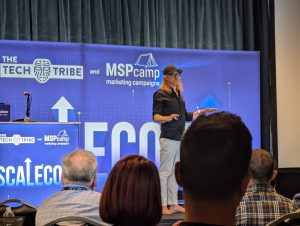
    Tech Tribe owner and resident chief motivational speaker Nigel Moore on stage at ScaleCon 2024.

    One saying from the event that will stick with me not just in my position at work but with life came from Harrison Baron of Growth Generators: “Don’t smoke Hopium.” Harrison’s message was a powerful reminder that while being in sales is about helping others see the value of your product, hoping they will see it is not enough. Relying on hope alone holds us back. As Harrison put it, “Hoping it works out isn’t going to make it work out.” Action is what moves things forward.

    And finally, Nigel Moore’s closing speech for the entire event struck a deeply personal chord. He reminded us to take care of ourselves, knowing that we can’t take care of other people’s tech unless we’re also taking care of the “grey squishy tech” between our ears. This was a perfect close to a week of intense learning and networking, reinforcing the importance of mental well-being for success.

    Unmatched Networking Opportunities

    Networking at ScaleCon was an experience in itself. With so many professionals gathered in one place, it was a prime opportunity to make new connections. The event organizers did an amazing job creating spaces for people to interact, whether it was through structured round tables or more informal happy hours. I walked away with a fresh perspective  and  valuable relationships I’m excited to nurture.

    Guest speakers at Scalecon 2024
    There was no shortage of speakers offering advice on sales, marketing and life in general.

    A Special Thanks to Taher and Nigel Moore

    I want to take a moment to express my gratitude to Taher Hamid and Nigel Moore (and their teams of course) for organizing such an amazing event. Their vision and leadership brought ScaleCon 2024 to life, and it was evident in every aspect of the convention. Their efforts created an environment where learning and connection could thrive, and I’m truly thankful for the experience they provided.

    We were impressed with the variety of swag found at the event.

    Looking Ahead to ScaleCon 2025

    Attending ScaleCon 2024 wasn’t just about the sessions and networking; it was about being part of something new and exciting. It’s rare to attend the first of anything, but ScaleCon truly set a high bar. I’m already counting down the days to next year’s event, and if you haven’t attended yet, make sure to put ScaleCon 2025 on your calendar. You won’t want to miss it.

    Our employee Ashton with ScaleCon co-creator Nigel Moore.

    Looking for more to read? We suggest these other articles from our site.

    This article was powered by Valley Techlogic, leading provider of trouble free IT services for businesses in California including Merced, Fresno, Stockton & More. You can find more information at https://www.valleytechlogic.com/ or on Facebook at https://www.facebook.com/valleytechlogic/ . Follow us on Twitter at https://x.com/valleytechlogic and LinkedIn at https://www.linkedin.com/company/valley-techlogic-inc/.

  • Verizon’s massive outage this week and it’s connection to Hurricane Helene

    Verizon’s massive outage this week and it’s connection to Hurricane Helene

    While much of the eastern side of the country continues to grapple with the effects of Hurricane Helene (in particular western North Carolina which had many towns wiped off the map), restoring cellular communication has been a top priority to locate and aid those currently affected.

    In order to do that, cellular communication providers have enabled something called “disaster roaming” in the effected areas, this type of roaming services allows customers of any mobile phone company to use any available cell tower. Normally, cell towers are maintained and restricted to certain companies. So, for example, you may find as an AT&T customer you have better service in one locations vs another. With disaster roaming turned on this would no longer be the case.

    What does this have to do with the Verizon outage that occurred this week? Well, this unplanned outage that affected as of writing caused over 100,000 reports from customers on DownDetector.com, a site that reports service complaints, also affected the areas currently recovering from Hurricane Helene.

    Users reported their phones being stuck in “SOS” mode, and after several hours issued a statement that their engineers had fixed the issue and that anyone still affected should try restarting their phones. During the outage the company’s response was underwhelming, in many cases just informing customers they were “aware of the issue”.

    The timing of this outage and the announcement that disaster roaming was turned on in certain areas is also possibly worth investigating, though no announcement on the cause of the outage has been revealed at this time.

    This is also not the first time we’ve written about a major cellular outage (AT&T and T-Mobile have had their fair share as well). Disasters like the one currently ongoing in North Carolina highlight our need to have effective ways to communicate in times of an emergency and it is past time that cellular companies be held to a higher standard when it comes to communicating and addressing outages that can have drastic consequences for their customers.

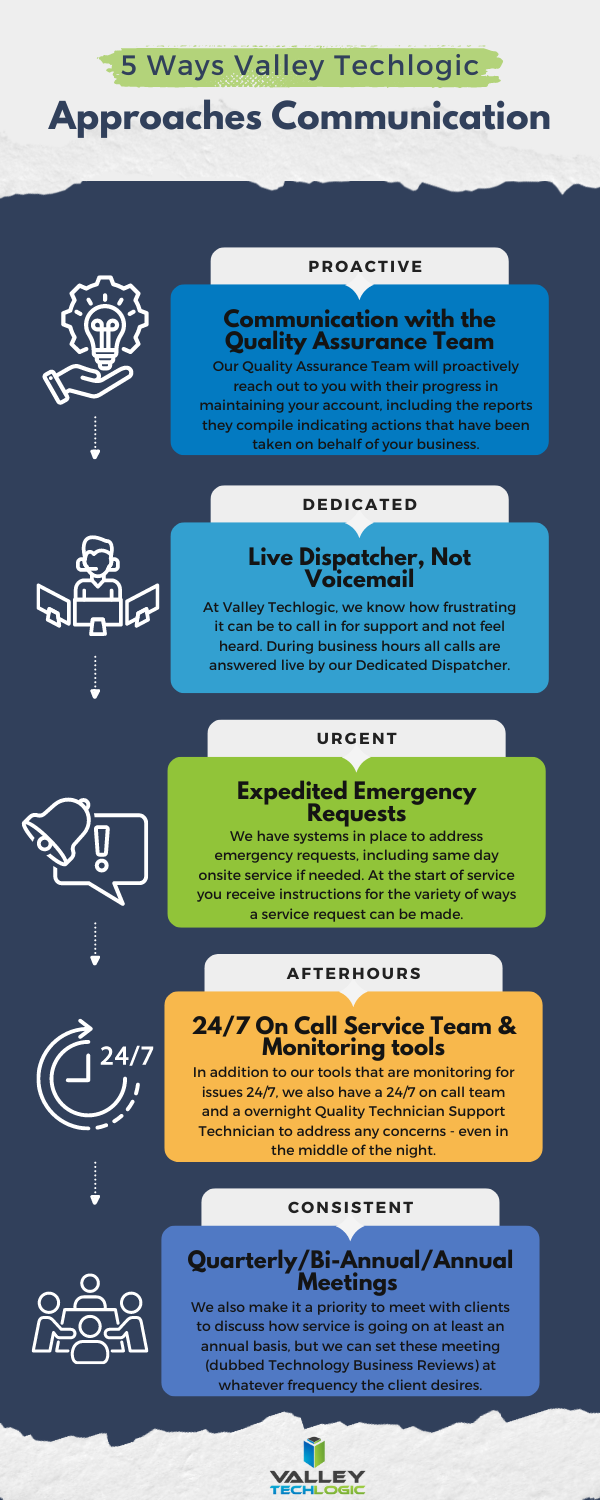
    Effective communication is an important part of running a business, if you’re not making your customers aware of your intentions then you’re leaving it up to them to draw conclusions on your behalf. Below are five ways Valley Techlogic addresses communicating with clients who have a technology service plan with us:

    Don’t settle for underwhelming or non-existent communication on the services you pay for, learn more about how Valley Techlogic can support your business today with a free consultation.

    Looking for more to read? We suggest these other articles from our site.

    This article was powered by Valley Techlogic, leading provider of trouble free IT services for businesses in California including Merced, Fresno, Stockton & More. You can find more information at https://www.valleytechlogic.com/ or on Facebook at https://www.facebook.com/valleytechlogic/ . Follow us on Twitter at https://x.com/valleytechlogic and LinkedIn at https://www.linkedin.com/company/valley-techlogic-inc/.

  • How easy is it to hack your car? For one brand it can take just a few minutes

    How easy is it to hack your car? For one brand it can take just a few minutes

    We are all aware of the devices in our home that are vulnerable to attacks, from the usual suspects like our PCs, laptops and phones to the less obvious like our internet capable smart home devices, but now we even have to worry about hackers when it comes to our cars?

    In the past, hacking a car required a great deal of skill and time. One recent variation was hackers taking advantage of RFID powered key fobs by intercepting their signal from outside your home. This attack still required the attacker to be quite close to your vehicle and security cameras (or even tinfoil wrapped around the keyfob) would be a deterrent, it also required knowledge in how the signals being broadcasted work and special equipment to intercept those signals.

    For Kia car owners, hackers have discovered a vulnerability in Kia’s own web portal that allows them to assume control of the internet connected features on the car, including swapping out the owner’s smart phone for the hackers own on the vehicle.

    This vulnerability wasn’t limited to a certain type of Kia but could be applied to any Kia with internet connected features, which in total is millions of cars. While the vulnerability Isn’t allowing the attacker to steal the car (yet) it can give the attacker control of the customers Bluetooth, vehicle cameras, door locks (allowing for theft of items in the car) and more.

    For researchers who discovered the vulnerability they also realized it led to a rabbit hole of similar vulnerabilities found on a variety of car maker websites, including Honda, Toyota, Hyundai, Infiniti and more. In a nutshell, the cyber protection available for cars leaves a lot to be desired.

    For more information on how these vulnerabilities are being exploited and exactly which car manufacturers are affected, you can read the comprehensive study put out by Sam Curry, an ethical hacker that works towards bringing critical vulnerabilities to light so they can be solved.

    So where do we go from here? In general, the more internet features devices like cars or home products have the more vulnerable they are to attacks, and the same protections we apply to our computers, servers and phones need to apply to Internet of Things (IoT) devices as well. Below are three ways you can secure your IoT devices:

    While we can’t help you with securing your car, we can help you with securing your business’s technology. At Valley Techlogic, cyber security protections are an included offering in every service plan we provide – including 24/7 monitoring, advanced threat detection, threat remediation and more. Learn more today with a consultation.

    Looking for more to read? We suggest these other articles from our site.

    This article was powered by Valley Techlogic, leading provider of trouble free IT services for businesses in California including Merced, Fresno, Stockton & More. You can find more information at https://www.valleytechlogic.com/ or on Facebook at https://www.facebook.com/valleytechlogic/ . Follow us on Twitter at https://x.com/valleytechlogic and LinkedIn at https://www.linkedin.com/company/valley-techlogic-inc/.

  • Is the cloud still your best option or would an on-premises server be the smarter way to go? 5 facts to consider about both

    Is the cloud still your best option or would an on-premises server be the smarter way to go? 5 facts to consider about both

    Originally touted as the wave of the future “the cloud”, which is nebulous phrasing that basically means putting your data anywhere besides your direct location, is often seen as the solution for corralling data into one central online location that’s managed by someone else (IE cloud providers).

    However, rising costs of data storage and uncertainty surrounding data security and availability in the wake of ever-increasing data breach threats has meant more businesses are seriously considering their options when it comes to the best strategy for data storage in their business. Where once more and more businesses were on board with an all-cloud solution, now many are turning away from the cloud for on-premises solutions or even a hybrid solution.

    First, five facts to consider in favor of an all-cloud solution:

    1. Scalability: Cloud solutions provide on-demand scalability, allowing businesses to easily increase or decrease resources such as storage, processing power, and bandwidth, based on changing needs without having to invest in physical infrastructure.
    2. Cost Efficiency: Moving to the cloud can reduce capital expenses (CapEx) for hardware and maintenance. Instead, businesses can move to an operating expense (OpEx) model, where they only pay for the resources they use, thus reducing waste and optimizing budgets.
    3. Accessibility and Flexibility: Cloud platforms allow employees to access data and applications from anywhere with an internet connection. This supports remote work, global collaboration, and increases flexibility for businesses.
    4. Automatic Updates and Maintenance: Cloud service providers manage routine maintenance, security patches, and software updates, freeing up internal IT teams to focus on more strategic tasks, and ensuring systems are up to date with the latest technologies.
    5. Disaster Recovery and Backup: Cloud solutions offer robust disaster recovery options, ensuring data redundancy and availability. Cloud providers often have geographically distributed data centers, reducing the risk of data loss due to localized incidents and enhancing business continuity.

    On the other hand, here are five facts in favor of an on-premises solution:

    1. Greater Control and Customization: With on-premises servers, organizations have full control over their hardware, software, and network configurations. This allows for highly customized setups that can be tailored to meet specific business or security needs.
    2. Data Security and Privacy: On-premises storage allows businesses to maintain direct oversight of their data, which can be crucial for industries that require strict data security and regulatory compliance (e.g., healthcare or finance). Sensitive data stays within the company’s infrastructure, reducing third-party access risks.
    3. No Dependence on Internet Connectivity: Unlike cloud-based solutions that require constant internet access, on-premises servers allow organizations to access and manage their data even if there are internet outages or network interruptions, ensuring business continuity.
    4. Predictable Costs: While the upfront costs of on-premises servers can be higher, they are typically one-time capital expenditures. Over time, businesses have greater control over their long-term budget for hardware upgrades and maintenance without the recurring subscription fees that cloud services often require.
    5. Legacy Systems Integration: Many businesses have legacy applications or systems that are better suited for, or only compatible with, on-premises infrastructure. Keeping data and applications on-site ensures better performance and integration with existing, sometimes older, internal systems.

    There are factors to consider when it comes to choosing either cloud or on-premises for your business storage solution, but what about a mix of both? Maintaining an on-premises storage solution combined with a cloud storage solution as a backup gives you both the redundancy you need with the flexibility of cloud storage and alongside the control of an on-premises solution in a hybrid solution completely customized for your needs.

    In today’s world, data storage can be customized to your business’s specific needs and here at Valley Techlogic we are experts in developing backup solutions that work for you (through our program TechVault). Whether you’re looking to protect your current data, migrate your data to the cloud or to an on-premises solution, or even if you’ve reached this article while going through a data loss event – Valley Techlogic can help. Reach out for a consultation today.

    Looking for more to read? We suggest these other articles from our site.

    This article was powered by Valley Techlogic, leading provider of trouble free IT services for businesses in California including Merced, Fresno, Stockton & More. You can find more information at https://www.valleytechlogic.com/ or on Facebook at https://www.facebook.com/valleytechlogic/ . Follow us on Twitter at https://x.com/valleytechlogic and LinkedIn at https://www.linkedin.com/company/valley-techlogic-inc/.

  • Back to school? 9 cyber safety tips for school devices and more

    Back to school? 9 cyber safety tips for school devices and more

    August and September are big back to school months in the United States and while you’re prepping your children’s backpack for their return with pencils and markers it’s also worth taking the time to go over safety tips for utilizing the internet.

    Schools have become more and more steeped in their usage of technology rather than pen and paper course work, however they may not have the bandwidth to monitor how those devices are used 100% of the time. School IT will do the best they can to bridge the gap but it’s still up to us as parents to make sure our children have the tools they need to safely navigate our interconnected world.

    Whether your schools have handed down iPads, Chromebooks or something else these 9 tips are worth noting as your children get ready for their first day of school:

    1. Does the device have content filtering? While most schools will implement strong content filtering as part of their device roll out plan to prevent students from viewing inappropriate content, it’s still worth reviewing on your own end and reporting if there are any flaws to it with your school’s administration.
    2. Does your child take their mobile phone to school? If your children have a mobile device they bring to school, we recommend taking the same measures you would with your own device and ensuring the lockscreen is enabled. A child is more likely to lose a device and the same rules apply with them as adults in protecting personal data that could be exposed via an unsecured phone.
    3. Also be wary of theft. Theft happens in schools and an unattended phone or laptop could make an appealing target, make sure they know their devices should be with them or in a secure location at all times.
    4. Strong passwords matter for kids too. It’s also not too early to get them started with a good password manager (and useful for you as a parent in maintaining access to your online children’s accounts). Here are our top 3 password manager recommendations.
    5. So do updates. Again, as with your own devices, you should be making sure their devices are up to date on current software or firmware updates. Kids will not be as thorough in investigating something they’re interested in before downloading it (especially with online games). Automatic updates are a must for children’s devices.
    6. Cyber bullying is another consideration. The Global Cybersecurity Forum has found that 72% of children worldwide have been exposed to one type of online cyber threat or bullying.
    7. Children should be aware of online scammers too. If your child is old enough to have access to an email account (to setup a mobile phone you often have to setup an email too) or even if they just have access to text messaging, it’s a good thing to go over the fact that online scams exist and what to look out for.
    8. Kids need backups too. Especially for middle and high school age students, saving their work may not be a given and losing it could be devastating (or at least will feel that way). If multi-page reports are a factor in your child’s life it’s worth making sure they’re writing them on software that will automatically save the draft, such as Microsoft’s Word or Google Docs. Both of these options save your progress as you write automatically.
    9. Teach your children what to share (and what not to share) online. Social media can be a tricky thing to navigate even for adults but for children there are additional safety concerns. If your teen has reached the age that they’re asking to or have already created a social media account, it’s worth reviewing what information they’ve made available on it and checking it continuously. We recommend making sure your teen’s online accounts are made private and they know not to share things like their location or other PII (Personally Identifiable Information) on the web.

    For parents and educators alike, we recommend following the SMART rules when it comes to online safety for your children and students. See and save the flyer below.

    Stay SMART Flyer VTL 2024

    Valley Techlogic is a technology service provider located in California and we have experience working with a range of businesses (including educational institutions) in support of their technology goals. Learn more with a consultation today.

    Looking for more to read? We suggest these other articles from our site.

    This article was powered by Valley Techlogic, leading provider of trouble free IT services for businesses in California including Merced, Fresno, Stockton & More. You can find more information at https://www.valleytechlogic.com/ or on Facebook at https://www.facebook.com/valleytechlogic/ . Follow us on Twitter at https://x.com/valleytechlogic and LinkedIn at https://www.linkedin.com/company/valley-techlogic-inc/.

  • The 7 most common network issues and how to fix them

    The 7 most common network issues and how to fix them

    “The internet is down” is a phrase no one enjoys hearing. Beyond the disruption to your day, troubleshooting network issues is also a notoriously frustrating experience. Questions like why is it down, is it us or our service provider, when will it come back up? are common place in this universally shared experience. These questions don’t always have easy answers, but we have 7 easy solutions you can try if your internet is out (even if you’re currently looking at this list from your cell phone).

    1. The tried and true, have you tried turning it off and on? When in doubt, a quick router reset is sometimes all it takes to get your network back online. If you’re curious why this works, it’s often because like with a computer resetting the device clears its memory which allows it to run more efficiently.

    2. Do a quick inspection. Is everything plugged in? Even if it looks like everything is plugged in snuggly and securely, we still suggest double-checking cables etc. for loose connections or whether a cable is showing signs of failure (fraying, loose or damaged connectors, things of that nature).
    3. Run a network test. We promise this tip is actually easy even if it sounds complicated. First, open a Command Prompt by typing CMD in the search bar of your device, from there simply cut and paste this command ping -n 100 1.1.1.1 (1.1.1.1 is a public DNS service provided by CloudFlare) and hit enter. Your device will start giving you the ping results, this can also help you if your internet is online but slow as it will tell you if your pings take a long time to reach the service.
    4. Try this command. Before you close that command prompt, we also suggest trying the simple command ipconfig /release followed by ipconfig /renew . What this will do is refresh your computer’s IP address and it may solve the problem if only one device in your office is affected.
    5. See if you’re due for an update. We’ve touched on this before, but small devices like routers and Wi-Fi connectors often fly under the radar when it comes to receiving updates. A firmware update may be all it takes to get you back online, and your device will also be more secure from being updated as an added benefit.
    6. Check if it’s you or your provider. Tried the above steps and still no dice? At this point we recommend reaching out to your internet provider to see if there’s a known issue in your area (this information may also be available online). You can also see if they can reset things on their end to possibly resolve the issue for you if there Isn’t a more widespread outage going on.
    7. Call for backup. If you’ve tried the above steps and your internet is still out, it’s time to reach out to your IT support team for escalating and more complex troubleshooting.

    Don’t currently have an IT support team for your California business? Valley Techlogic can help, networking support and troubleshooting is included in all of our service plans. We have personally assisted customers with persistent network outage situations, developing complex and creative internet connectivity solutions for more remote locations and more.

    Don’t let a bad connection get between you and your ability to run your business, reach out today for a consultation.

    Looking for more to read? We suggest these other articles from our site.

    This article was powered by Valley Techlogic, leading provider of trouble free IT services for businesses in California including Merced, Fresno, Stockton & More. You can find more information at https://www.valleytechlogic.com/ or on Facebook at https://www.facebook.com/valleytechlogic/ . Follow us on Twitter at https://x.com/valleytechlogic and LinkedIn at https://www.linkedin.com/company/valley-techlogic-inc/.

  • Code named “Strawberry”, OpenAI’s latest update aims to boost reasoning capacity in their AI model

    Code named “Strawberry”, OpenAI’s latest update aims to boost reasoning capacity in their AI model

    Initially labeled Q* for Q Star, Project Strawberry is set to become ChatGPT5 and OpenAI is prepared to launch this update any day now at the time of writing.

    AI competition continues to stiffen up, but many would argue OpenAI has a commanding lead in the AI space with it’s a comparatively more mature model that many believe is more accurate than competitors such as Google’s Gemini and Microsoft’s CoPilot.

    However, as with most AI tools on the market, errors and just general wonkiness are part of the experience and OpenAI and other AI tool providers hope to continue to improve in that arena, providing more accurate results to users without errors and sometimes comical mistakes or “problems” as in the inaccurate word scramble below.

    Hint, no actual words can be spelled with all the letters given.

    OpenAI’s claims Project Strawberry will have “human-like” reasoning skills and answer questions that have stumped the algorithm so far, especially complex math and programming problems.

    This update is also leading up to the larger project for OpenAI, codenamed “Orion” this future tool will be an entirely new AI model and it’s going to be trained entirely via ChatGPT5/Project Strawberry. The hope with using AI to train AI rather than training it via data found online is that we will see a reduction in “AI hallucinations” (or incorrect predictions) and also speed up the rate at which AI can be improved without having to feed it large amounts of online data.

    This would also help OpenAI and other AI competitors avoid the murkier topic of privacy concerns when it comes to where AI is getting it’s data from.

    If you’re considering investing time in AI solutions for your business, we have 4 considerations for you to mull over first (and the first does relate to the data security topic we just mentioned):

    1. Data Security: For most of the AI tools on the market, it’s a known fact that any data you feed into it will also feed into the models they use. We would suggest if you’re considering implementing AI solutions in your business you do so with this factor in mind. Even if a tool claims your data will be secure and not accessible to other users (we’re looking at you CoPilot) AI is still realistically in its infancy. We suggest using an abundance of caution when it comes to data that is proprietary to your business.
    2. Cost (especially Time Cost): AI when used correctly can save your business time and money but using it correctly can be a high barrier to entry. For example, if copy writing is a core facet of your business AI is an excellent tool for sourcing ideas that your team can then spin off into their own creations. If your business is word-of-mouth based cabinetry sales, AI may not be very useful to you at this point in time.
    3. User Experience: Consider the human experience, especially for your customers, when implementing AI solutions. AI chatbots exist but should they replace a real person answering questions on your business’s behalf? Or instead does it make sense to utilize it half way (IE the chatbot answers common questions) with a human representative ready to take over if the questions get more complicated.
    4. AI is not magic: AI will not replace human ingenuity, as outlined above it’s not a perfect solution by any means at this point in time and that’s unlikely to change anytime soon. AI should be used to build upon existing structures in your business (like adding more capacity to your marketing capabilities for example) not with the expectation it’s going to replace those structures entirely.

    Considering implementing AI solutions in your business or hoping to hone in on advancements in technology to your advantage? Valley Techlogic continues to stay at the forefront of new innovations in tech, and we utilize our expertise on behalf of our customers. Reach out today for a consultation.

    Looking for more to read? We suggest these other articles from our site.

    This article was powered by Valley Techlogic, leading provider of trouble free IT services for businesses in California including Merced, Fresno, Stockton & More. You can find more information at https://www.valleytechlogic.com/ or on Facebook at https://www.facebook.com/valleytechlogic/ . Follow us on Twitter at https://x.com/valleytechlogic and LinkedIn at https://www.linkedin.com/company/valley-techlogic-inc/.

  • The day the world stopped (for Windows users anyways)

    The day the world stopped (for Windows users anyways)

    Unless you’ve been living under a rock for the past week, you’re probably well aware of the worldwide outage that occurred last Friday effecting millions of Windows users and causing disruptions for airlines, healthcare facilities, banks and more.

    CrowdStrike, a cybersecurity technology company that provides endpoint protection and cyberattack response services to numerous Fortune 500 companies was behind the outage which was linked to a software glitch.

    The update that was pushed out Friday was supposed to just enable sensors on Windows devices to detect new potential threats, but instead knocked systems offline around the world. CrowdStrike utilizes an update mechanism they call “Rapid Response Content” which is supposed to react to threats in real time and push updates out to respond to those threats. As we know, time is of the essence with cybersecurity especially with Zero Day attacks.

    Instead of addressing threats though, a defect in the update caused an outage that has cost airlines in particular $860 million in losses during the course of the outage. Airlines even resorted to writing flight times on whiteboard in airports for travelers who had no access to flight information during the outage. Affected devices all displayed the infamous blue screen of death.

    Photo courtesy of Reddit user u/New_Fault_1002.

    It’s also being reported that cyber insurers are expected to only cover 10 to 20 percent of the costs associated with this outage, leaving much of the financial burden on companies still trying to recover from the disruption the outage caused to their business.

    The bittersweet news behind this outage is that companies with cloud facing options for their data recovered much more easily than businesses dependent on physical devices. For the example the healthcare sector, which despite the overwhelming coverage airports have received was the hardest hit with $1.94 billion in losses anticipated so far. Companies that could access unaffected devices to reach the data they had stored in the cloud were able to resume business as usual much quicker than those dependent on hard copy data found only on their Windows devices.

    CrowdStrike has pledged to keep an outage created by an update glitch from happening again by taking a more staggered approach to their updates by not having every user receive the same update all at once and also by having a more thorough process to vet updates before they go live.

    However, the fate of the company and its ability to rebound after such a critical failure is unknown at this point and they’re not winning any favors with a measly $10 gift card being offered as a “sorry” for the outage.

    For us at Valley Techlogic, the outcome of relying on having all of your “data eggs” in one basket is unsurprising. We have long been proponents of taking a layered approach to backups, two is good and three is better. Our backup service, TechVault, is included with all our service plans. If you would like to learn more, reach out today for a consultation.

    Looking for more to read? We suggest these other articles from our site.

    This article was powered by Valley Techlogic, leading provider of trouble free IT services for businesses in California including Merced, Fresno, Stockton & More. You can find more information at https://www.valleytechlogic.com/ or on Facebook at https://www.facebook.com/valleytechlogic/ . Follow us on Twitter at https://x.com/valleytechlogic and LinkedIn at https://www.linkedin.com/company/valley-techlogic-inc/.