
Author: rory-admin

  • Windows 11 is out, should you upgrade?

    Windows 11 is out, should you upgrade?

    Windows 11 officially came out on October 5th and maybe it just us or perhaps it’s been overshadowed by other tech news this week, but the release has seemed somewhat unceremonious so far.

    Perhaps that’s because it wasn’t released for everyone. In fact, it’s not available for most people.

    How will you know if your PC has the upgrade (which is free by the way) available? Well, there are some steps to take first.

    1. Make sure you’re on Windows 10, you can only receive the Windows 11 free upgrade if you’re already on Windows 10.
    2. Download the free Microsoft Health Check App to see if your device is supported.
    3. Perform a backup of any important files and documents. This is a big upgrade, so you want to make sure your prepared if anything problematic happens during it.
    4. Then head to Settings > Update & Security > Windows Update on your PC.
    5. If the update is available to you, you’ll see it in your update section and can perform the upgrade if you wish to but maybe read on first to see if that’s a good idea.

    For most of us though, the upgrades not available yet and that’s probably a good thing. It can take a bit of trial and error following a release, especially on the level a Microsoft operating system releases at, to get the kinks worked out. Many of the promised features are still not available yet and won’t be for several months.

    Also, for many people their PCs don’t have the required specifications for Windows 11. Especially concerning issues surrounding TPM and secure boot.

    There’s also no rush, Windows 10 will continue to receive mainstream support through October of 2025. Looking at all the features we understand why some are rushing to upgrade ASAP, but for businesses especially a calculated approach to performing this upgrade is a smart idea.

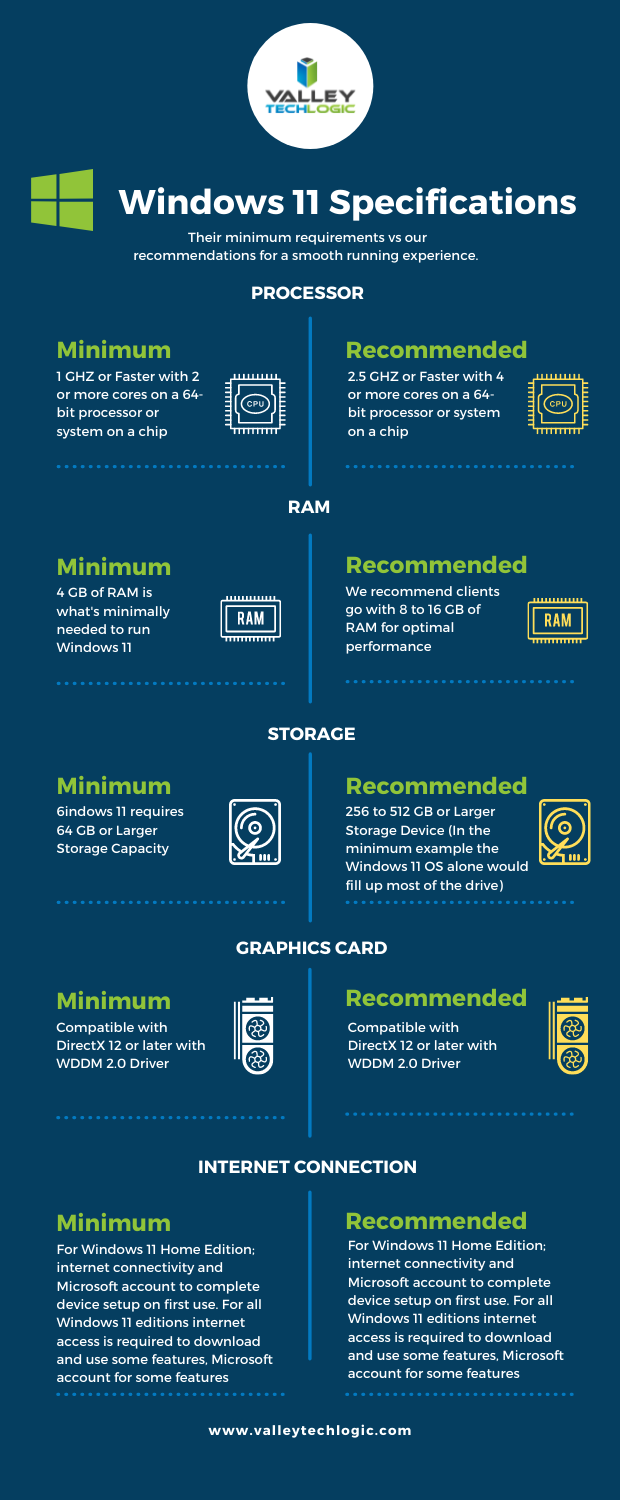
    We’ve talked about the system requirements surrounding making the upgrade to Windows 11 in the past. We’ve even turned the graphics we made for that article into a side-by-side chart you can print out.
    Though the global chip shortage is making it virtually impossible for the average person to easily make a new desktop or laptop purchase at the moment. Even as an IT provider, we’re feeling the pinch.

    If you’re a business owner in the Central Valley and need some advice on upgrading your office computers to Windows 11 (or even to Windows 10) or need help with hardware, we’re here for you. Schedule a discovery call today to learn more.

    Looking for more to read? We suggest these other articles from our site.

    This article was powered by Valley TechLogic, adns, n IT service provider in Atwater, CA. You can find more information at https://www.valleytechlogic.com/ or on Facebook at https://www.facebook.com/valleytechlogic/ . Follow us on Twitter at https://x.com/valleytechlogic.
  • Yesterday, Facebook experienced their worst outage since 2008

    Yesterday, Facebook experienced their worst outage since 2008

    Yesterday if you were trying to login to Facebook, Instagram, WhatsApp or even Oculus VR you wouldn’t have had much luck. Facebook experienced their worst outage since 2008 (when a bug caused the site to be down for an entire day). They were down for just over 6 hours as a world that suddenly found themselves with more time on their hands speculated why.

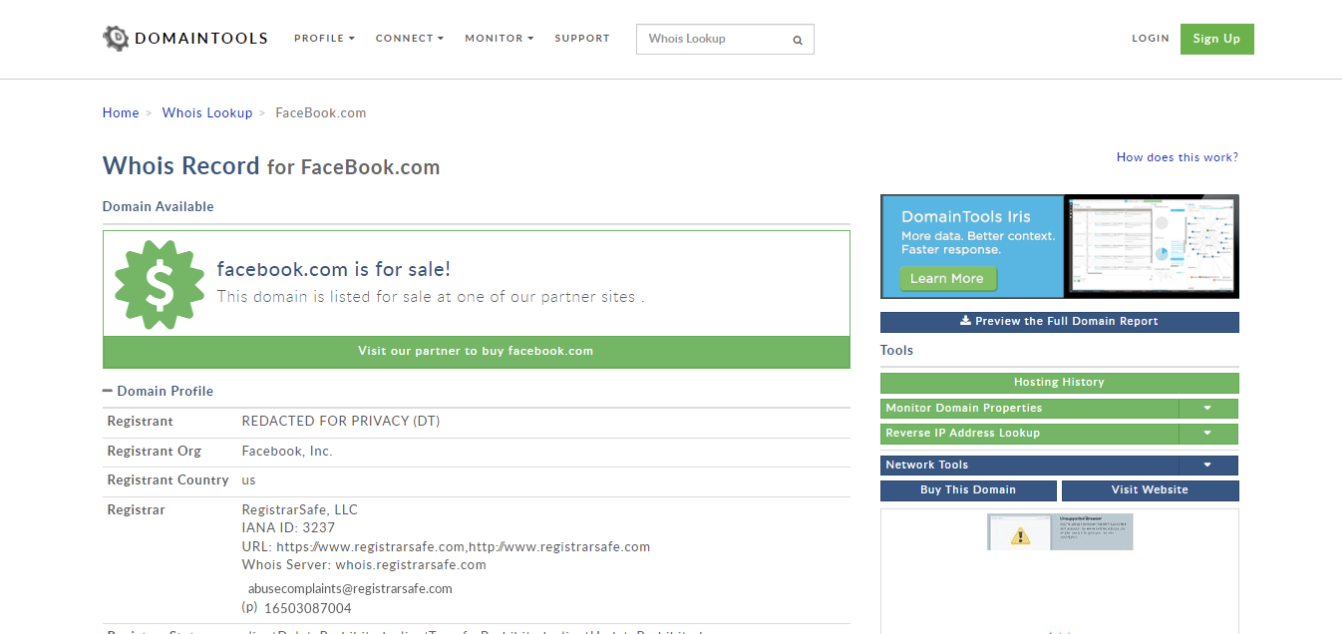
    For a brief period, the domain Facebook.com was even for sale if you performed a search for the domain on a domain name search website.

    While many thought it could be an attack on their networks, such as what’s been happening in the VoIP sector lately, others speculated the outage was related to the fire Facebook has been under lately for their business practices.

    On Sunday, Facebook whistleblower Frances Haugen – a former Facebook project manager – went public on how Facebooks policies prioritize profits over their user’s wellbeing. She was the person responsible for the massive data dump that showed Facebook’s algorithms even optimize for hate speech. She noted these problems also exist at Google and Pinterest, other companies she’s performed similar duties for, but that the problem is much worst at Facebook.

    Mark Zuckerberg Meme
    There have been no shortage of memes taking shots at Facebook founder Mark Zuckerberg following the outage.

    Hearings begin this week analyzing the whistleblower findings, particularly as they relate to children on these sites. Amid the controversy Facebook has shelved plans for an Instagram Kids app, though Facebook claims the delay is so they can better analyze the needs of children and parents before moving forward with the app.

    The main crux of the case has to do with both the deluge of data and how major players such as Facebook (and likely beyond) serve that data to their users. It’s a tricky situation because you don’t want to stifle free speech but promoting hate speech and negative imagery, especially to vulnerable audiences such as children, is also wrong.

    There is so much more to the case then we can get to here but suffice to say hearings such as these play an important role in how we as a society consume and regulate data.

    Back to the topic at hand though, after being down for 6 hours Facebook finally emerged although they did so with little in the way of answers as to why their domains were down to the first place. They’ve issued an apology for the outage but beyond that silence.

    Experts who have weighed in speculate the issue had to do with Facebooks DNS (Domain Name System), and anonymous comments that have surfaced from employees said they don’t think the downtime was caused by an attack.

    Some reports have even said during the outage functions inside Facebook offices ground to a halt, with some employees being unable to even use their keycards which could have also contributed to the lengthy delay in fixing the problem.

    Outages such as these should cause even smaller businesses to take a hard look at their technology practices. If Facebook, with the resources they have available, can be brought to a standstill for hours over potentially a small issue such as DNS how would your business fare when faced with a similar issue?

    Downtime adds up, but it doesn’t have to. Having a partner in technology like Valley Techlogic is the number one way your business can avoid the hassle, expense, and embarrassment of lengthy downtime. Find out more today.

    Looking for more to read? We suggest these other articles from our site.

    This article was powered by Valley TechLogic, adns, n IT service provider in Atwater, CA. You can find more information at https://www.valleytechlogic.com/ or on Facebook at https://www.facebook.com/valleytechlogic/ . Follow us on Twitter at https://x.com/valleytechlogic.

  • Massive DDoS Attacks Cripple VoIP Services

    Massive DDoS Attacks Cripple VoIP Services

    If you use VoIP in your business, you may have been affected by service outages so far this week.

    That’s because Bandwidth.com, a major hosting provider for VoIP services such as Accent, Ring Central, Twilio and more has been under assault by a major distributed denial of service (DDoS) attack. While they’re working tirelessly to reroute call streams, as of Tuesday outages were still occurring nationwide.

    Distributed Denial of Service (DDoS) attacks are not a new occurrence in the VoIP world, hackers regularly target VoIP services in an effort to gain a ransom to make the attacks stop. Canadian VoIP provider, VoIP.ms, has been under siege since last week by a DDoS attack being performed by the hacking group REvil.

    REvil, a Russian linked ransomware gang, was also responsible for the attacks on Kaseya that made major news in July. They are demanding $4.5 million from VoIP.ms to end the attacks but so far VoIP.ms is holding firm and not giving in to the demands.

    You may be wondering what happens during a Distributed Denial of Service (DDoS) attack or even what a DDoS attack is. During a DDoS attack hackers flood the target networks with service requests, bogging down the systems until they either slow to a crawl or go offline completely due to the overload.

    To put some context behind it, Cloudflare a cybersecurity oriented service provider that helps websites mitigate DDoS attacks were themselves hit by a DDoS attack last month that served their website 17.2 million requests per second. The real target of the DDoS attack, a financial customer of Cloudflare, was served 330 million attack requests in seconds. Most websites and online servers cannot bear the brunt of that many requests instantaneously.

    VoIP providers are an easy target for ransomware, cutting off communications to the outside world for those who are affected is a tangible problem that creates a heightened sense of urgency. The same urgency cannot be replicated from your business’s website being down for a while, though the loss of revenue that may occur from that should not be overlooked. For some business’s that loss can equal as high as $250,000 hourly.

    You may be thinking, I can’t have my phones go down I’ll just switch back to a landline provider even if the cost is higher and it would lack many of the features acquired with VoIP. I’m sorry to say It would do you no good.

    Nothing is truly cut off from the web these days, even your typical landline phone utilizes a web-based connection somewhere down the line. POTS aka Plain Old Telephone Service which performed phone services over copper wires is going the way of the dodo in most places.

    The FCC even called for a mandatory termination of POTS lines In 2014. As of 2018 only 5% of the country was landline only.

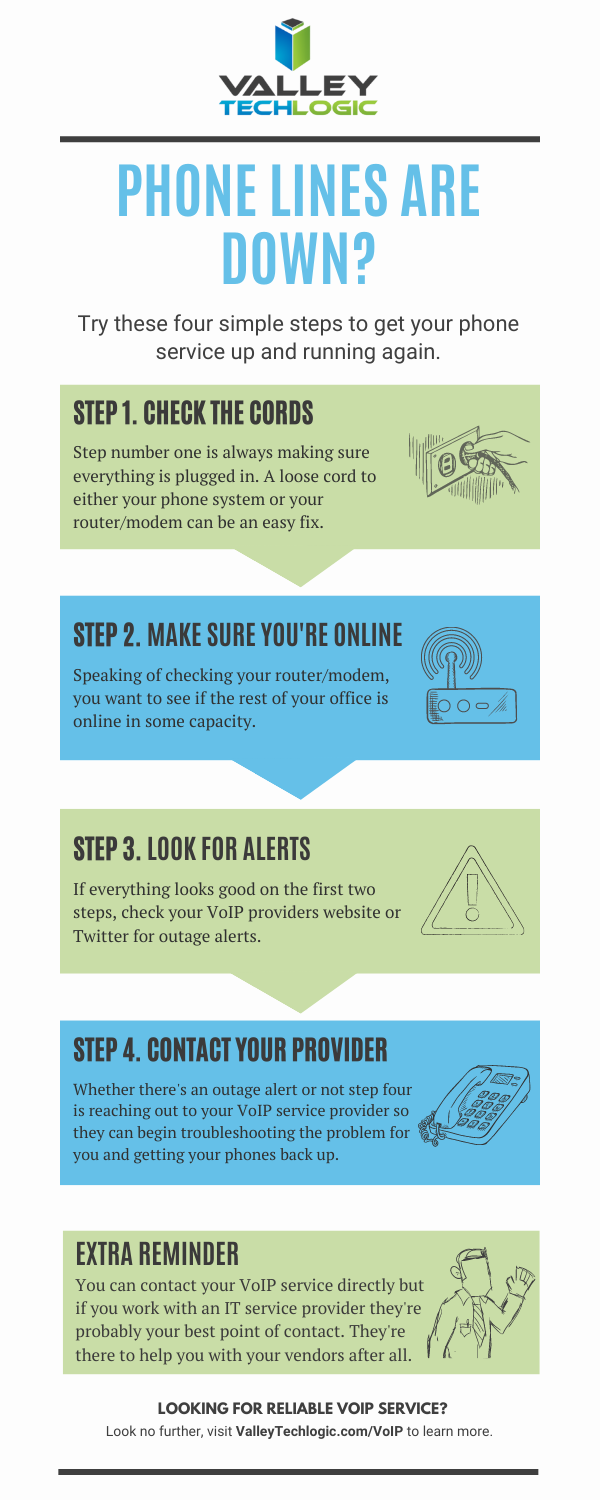
    To sum it up, avoiding the internet when it comes to making phone calls is no longer a possibility. With that said we understand that having your phone lines down is disruptive and unnerving. We’ve created this checklist with steps to take if you find your phone service down.

    If you don’t have a service provider to reach out to in the event of a service outage, we can help. We are proud of our VoIP service solutions and the reliable uptime we maintain for our clients. You can learn more about our VoIP services here. We even have a promotion for new customers. ?

    Looking for more to read? We suggest these other articles from our site.

    This article was powered by Valley TechLogic, an IT service provider in Atwater, CA. You can find more information at https://www.valleytechlogic.com/ or on Facebook at https://www.facebook.com/valleytechlogic/ . Follow us on Twitter at https://x.com/valleytechlogic.
  • The global chip shortage timeline of events, and when it could end

    The global chip shortage timeline of events, and when it could end

    The global chip shortage is still raging on and it’s effecting more business sectors than you might expect. As a technology provider we’re certainly feeling the pinch when it comes to ordering hardware for our clients. The delays have challenged us to get creative with our clients and we’re coming up with interim solutions until hardware makes it in.

    Some vendors are certainly meeting the needs for computer hardware better than others, so that buffet of choice you may be used to is a thing of the past – at least for the moment. We’re thankful for our channel connections as they give us an edge when ordering that the ordinary consumer may not have.

    We’re not the only ones feeling the pinch though, car manufacturers, appliances, even children’s toys. Consumers are being told they should consider purchasing their children’s wish list items earlier this year, if you wait those electric wish list items may be long gone before December. We’ve even seen it suggested that you may want to consider “dumb” toys such as those made of wood that are unaffected by the chip shortage. Lincoln logs anyone?

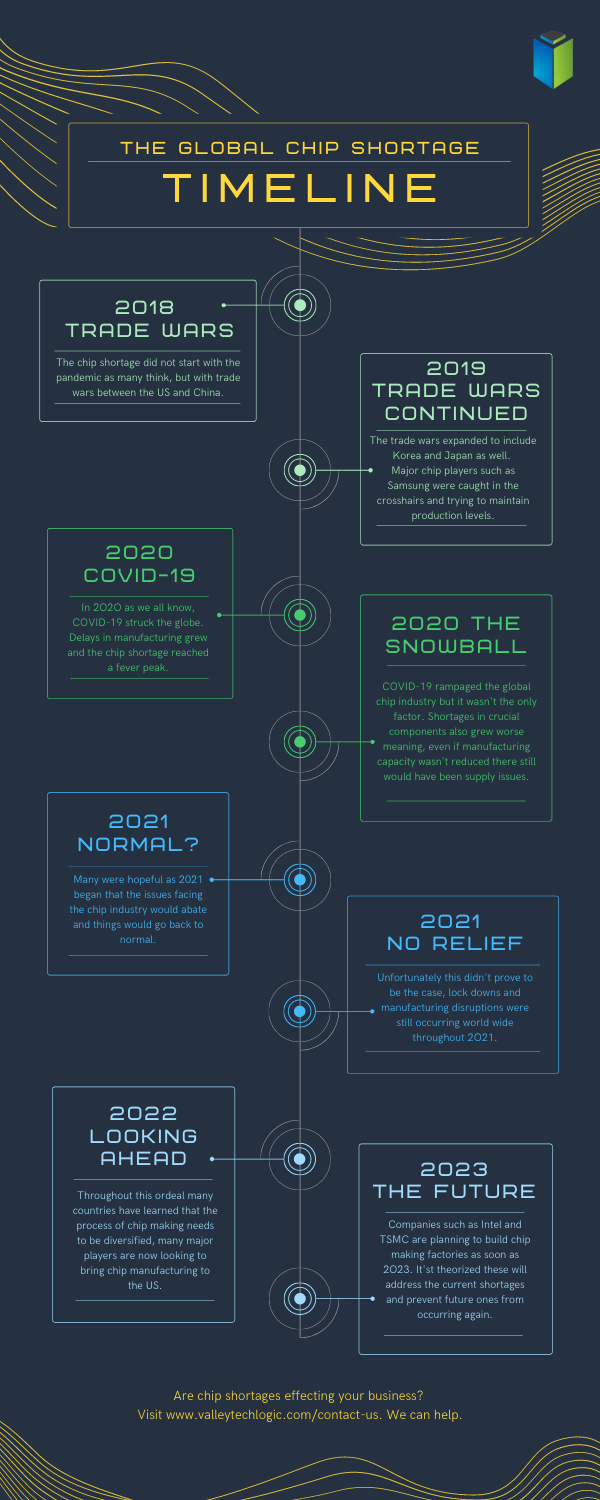
    Here is a simple timeline of events for the chip shortages, which started long before the pandemic in 2018.

    Global Chip Shortage Timeline
    Click to Download the Full Size Version

    As you can see the chip shortages definitely didn’t start with the pandemic, but it did exacerbate the existing problems greatly. Shortages in components, shortages in labor, shipping delays are all contributing to worldwide pains that have even led to products exceeding their MSRP.

    The graphic card market sums up the problem succinctly, with scalpers taking advantage of the low stock to sell cards for hundreds of dollars outside of their MSRP.

    No one can say for sure when the chip shortages will end, but major players such as Intel and chip-making behemoth TSMC are all looking to bring manufacturing state side to help. This would at least cut down on shipping times and if future global trade issues were to occur the US electronic manufacturers would be much better prepared for it.

    These are not permanent fixes though as component shortages are an ever-growing issue that needs to be addressed. We don’t know what a long-term solution will look like but more investments into infrastructure could easy the burden in the short term.

    For more information on the time line of events for the global chip shortage we suggesting reading this article which goes into more details about the timeline of events since 2018 and other global factors that have occurred.

    If you’re having difficult sourcing hardware for your business, Valley Techlogic can help. We have channel connections that allow us priority buying for our clients and should you be interested in partnering with us we can extend those benefits to your business. Reach out today to learn more.

    Looking for more to read? We suggest these other articles from our site.

    This article was powered by Valley TechLogic, an IT service provider in Atwater, CA. You can find more information at https://www.valleytechlogic.com/ or on Facebook at https://www.facebook.com/valleytechlogic/ . Follow us on Twitter at https://x.com/valleytechlogic.

  • Looking for a new IT provider? Here’s a checklist to start with

    Looking for a new IT provider? Here’s a checklist to start with

    As an IT provider ourselves we have some thoughts – okay a lot of thoughts – on what makes a good one.

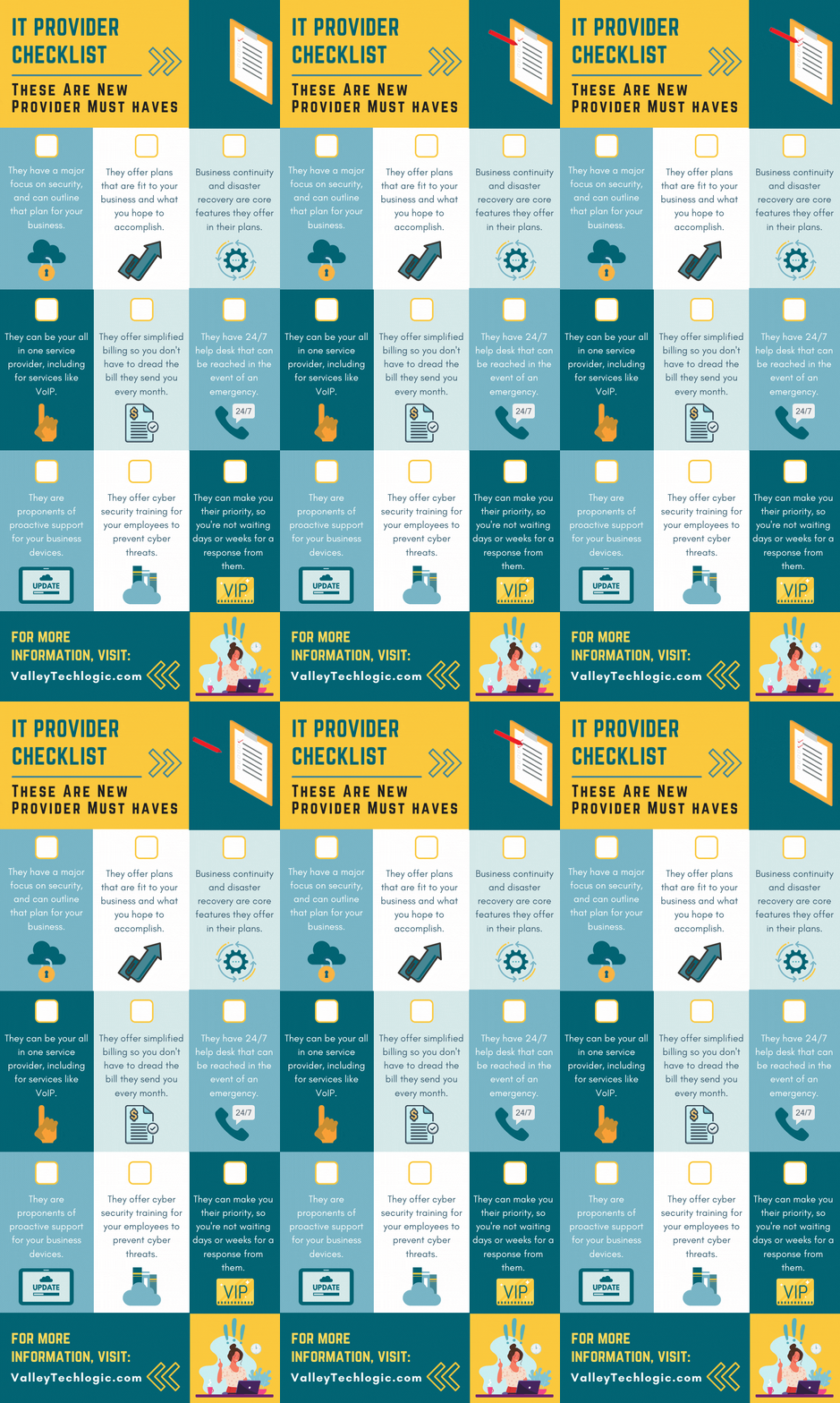
    It’s an unfortunate fact that many of our clients came to us after being failed, sometimes catastrophically, by their previous provider. While we service a large portion of the Central California area, we know many readers fall outside this region and we thought it would be helpful to provide a printable and online capable checklist for the top 9 things to look for in an IT provider.

    The items found on this checklist are simple enough you could even have it handy while you interview new provider options. If the answers to any of these questions are a “no” or even hesitancy, we suggest you continue looking. Items like security, disaster recovery and responsiveness to requests are hard stops when it comes to choosing a provider that will best support your business.

    If your old IT service provider left you in the lurch during a disaster, why would you risk choosing a new provider that can’t guarantee that the same thing won’t happen again?

    You also want to make sure they believe in proactive maintenance. When choosing a new provider and paying for their services the last thing you want to have happen is that you’re still the person responsible for maintaining your own IT. Paying their bill every month while still slogging through updates on workstations yourself would just be salt in the wound. We think this should be an included part of any full coverage service plan.

    Speaking of full coverage plans, at Valley Techlogic we believe in unified billing. This means when you choose us all of your IT services are contained under our one billing umbrella. We manage their IT subscriptions, their VoIP plans – everything is designed to be as hassle free as possible. While not all providers operate the same as we do in this regard, we (and our clients) think of it as a positive feature.

    Migrating from your previous provider can also be an intimidating time for any business owner, this person or business had access to all of your sensitive systems and if things ended on a sour note, you may be feeling unsure whether your data and systems are safe.

    We wrote a comprehensive guide on what to do when your IT guy (or IT provider) suddenly quits, you can find it here. The topics are applicable whether they quit or were fired by you. It’s our suggestion you don’t try to manage this on your own, locking down access and recovering credentials is really best left to the professionals.

    If your business is located in Central California (Sacramento, Stockton, Modesto, Fresno, Merced and everywhere in between) and you’re looking for a new IT service provider, Valley Techlogic meets all of the criteria found in the above checklist and more. Reach out today to learn more.

    Looking for more to read? We suggest these other articles from our site.

    This article was powered by Valley TechLogic, an IT service provider in Atwater, CA. You can find more information at https://www.valleytechlogic.com/ or on Facebook at https://www.facebook.com/valleytechlogic/ . Follow us on Twitter at https://x.com/valleytechlogic.
  • Your data is safer in the cloud, period.

    Your data is safer in the cloud, period.

    Speaking in absolutes is not usually a good idea, but in the case of data storage we feel the onus is on us to speak plainly – and it’s the plain truth that your data is safer in the cloud.

    It’s natural to be hesitant to move everything into the cloud, especially when it really wasn’t that long ago in the grand scheme of things that all data was stored in filing cabinets. Safely tucked away and (hopefully) properly indexed to be pulled out as needed.

    Sure, we didn’t have to worry about malware with paper files, but theft and natural disasters were the enemy of on premises paper documents. Or just the ravages of time wreaking havoc on plain paper and ink. You also had to make sure to shred important documents and not just trash them lest they fall into the wrong hands.

    With the advent of computers most of our data moved to our personal computers and it greatly elevated our ability to communicate that data to others. Multi-million-dollar transactions can be easily completed by simply emailing a proposal and contract. Billing information, medical documents, all of the private information about an individual or business is often times found online and is available to be pulled up when needed.

    But this ease of information is also it’s downfall. Old fashioned robberies where thieves would break into brick-and-mortar establishments and steal private information to then be used to create false identities and/or use payment details for their own benefit have now been replaced with often a single user attacking a small business’s online accounts. They can dismantle everything that business has built in days or even hours and make recovering difficult or even impossible.

    That’s not even taking to account that a single on-premises server is just as vulnerable to fire or flood damage as your filing cabinet is. A singed or waterlogged hard drive has no more usefulness than the same data contained in a charred or dripping stack of papers.

    Like with many things in life this problem is solved by working together with others, and that’s where cloud data solutions come in. It’s still your data and we, like you, think it should have the same level of accessibility as it does when it’s on your personal computer or even a paper file on your desk.

    With the high-speed internet most of us have in our homes and offices downloading files from the cloud is often a nearly instantaneous click of a button and then you’re working on the file you were last night. Make a mistake a few hours in? Another benefit of the cloud is you can often times roll back to an earlier version.

    The cloud can sound nebulous but it’s not, it’s just using the resources of companies that put their whole stake into safeguarding data. Their existence as a business is in keeping your data safe, companies that fail at that task don’t stay in business long.

    It’s really not that different than utilizing the services of the power company for all of your power, or your local ISP for all of your networking needs. These services work best when they’re maintained by companies that dedicate themselves to the task and can provide a high level of continuity.

    And there are some major players in the game, players that have been in the business of data and even computers themselves as a whole for decades. At Valley Techlogic we greatly utilize the power of Microsoft’s cloud service – One Drive – to collaborate within our business. It’s even paved the way for our remote employees to maintain productivity with the whole team without missing a beat. The default storage capacity is 1 Terabyte (TB) which is more than most users will ever need.

    If our office ever burned down with no one inside, we can state with the utmost confidence it would not affect our ability to do business. Could you say the same?

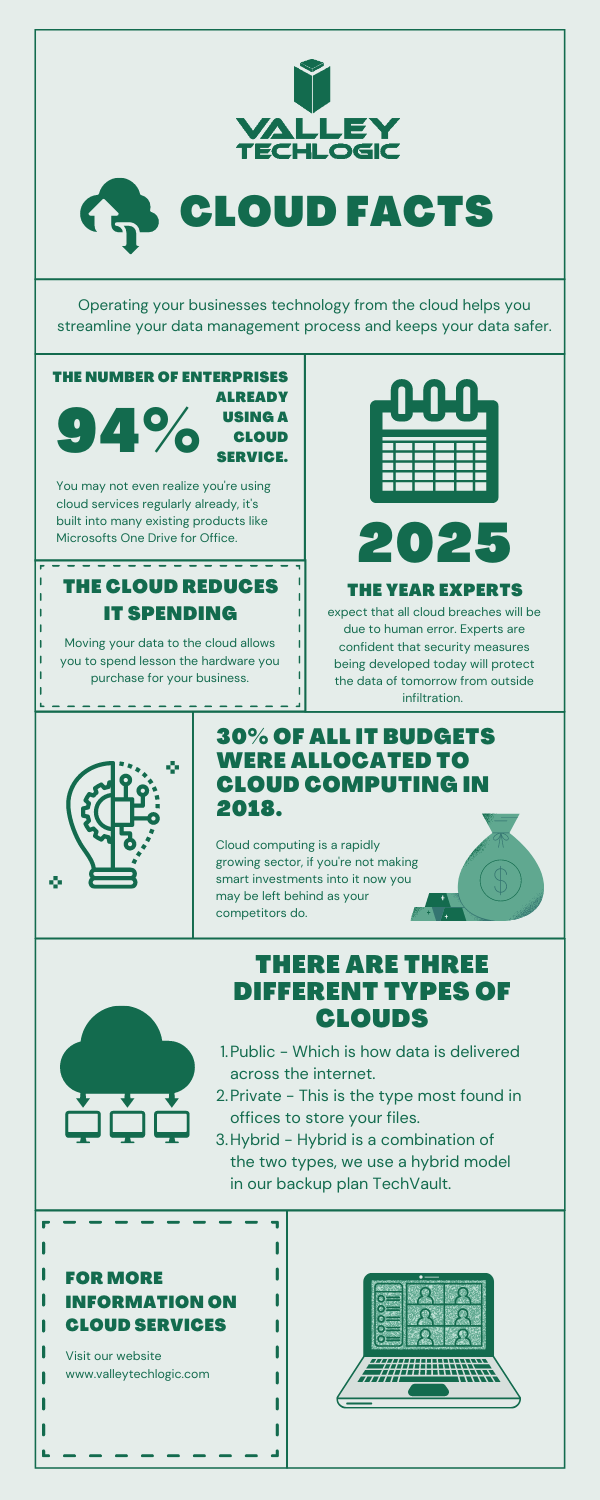
    Cloud Data Facts

    If you’re considering a move to the cloud for your business, we can help. Backups and data recovery solutions are a keystone piece of all of our service plans, learn more today.

    Looking for more to read? We suggest these other articles from our site.

    This article was powered by Valley TechLogic, an IT service provider in Atwater, CA. You can find more information at https://www.valleytechlogic.com/ or on Facebook at https://www.facebook.com/valleytechlogic/ . Follow us on Twitter at https://x.com/valleytechlogic.

  • Microsoft’s Windows 11 finally has an official release date, and more Windows 11 updates

    Microsoft’s Windows 11 finally has an official release date, and more Windows 11 updates

    Microsoft finally has an official release date for their first operating system release in six years, it will be released October 5th, 2021. Windows 11 will be a free upgrade to Windows 10 users – if you’re not already a Windows 10 user we urge you to upgrade while it’s still available and free.

    This means that the release is just over a month away and the buzz surrounding it is only continuing to amp up.  We had word last week that while Windows 11 may work on older computers, you may be prevented from completing updates as normal.

    Microsoft is drawing a line in the sand when it comes to not supporting old hardware. We talked about the specifications required in this article a few weeks ago and nothing has changed on Microsoft’s end when it comes to those required specifications so far. They’ll also be unveiling their own hardware lineup that will feature Windows 11 on September 22nd.

    There are even some indications you not only won’t get software updates, but you may not get security patches either, although they’ve proven to be somewhat soft on that stance on the past when it comes to unsupported copies of their operating systems. Either way with chip shortages and other pandemic related shipping delays this may be a tricky time for those looking to upgrade but realizing they don’t have a machine with the hardware capable of supporting the new operating system.

    Another thing we now know is that even though the Android support found in Windows 11 was a heavily lauded feature, it won’t be there at launch. All of the other showcased featured will be there but the Android support will come later in the year, although a preview of it should be available to Microsoft Insiders soon.

    If you’re wondering how you’ll know when Windows 11 is available to you or whether it will be difficult to figure out, you need not worry. Microsoft is aiming for a “phased and measured” launch and will prompt users via the Windows Update system that the upgrade to Windows 11 is available.

    It won’t be available to all PCs and laptops right on October 5th however, they’ll be slowing releasing it in waves dependent on your computer specifications, the age of your device and other factors. It’s been noted though that some users will have to wait until 2022 to receive the upgrade.

    That should give users plenty of time to sort out any of their hardware related questions and for those on the fence about upgrading, time to see how it fares for other people first.

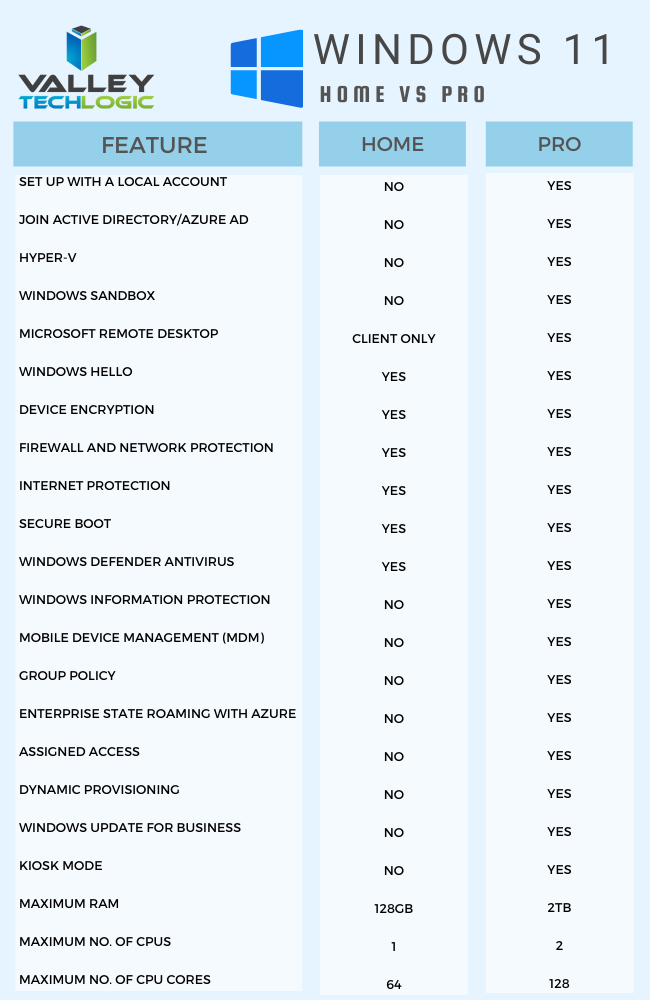
    For business users, who often opt for the pro version, the choice to upgrade can require more thought and planning then simply clicking the upgrade button when it pops up. We’ve made this chart that outlines the differences between Windows 11 Home and Windows 11 Pro.Windows11HomevsProChart

    One other big difference is that going forward Microsoft is requiring home users to tie a Microsoft account to their Windows installation, but this Isn’t a requirement for Pro users, you can just set up your computer with a local account.

    It will be interesting to see what other details are released as we continue to creep closer to the October release. If you’ve got Windows 11 on your radar for your business Valley Techlogic can help with the planning, we’re a certified Microsoft partner and help businesses all over the Central Valley manager their Windows applications, both for PC and server. Learn more today.

    Looking for more to read? We suggest these other articles from our site.

    This article was powered by Valley TechLogic, an IT service provider in Atwater, CA. You can find more information at https://www.valleytechlogic.com/ or on Facebook at https://www.facebook.com/valleytechlogic/ . Follow us on Twitter at https://x.com/valleytechlogic.
  • Microsoft 365 and Office 365 prices are going up, when and by how much?

    Microsoft 365 and Office 365 prices are going up, when and by how much?

    We’ve been on a roll lately discussing the changes and products being rolled out by Microsoft this year, primarily Windows 11 which should be launched this fall. Last week Microsoft announced a price increase to their ubiquitous business products, Microsoft 365 and Office 365.

    Office has been a business staple since it’s launch in 1989 (although Word predated the Office grouping of products quite a bit, launching in 1983). The original launch set was Word, Excel and Powerpoint but the product line up has exploded since then including other must-have features such as Outlook, Teams, OneDrive and more. For many business users the Office suite of products is their go to collaboration and productivity center.

    Microsoft 365 was announced in 2017 and aimed to take things up a notch and out of just the business productivity center of activity, bringing many Windows specific cyber security features to the table as well as expanding the usability for remote employees.

    It also expanded the ease at which IT administrators can manage their office’s users in a Windows centric environment. The outcome was an all-in-one platform for business users especially that brought functionality, safety and security, and collaborative work processes together in unison all for one easy to budget for monthly fee.

    But as with many online services, fee increases are to be expected (remember when Netflix was just $7.99 a month for the standard package?). Microsoft however has bucked this trend for quite a while, pricing has been the same since Office 365 was launched in 2011.

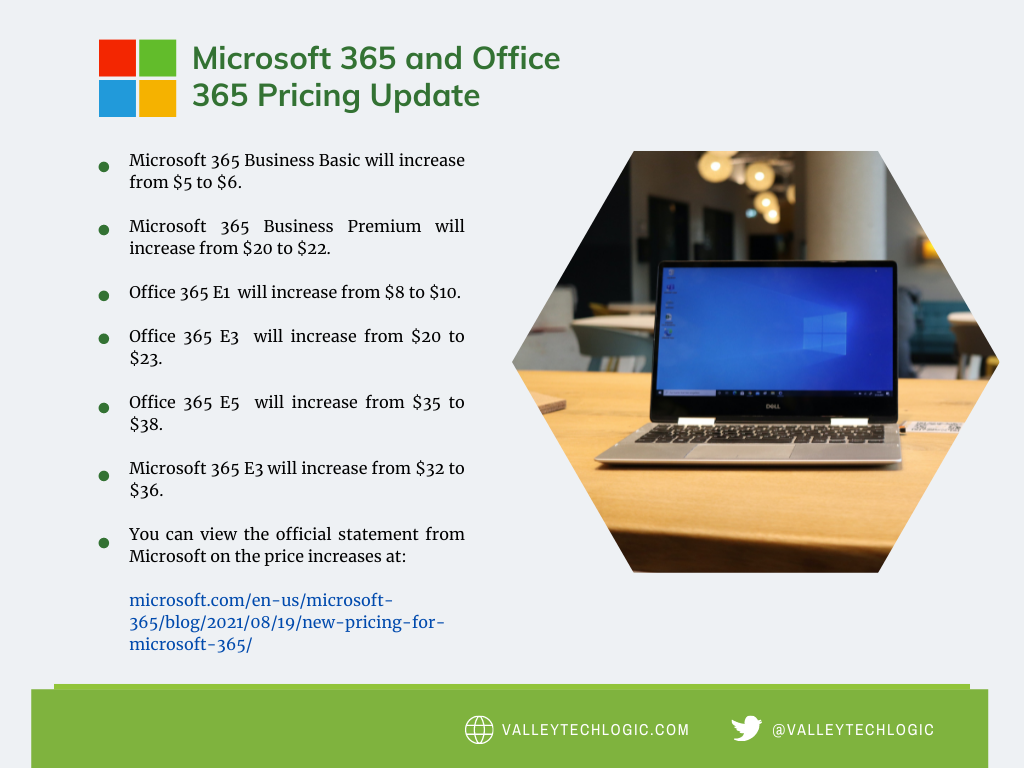
    In that time, they’ve added untold value in the way of product innovation all for no increased monthly fee, so this price increase is both expected and possibly overdue. It’s also expected to be just a few dollars more for each product category, so you won’t need to worry about a drastic price hike. Have a look at our chart below to see what to expect.

    Microsoft Price Increase Chart

    As you can see the price increases are moderate and shouldn’t result in a drastically higher overall IT bill for most users. If you’re in the education sector you won’t have a price increase at all, and consumer products will also stay the same price at this time. These price increases are expected to go into effect March 1, 2022.

    One thing that’s worth mentioning is the program Microsoft has for non-profits, if you own or operate a non-profit organization you can receive your Microsoft products at a deeply discounted rate. This includes Microsoft 365 and Office 365 subscriptions. We have helped our non-profit clients navigate this in the past to great success, if you’re a non-profit in the Central Valley area feel free to reach out to us for more information.

    We also assist businesses with their questions when it comes to the Microsoft line or products or their Windows desktop and server machines, we’re a long time Microsoft partner and consider ourselves experts when it comes to navigating even the most complex setups. We even include the subscriptions we discussed in today’s article within our all-inclusive plans to reduce our customers IT spending to one easy to read monthly bill. Find out more today.

    Looking for more to read? We suggest these tech articles from the last week.

    This article was powered by Valley TechLogic, an IT service provider in Atwater, CA. You can find more information at https://www.valleytechlogic.com/ or on Facebook at https://www.facebook.com/valleytechlogic/ . Follow us on Twitter at https://x.com/valleytechlogic.

  • Windows 11 updates as the fall release rapidly approaches

    Windows 11 updates as the fall release rapidly approaches

    While it hasn’t been made official yet, all sources seem to indicate an October 2021 release of Windows 11 is eminent. That date would track with previous release schedules and merges nicely with the big feature updates that always occurs around that time for mainstream Microsoft products.

    As we inch closer, and the beta versions reveal new details we want to continue our coverage of new features that are being announced as well as specification requirement updates that may impact your future device purchases (or device upgrades).

    For example as of August 2021 here are the minimum specifications to run Windows 11:

    • Processor:1 gigahertz (GHz) or faster with at least two cores on a compatible 64-bit processor or SoC
    • RAM:4GB
    • Storage: 64GB
    • Graphics Card:DirectX 12 or later with WDDM 2.0 driver
    • Display:720p, 8-bit per color channel, at least 9-inch diagonal

    These requirements are published by Microsoft but are still subject to change as the release nears. Also, computers currently running Windows 10 may not have the upgrade available to them as soon as October hits. It seems likely that new machines will be released featuring Windows 11 at that time but the free upgrade for Windows 10 running machines may come later in 2022.

    Tech News #12

    If you would like to try Windows 11 for free right now you can do so by joining the Microsoft Insider program. This program allows you to preview you Windows releases before they’re pushed out to the market, and you can take part in the Microsoft community to see what others are saying about Windows 11 in real time.

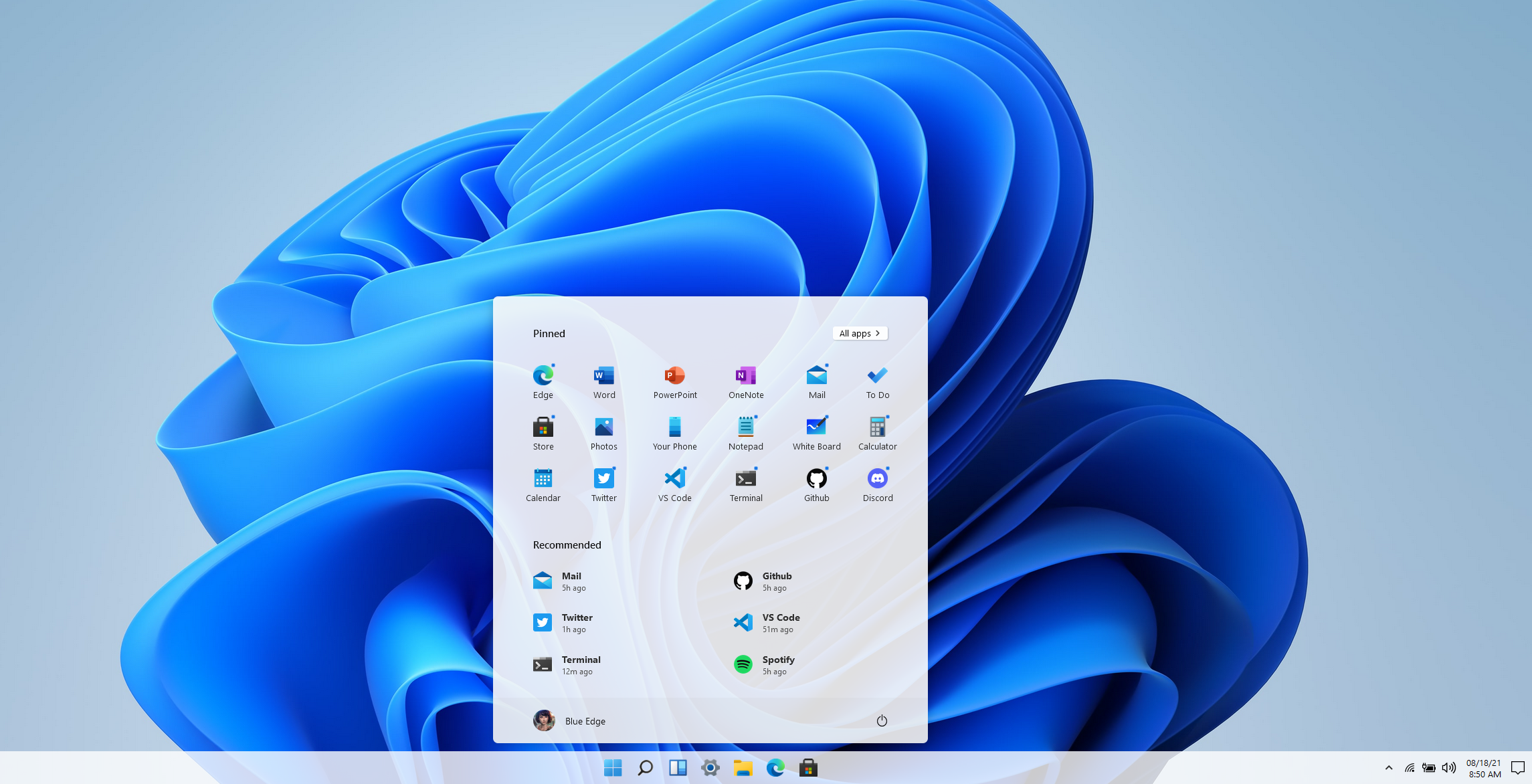
    Another option if you would just like to get a feel for the UI without downloading anything is a widget that was created by Github user BlueEdgeTechno. This Windows 11 simulator lets you access all the UI navigation elements and even browse through the new Microsoft Store. You can find it here: win11.blueedge.me/

    Also making a comeback in Windows 11 are Windows widgets. These widgets are AI determined, meaning your use of Windows 11 will help Microsoft dynamically choose widgets that will give you a customized Windows experience. Widgets such as weather and news as well as 3rd party widgets that you may have available on your Android and OS devices will all be possible options.

    Windows 11 is also making it much easier for users (even those not technically inclined) to keep track of the health of their device. With the new health check feature you can see at a glance how your machine is performing including applications that may have higher than normal battery usage or how much space is available on your SSD.

    Windows 11 is expected to be a free upgrade from Windows 10. If you’re still using Windows 7 or 8 on your device, we urge you to make the jump to Windows 10 while it’s still available as a free upgrade. You can learn how to take advantage of that here. We realize upgrading can be a complex task for businesses, especially if a number of machines are involved. You can schedule a consultation here and we can help you create a plan to bring your office computer software current.

    Looking for more to read? We suggest these tech articles from the last week.

    This article was powered by Valley TechLogic, an IT service provider in Atwater, CA. You can find more information at https://www.valleytechlogic.com/ or on Facebook at https://www.facebook.com/valleytechlogic/ . Follow us on Twitter at https://x.com/valleytechlogic.
  • Your IT Guy Quit, Now What?

    Your IT Guy Quit, Now What?

    Your relationship with your IT person can be a somewhat fragile dichotomy, sure you’re friendly with them and they’re probably a great person (you chose/hired them after all).

    But for many small business owners they couldn’t really tell you what this person does beyond making the computers “work”. You hired them for their skills and those skills should exist outside the realm of what you could manage for your own IT (though many owners try).

    So, if they quit, you’re suddenly in the lurch. You have all these systems that were being maintained by one individual that are now in limbo as you try to figure out what to do next, perhaps even trying to entice them to come back.

    For any new person you bring on, the relics of your old IT person may haunt them for them for the entirety of their tenure with you. When you’re just one person trying to manage many systems and users, documenting as you go can feel like a lost cause – especially during the busy times.

    That’s also supposing the split was amicable. If it was not, the damage can be difficult to recover from. We always recommend business owners maintain access to their own systems and never let themselves be completely cut off from the admin side of things no matter how capable your IT person is. Recovering those accounts can be difficult to impossible depending on the system in question.

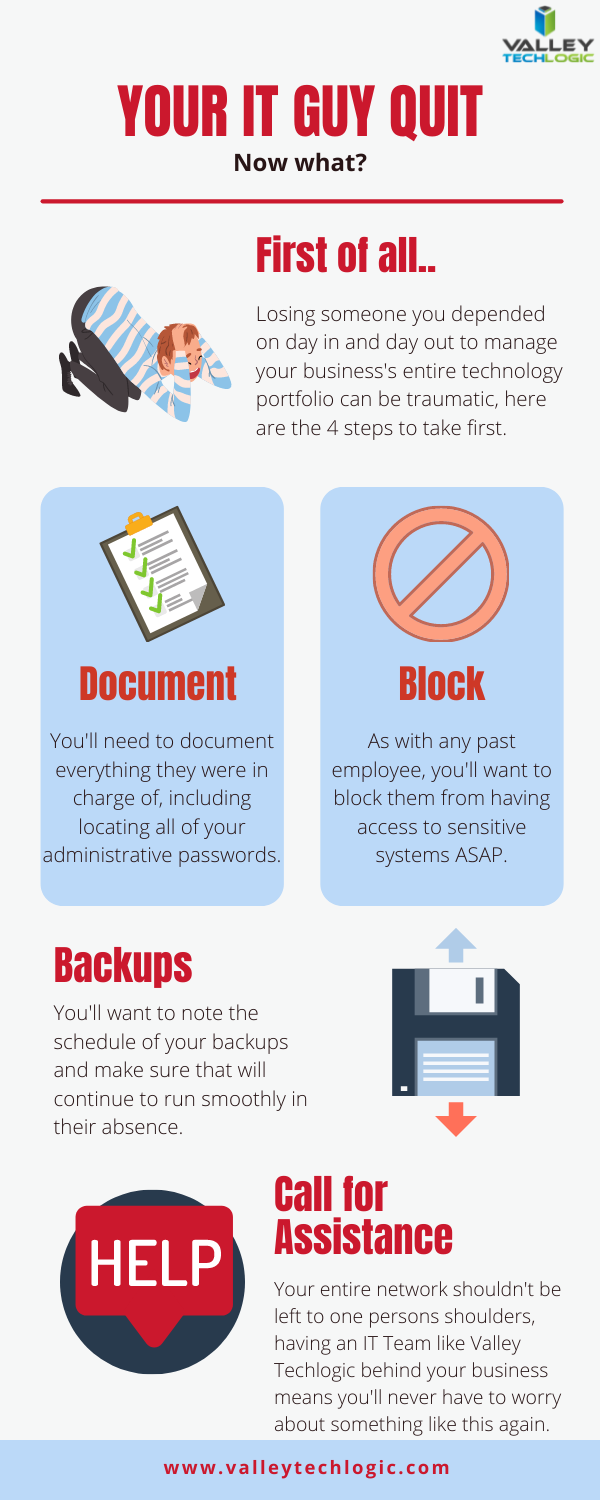
    That leads us to our list of the top 4 things you should do as soon as your IT person quits.

    First 4 things to do when your IT person quits

    As we say in our infographic, leaving the entirety of your technology support to one person can be a dicey proposition. That’s where our co-managed solution comes in.

    In a co-managed scenario, you keep your IT guy, and we work with him to offload some of the tasks that may be bogging him down day to day. We also will bring our tools that we have honed and perfected across nearly two decades in the business to improve your processes.

    This includes better documentation, better reporting, and just overall better transparency so you as a business owner can have a bird’s eye view into this process that is so important to the continued success of your business.

    The added bonus to lightening their load is that they can then focus on activities that will move your business forward, such as projects that had been on hold because there just wasn’t time or activities that can actually grow your business.

    For example, they can address aging hardware issues that there just hasn’t been time for in the past that are holding your business back and representing a cybersecurity threat. We can even help with sourcing. Technology is a necessary component in the success of any business no matter what category or size – if yours is stuck in the past it’s going to curtail your efforts to grow your business.

    If your IT person just quit and you’re thinking you would rather have a competent IT team managing your technology, we have a plan for that as well. Our managed IT department plan is all encompassing and includes all of the support you will need, 24/7. You can learn more by taking a quick consultation with us here.


    Looking for more to read? We suggest these tech articles from the last week.

    This article was powered by Valley TechLogic, an IT service provider in Atwater, CA. You can find more information at https://www.valleytechlogic.com/ or on Facebook at https://www.facebook.com/valleytechlogic/ . Follow us on Twitter at https://x.com/valleytechlogic.