Author: rory-admin

  • October is Cybersecurity Awareness Month, now in its 18th year

    October is Cybersecurity Awareness Month, now in its 18th year

    We’re announcing this a bit late, but we did want to touch on this annual event (now in its 18th year). Every year CISA (Cybersecurity and Infrastructure Security Agency) releases new resources that are free to download and share for Cybersecurity Awareness Month. The theme this year is “See Yourself in Cyber” and we appreciate the effort to help everyone understand that cybersecurity measures are up to all of us to maintain.

    So many cybersecurity measures feel very passive, you’re protected by your anti-virus or firewall automatically. Your IT team helps you navigate any issues that make come up. For businesses, advanced cybersecurity threat protection can detect a threat just from activities that fall outside the norm (like your computer being online at three in the morning) and send you a warning.

    Unfortunately, hackers are always trying to circumvent these automatic measures no matter how advanced they become. The human element is still the biggest cybersecurity threat to your network and business. That’s why acknowledging we all have a role to play in preventing cyber threats is so important.

    CISA recommends four important steps we all need to take online:

    1. Think Before You Click: Before you click on that link in an email or download an attachment, do a little research. Is the sender who you expect it to be? Phishing emails are still the #1-way users are hacked.
    2. Update Your Software: This is good common-sense advice; most patches also include important security updates and it doesn’t take very long to install them (and for Windows devices you can even have them run automatically).
    3. Use Strong Passwords: This is another easy one and if you use one of our password manager recommendations, it’s even easier to create stronger passwords that you don’t have to manually remember.
    4. Enable Multi-Factor Authentication: This is CISA’s fourth tip for this year and lucky for you we have a guide for this too.

    These tips may seem simple, but they will be hugely beneficial to preventing a cyber threat for you, your business or your employees. However, you can take it a step further and engage with cyber security training.

    You may be wondering what that would look like, well you’re in luck. We have a sample training session right here for you to review with your employees:
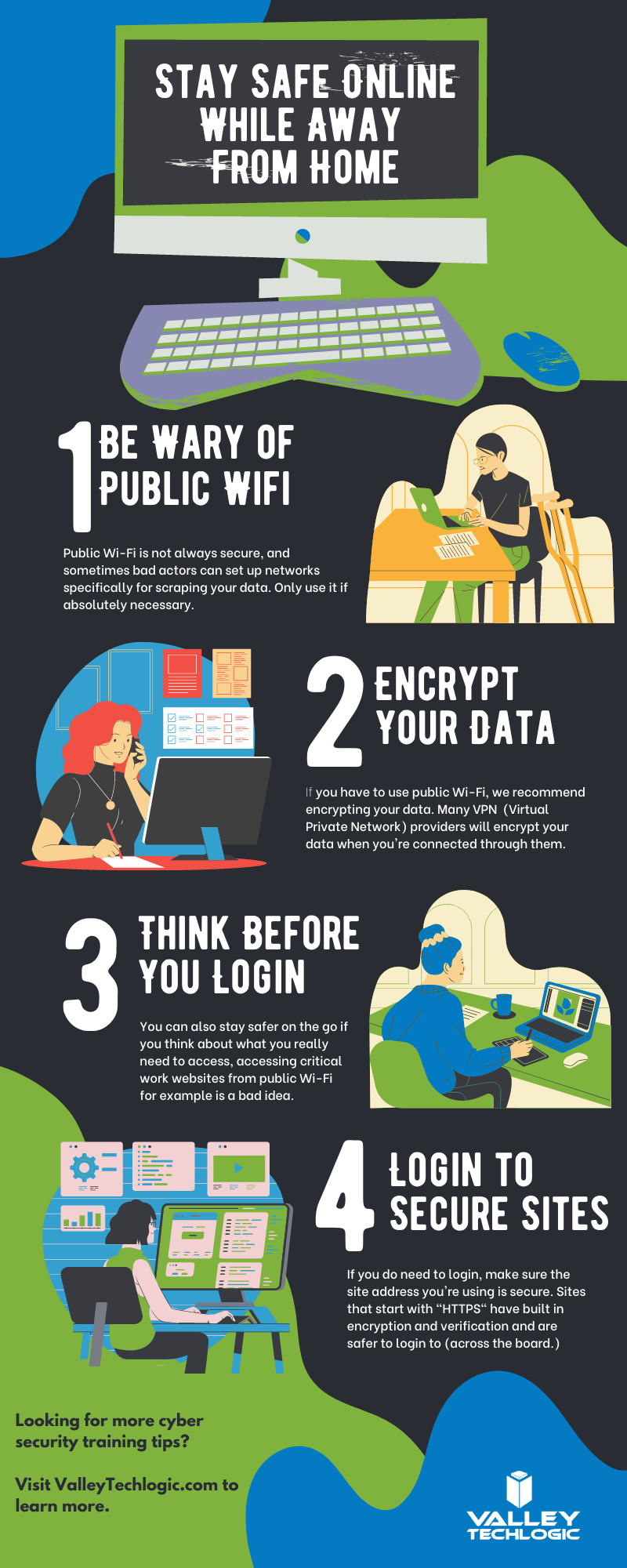
    This is just a quick sample lesson; through our partner we have bite sized lessons that include video that you and your team can take to beef up your cybersecurity knowledge. They average 2-3 minutes long with a quick quiz at the end to make sure the knowledge was absorbed, and you can even see your employees average scores to see how everyone is doing.

    If you incentivize taking this training it will not only be a team building opportunity, it will also help your business stay safe from cyber security threats. If you’d like to learn more about cybersecurity training or stepping up your cybersecurity measures in your business (including the aforementioned advanced cyber threat detection) reach out today for a consultation.

    Looking for more to read? We suggest these other articles from our site.

    This article was powered by Valley Techlogic, an IT service provider in Atwater, CA. You can find more information at https://www.valleytechlogic.com/ or on Facebook at https://www.facebook.com/valleytechlogic/ . Follow us on Twitter at https://x.com/valleytechlogic.

  • Windows Server 2012 and Server 2012 R2 are approaching end-of-life, what should you do?

    Windows Server 2012 and Server 2012 R2 are approaching end-of-life, what should you do?

    Upgrading your personal computer with the latest Windows can come with some challenges and hesitancy due to changes that are made to every new consumer and business version of Windows for personal computers.

    UI changes and increased specifications both come to the forefront for our customers when making these changes, but for servers that decision process feels even more fraught with danger.

    On October 9th, 2023, Windows Server 2012 and 2012 R2 will be in their end-of-life. What this means is it will no longer be a primarily supported product by Microsoft, who understandably needs to focus their time and energy supporting more current products. What it means for customers still utilizing Windows Server 2012 (or 2012 R2) is that their servers may not receive crucial support updates that often prevent things like your server malfunctioning, software working as intended, or even security updates.

    With just under a year to go that gives you time to consider your options when upgrading to a more current software, or if it makes sense to pay for extended support through Microsoft.

    The Extended Security Updates (or ESU) program does not include any feature updates, the only updates your server will receive will be security updates only, and to expand on that further that will only be important or critical security updates.

    This may mean your server is still vulnerable to intrusion although much less so than devices going unpatched. Often times a device ending support is a green light to hackers to begin working on breaching these older devices now that they’re less secure.

    That problem is not unique to Microsoft either, even smaller devices such as routers or switches can fall under end-of-life and no longer receive critical security patches. Just look at the recent Cisco zero-day security announcement and their stance. They will not be patching the outdated routers to prevent security intrusion; the expectation is that customers that own those routers will need to upgrade to ensure their business is safe.

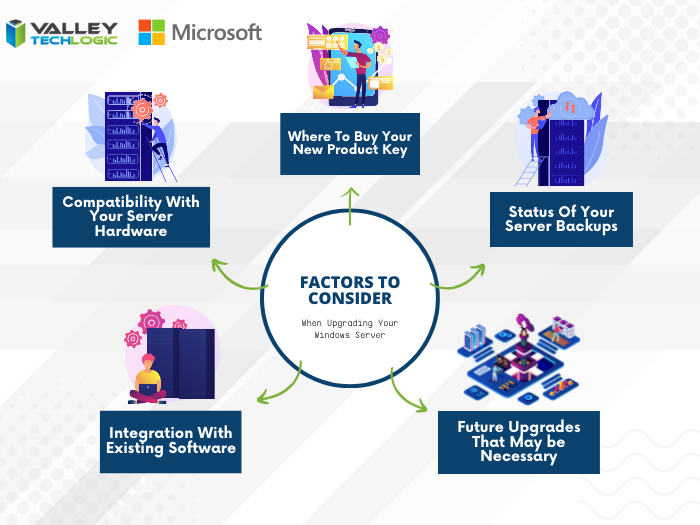
    There are some factors to consider however when it comes to upgrading your Windows serve, see our chart below:

    Five Considerations to Take When Replacing Your Windows Server

    The chart assumes an ideal scenario of either performing the update on a newly purchased server or taking the server offline temporarily. Performing an in-place Windows Server update can be risky and is best left for the professionals to decide whether it’s possible in each unique scenario.

    Purchasing a new server if your current server is too out of date to run the current version of Windows Server is tricky as well, there are more factors to consider with a machine that supports your entire business than with a device that’s only utilized by one or two employees.

    It’s also important no matter which avenue you take that you’ve properly backed up the existing server, if something were to go wrong not having that backup could mean losing all of your data. Which in many cases, is a catastrophic event.

    If we haven’t convinced you yet we’ll say it plainly, this is not a job that should be attempted by someone who’s just “computer savvy”. Upgrading your server requires an expert’s knowledge to execute in a timely manner and without losing your company data. Valley Techlogic can be that expert hand, learn more today with a free consultation.

    Looking for more to read? We suggest these other articles from our site.

    This article was powered by Valley Techlogic, an IT service provider in Atwater, CA. You can find more information at https://www.valleytechlogic.com/ or on Facebook at https://www.facebook.com/valleytechlogic/ . Follow us on Twitter at https://x.com/valleytechlogic.

  • 2023 is coming, is your business CMMC ready?

    2023 is coming, is your business CMMC ready?

    For some Department of Defense (DoD) contractors, CMMC or Cybersecurity Maturity Model Certification compliance may be a looming figure that they’ve yet to address. If you’re one of the ones currently making headway on it, you may not be certain which level you need to reach for your business.

    CMMC version 2.0 was announced last November, and it seems as if that’s going to be the de facto model going forward. In version one there were 5 levels of CMMC compliance, which have now been reduced to 3. To put it simply, level 1 of the program remained the same, levels 2 and 3 were combined and levels 4 and 5 were also combined.

    This means if you were previously aiming for level 2 in the previous version of the program, you will now need to address topics in level 3 to be compliant.

    Level one or the Foundational Level is meant for who do not handle Federal Contract Information (FCI) data. The checklist features just 17 items, and your compliance is self-attested which means you do not need to have a formal CMMC testing done to be compliant with the program.

    Many DoD contractors though will fall into level 2 or the Advanced Level due to their handling of Controlled Unclassified Information (CUI), level 2 features 110 controls. All of CMMCs level 2 controls originate from NIST SP 800-171.

    With the announcement of version 2.0 it was also announced the additional CMMC specific controls would be removed. If your business has already been working towards compliance with NIST before CMMC was announced you’re in a perfect position to work towards your CMMC compliance goals.

    While 2.0 has not yet been signed into law, it was announced by the Pentagon last April that CMMC language would begin to start showing up in DoD contractors starting July 2023 – so the clock is definitely ticking if your business will be vying for those contracts.

    A small portion of businesses will be required to undertake the rigorous task of being compliant with level 3 of CMMC, or the Expert Level. It’s based on NIST-800-171 and 172 and has 134 requirements at the time of writing, many of which require specialized equipment and software.

    For both levels 2 and 3, audits will be required through the CMMC Accreditation Body (recently renamed Cyber-AB). Cyber-AB is an independent auditing body and we’ve been told the wait times to be audited are lengthy, though this will get a little better as the program gains more auditors. It’s still a good idea to make sure your business is ready and meets the compliance standards though especially as CMMC regulations continue to be rolled out ahead of the official release. You don’t want to be caught needing that proof of compliance to meet your contract requirements and not having it.

    The DoD has also indicated it would take a contractors level of CMMC compliance into consideration when choosing for their contracts – so not being compliant may not just put your existing contracts at risk it could cost you new ones as well.

    We have several articles explaining the levels and controls in more detail, here are our articles on levels one, two and three.

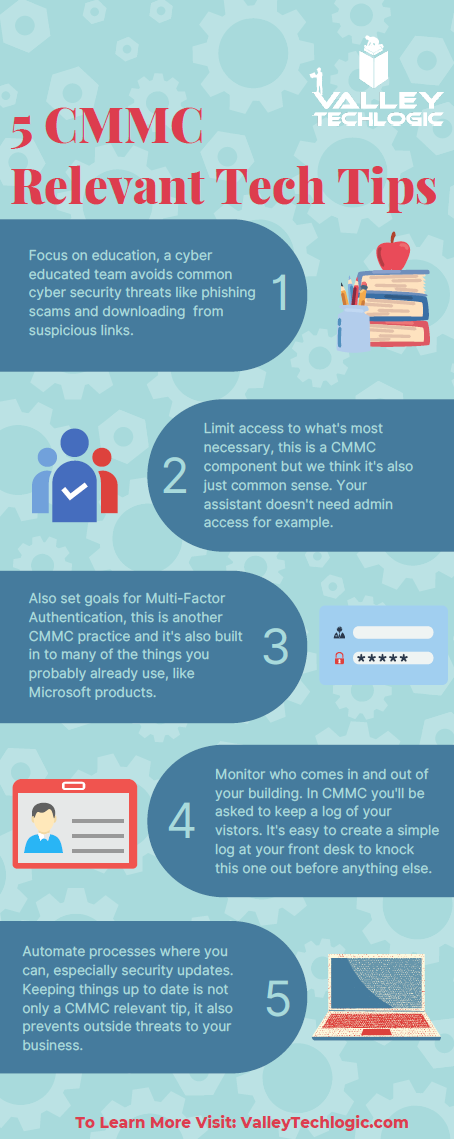
    If you’ve barely scratched the surface in your organization, you can still make changes that will put you in a better position when you begin to tackle it in earnest. Many of the requirements, especially those found in level one, is common sense advice for being safer online. You (and your employees) can work on these five items first:

    If after reviewing the information, you feel like you just need a hand to either cement cybersecurity processes you already have in place or have a partner in your CMMC goals, Valley Techlogic can help.

    We have firsthand knowledge of the CMMC program and helping clients become CMMC certified. Our tools will help you meet the requirements necessary and quickly get your business ready for the audit process.

    Make an appointment today for a free consultation to learn more.

    Looking for more to read? We suggest these other articles from our site.

    This article was powered by Valley Techlogic, an IT service provider in Atwater, CA. You can find more information at https://www.valleytechlogic.com/ or on Facebook at https://www.facebook.com/valleytechlogic/ . Follow us on Twitter at https://x.com/valleytechlogic.
  • 10 ways to get the most out of your outsourced IT

    10 ways to get the most out of your outsourced IT

    Whether you currently have an outsourced IT resource or you’re considering one (which by the way Valley Techlogic can help with that), you may be wondering how to make the most of the service you’re paying for.

    First let’s describe what we mean by outsourced IT, any personnel resource that’s not directly hired by your organization is outsourced, and with IT specifically there are providers that will provide you access to their entire team for a singular fee (which is often times lower than the cost of hiring one full time person would be).

    Another example is you do have in-house IT personnel, but they’re overwhelmed and unable to keep up with he demand of your organization, or there are projects that fall outside their scope of expertise. In either of these cases, it can make sense to contract with an IT provider to fill in the gaps.

    A third scenario is you have regulatory factors within your business sector and need specialized support to meet those requirements. It can be cost prohibitive as a singular organization to acquire the protections needed but an IT provider is able to share that cost across many clients, which in turn lessens the cost for you and provides the other benefits of outsourced IT as an added bonus.

    There may be a misconception that “outsourced” always means “outside the US”, at Valley Techlogic our technicians are local and able to assist our clients onsite as needed on top of providing remote support. It’s a good idea to ask that question of your provider, especially if they will be handling all of your IT.

    Now that we’ve covered what it means to outsource your IT, here are ten ways to make the most of the services you’re paying for:

    1. Reducing redundancy. You may have redundant IT services you’re paying for, we can identify those services and remove them.
    2. Increased cybersecurity protection. To sum a complicated topic up simply, outsourcing your IT to a provider like Valley Techlogic means you will probably have access to advanced cybersecurity solutions that you may not have otherwise had access to.
    3. Backup for your backups. You hopefully already have a backup plan in place (if you don’t we can help with that too) but are you always sure it’s running appropriately? Part of our daily quality assurance checks is making sure all of our client’s backups are performing optimally.
    4. More time for your existing IT personnel. If you already have IT personnel, they may be swamped just with your day-to-day tasks, if you outsource your IT you can lessen the load so they can focus on business forward activities.
    5. Less time spent down. Downtime is expensive for businesses, your outsourced IT resource should be focusing on eliminating as much downtime as possible due to outages, hardware malfunctions, etc.
    6. Procurement assistance included. Procuring hardware has been more difficult lately due to chip shortages and other delays, our resources for procurement become your resources and we can help you source the equipment you need at possibly a better value.
    7. 24/7 support. Even if you have existing IT staff it’s not realistic to expect them to be on call 24/7, with Valley Techlogic we have a team of technicians, and someone is always available to take your call.
    8. Bring it all under one umbrella. Similar to number one, we can bring all of your IT spending under one umbrella. This includes your Microsoft spending because we’re a dedicated Microsoft partner.
    9. Expert advice. We don’t just provide expert services; we also provide expert advice to our clients on improving their technology and efficiency.
    10. Increased consistency. We usually find with new clients that there’s a lot to do in the beginning, but as we onboard our software and tools and regulate tasks such as performing updates and backup maintenance, the technology process becomes more consistent and reliable for them going forward as a result.

    If you’ve never outsourced your IT before, or have and it didn’t go well you may be wary about trying again with another provider. We value creating a smooth transition to our services for our customers, but we also know sometimes you just need to try something out before committing to it.

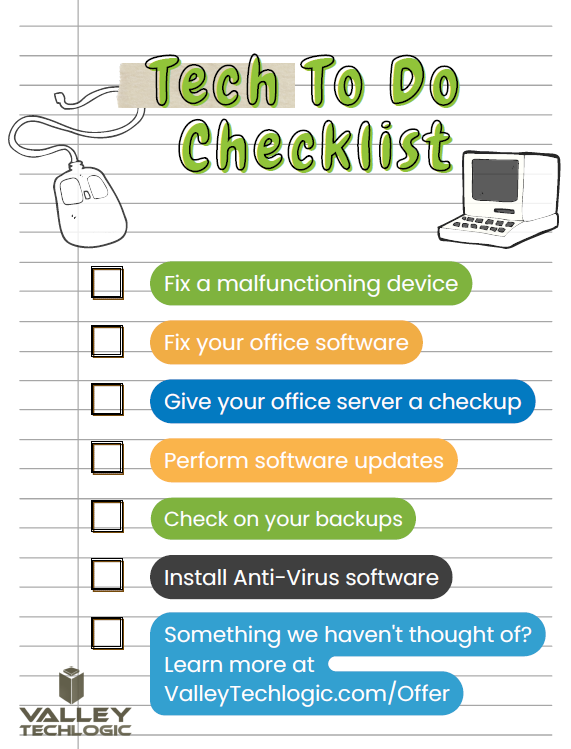
    That’s why we’re offering 2 hours of service free to qualified businesses. Here’s a list of ideas for what we could tackle 2 hours on the table, we’re confident our technicians could complete any one of these tasks for you in 2 hours.

    Click to grab the full size printable version.

    Ready to learn more? Claim your 2 hours here or schedule a consultation with us today.

    Looking for more to read? We suggest these other articles from our site.

    This article was powered by Valley Techlogic, an IT service provider in Atwater, CA. You can find more information at https://www.valleytechlogic.com/ or on Facebook at https://www.facebook.com/valleytechlogic/ . Follow us on Twitter at https://x.com/valleytechlogic.

  • Our top 10 safety tips for mobile devices

    Our top 10 safety tips for mobile devices

    There’s a popular misconception that mobile devices are somehow more resistant to hacking and cyberthreats than PCs (personal computers) or other standalone devices, this Isn’t exactly true.

    In today’s age, anything connected to the internet can be tampered with or hacked. The age of the “Internet of Things” (IoT) is here and there have even been cases of web connected devices like appliances being hacked and used to gain access to data within your household or office.

    Your cell phone or tablet are really just smaller computers. Whether you have an Android phone or tablet or stick to Apple products, you still need to take precautions when visiting websites or opening emails and attachments as you do with your laptop or desktop. Plus, because these devices are much more portable you even should take extra precautions when taking it out in public.

    Here are our top 10 safety tips for mobile devices:

    1. Always lock your phone when you’re not using it. Setting up a pin, facial recognition or fingerprint recognition will also add another layer of security.
    2. Keep your software up to date. Just like with computer updates, phone OS updates often include important security patches to keep your device safe.
    3. Only download applications from secure sources. Questionable applications can lead to your phone being compromised, and even with applications from a known good source (like the Google Play Store or the Apple Store) only give them as many permissions as they need to function and no more.
    4. Install an Antivirus on your phone. Many may not know antivirus software Isn’t limited to computers, but there are antivirus solutions for computers that will include a phone version bundled together.
    5. Be careful with public Wi-Fi. Open public networks are open to everyone – including hackers who are able to see everyone who’s connected. Only use them if absolutely necessary.
    6. Same goes for public phone charging. Hackers can tamper with or even setup fake cellphone charging stations in a scheme known at “juice jacking”, when you plug your phone in it installs malware on your device. If you need extra battery power, consider carrying a power bank with you.
    7. Just like with your PC, vary your passwords. It can be more difficult to create good passwords on your phone, luckily the same applications like LastPass (our recommended password manager) you use on your PC for password management also have mobile versions.
    8. On the upside 2FA is even easier on a phone than a PC. Many 2FA applications like Google Authenticator are cellphone based, making 2FA even easier to use on your phone.
    9. Be careful what data you save to your phone. Many of us save our payment information to our phones for easier checkout but if your phone is compromised (or stolen) than all that information is now in the hands of a bad actor. It’s might be worth reconsidering saving that information, especially details for something like your bank account or anything that can’t be easily changed.
    10. If you are going to take some risks (like using public Wi-Fi) consider a VPN. Virtual Private Networks (VPN) can encrypt your data, making it a little safer to use public Wi-FI.

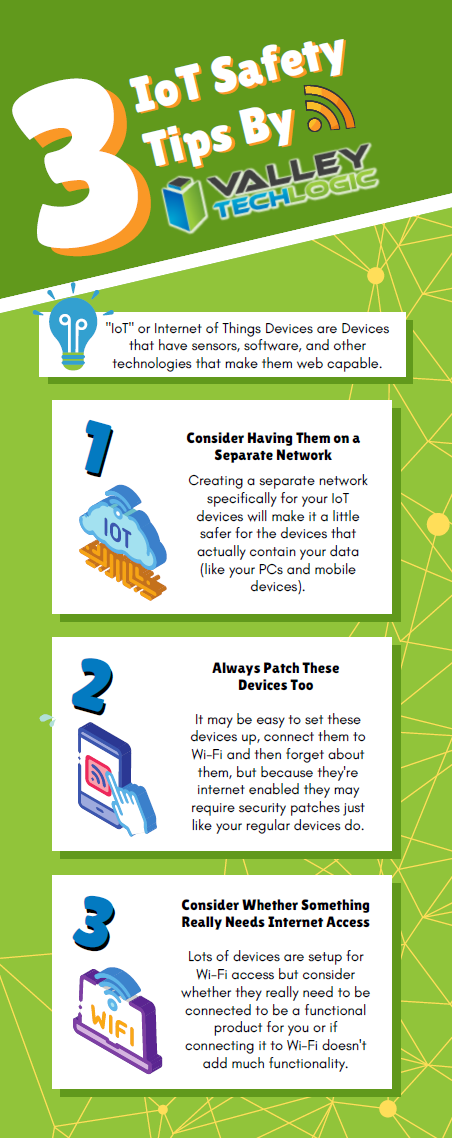
    We also have some safety tips for your IoTs devices in this chart:

    Click to view the full size version.

    If you have mobile devices connected to your business’s office network, it’s worth evaluating whether there is any risk involved for your business. There are network security solutions that will apply the same rules for mobile devices as it does for PCs, meaning even if a compromised cellphone connects you will still have protection from the rest of your network being infected. If you’d like to learn more schedule a consultation with us today.

    Looking for more to read? We suggest these other articles from our site.

    This article was powered by Valley Techlogic, an IT service provider in Atwater, CA. You can find more information at https://www.valleytechlogic.com/ or on Facebook at https://www.facebook.com/valleytechlogic/ . Follow us on Twitter at https://x.com/valleytechlogic.
  • The Rockstar Games data leak and how reputation loss can be one of the costliest aspects of being hacked

    The Rockstar Games data leak and how reputation loss can be one of the costliest aspects of being hacked

    Video game news might fall outside our normal wheelhouse but reporting on cybersecurity events is right up our alley, and this the most recent hack on major game developer Rockstar Games made major news over the weekend so we wanted to chime in with our thoughts.

    The hacker going under the moniker “Tea Pot” released video clips of Rockstar Games unreleased (and previously unannounced) new game, Grand Theft Auto 6. The clips revealed spoilers on the games content and also showcased rougher assets as the game is still in early development, something game publishers don’t ordinarily highlight.

    In a message acknowledging the breach the Rockstar Games Team had this to say:

    Rockstar Games Response to the data leak.

    The hacker returned after releasing the data and sent a message on the GTAForums claiming they wanted to “negotiate a deal” with Rockstar Games, hinting that they had more data to release. Speculation proliferated across the internet that the hacker had somehow obtained some of the games source code.

    With the source code portions of the game could be re-engineered (outside Rockstar Games) and that could even possibly be used to provide at least a semi-playable version. The fallout from that would be devastating as it would steal the developer’s agency in releasing their own content and also reveal trade secrets that could be used to help create knockoff or pirated versions.

    Rockstars parent company, Take-Two, has issued take down notices to social media accounts and Youtube channels broadcasting the stolen footage as work to perform damage control. There will probably be a costly investigation into the origination of the hack and there may even be financial complications beyond that, as investors may question what effect this leak will have on the eventual release of the game.

    This hack is a perfect example of the reputation cost associated with being hacked. Recovering data you need to do your day to day job is one aspect, but you also need to think about data you wouldn’t want released to the public.

    Projects that haven’t been announced yet or information that’s not easily changed (tax information, personal identifying information) are just two factors, but there’s also the release of your customers private data. Many aren’t aware a breach involving client information can even lead to legal ramifications depending on regulatory factors in your sector.

    There’s also your private emails or messages, which could have future business plans, personal information, or other things that could be used by the hackers in a ransomware attempt (or even ongoing blackmail).

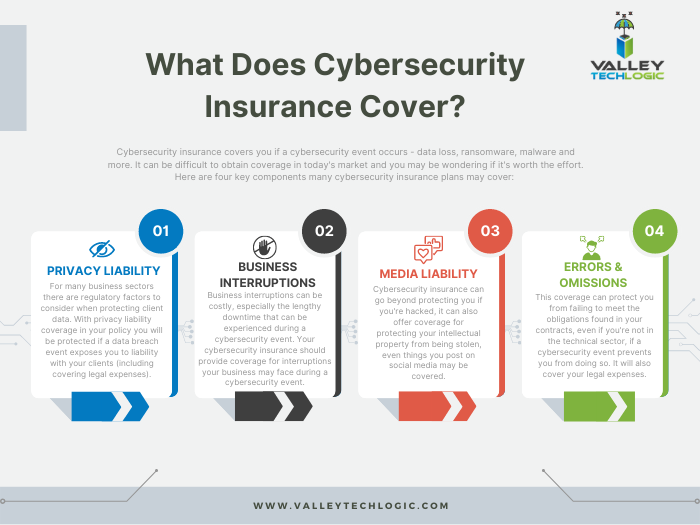
    Cybersecurity prevention’s are important but one element that has surged to the forefront of our minds is a recovery tool that’s becoming more difficult to obtain – cybersecurity insurance.

    You can review our comprehensive guide on the topic but here’s a brief chart on what cybersecurity insurance typically covers:

    Click to view the full size version.

    Obtaining coverage can be challenging, the requirements have grown much steeper as cybersecurity attacks become more common place, and that doesn’t look like it’s going to change anytime soon. At Valley Techlogic we have experience in helping clients obtain coverage so if the unthinkable does occur, their business will survive the hit.

    Whether you’re are in the early stages of researching cybersecurity coverage or if you have an application form in front of you, we can be your guide through the process. Schedule a consultation today to learn more.

    Looking for more to read? We suggest these other articles from our site.

    This article was powered by Valley Techlogic, an IT service provider in Atwater, CA. You can find more information at https://www.valleytechlogic.com/ or on Facebook at https://www.facebook.com/valleytechlogic/ . Follow us on Twitter at https://x.com/valleytechlogic.

  • How the “skills gap” is changing the world of IT

    How the “skills gap” is changing the world of IT

    The term “skills gap” has been popping up a lot lately and in a nutshell it’s the refers to the difference between the skills your business needs from its employees and what’s actually available in the marketplace.

    Tech innovations occur so rapidly it would be impossible for any one person to be a master in everything that’s required to maintain the technology in most modern workplaces, there will always be a need to seek out assistance with some component of it whether it be through outsourced help or through automation – or both.

    In a survey by Monster nearly one third of employers agree the skills gap has been growing, and it’s effecting how they’re sourcing and employing candidates. With inflation on the rise employees are also seeking greater compensation for highly in-demand skill sets, which from a budgetary standpoint may be difficult for many employers to grapple with.

    It may be advantageous for employers to offer compensation or incentives to existing employees to increase their existing skillsets or “reskill”. With the many hurdles found in hiring qualified candidates in the current working environment, retention will be a key factor in many businesses being able to stay afloat.

    Automation is another component hiring managers are looking towards, especially in the world of tech.

    1. Backing up data: If you’re a Microsoft 365 customer, backing up your device data is easy with OneDrive.
    2. Email Signature: Still typing your name at the end of every email response? It doesn’t take very long, but across dozens of emails per week it can add up. Setup an email signature in Outlook (with a new email open go to Insert > Signatures) and save that little bit of time with every email.
    3. Paying Bills: Still making manual payments? Why? Setup automatic payments where you can and skip logging in and making that manual payment every month.
    4. Typing Passwords: Not only does typing in a password for everything waste valuable time, it also creates a security risk because an easy to remember password is also potentially an easy to crack password. Try using a password manager like LastPass to create stronger passwords and save time.

    Of course, there are much more advanced automation services available to assist your business, but many will require at least some initial tech know-how or even an on-hand technician available to maintain them.

    The skills gap is also affecting those who rely on short-term technical help to bridge the gap, during a time when it seems like the price of everything is going up so to, is the cost of hiring emergency technical support. Especially when it’s required afterhours.

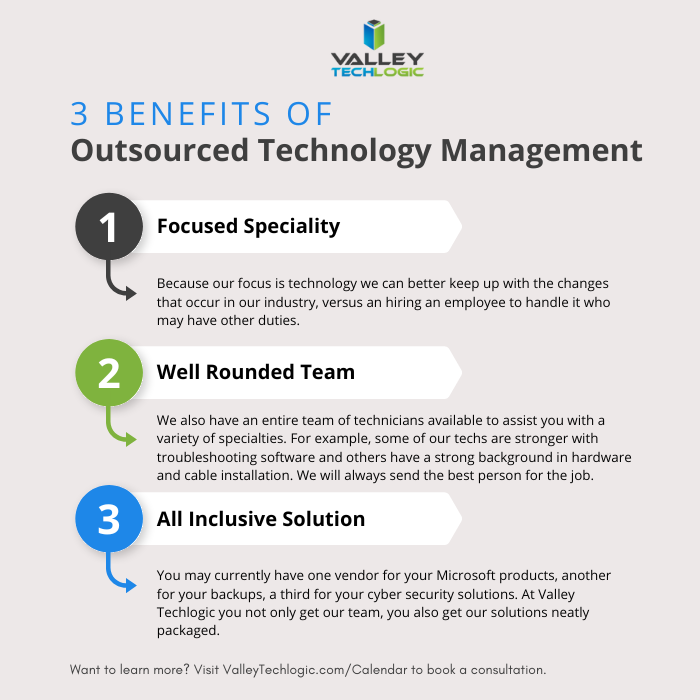
    If after reading this you’re wondering what your best option is, trying to hire someone or relying on expensive emergency support we do want to provide a third option – outsourced IT.

    We’re not unbiased here, but hiring outsourced IT does have a number of benefits in the current hiring climate that you may not have considered. See the chart below for examples:

    Interested in learning more? Schedule a consultation with us today.

    Looking for more to read? We suggest these other articles from our site.

    This article was powered by Valley Techlogic, an IT service provider in Atwater, CA. You can find more information at https://www.valleytechlogic.com/ or on Facebook at https://www.facebook.com/valleytechlogic/ . Follow us on Twitter at https://x.com/valleytechlogic.
  • Why “DIY” IT is a bad idea as a business owner

    Why “DIY” IT is a bad idea as a business owner

    We get it, handing over any part of your business to someone who’s not you can be stressful and unnerving. You painstakingly grew your business to where it is today. You may still be personally vetting every new member who walks through your door.  Hiring technical staff can be an arduous process so it’s just made sense so far to learn the ropes yourself to keep devices up and running (and as maintained as possible).

    The problem is, you’re one person with a finite amount of time. By the time cracks start to show it’s often too late, things like server failure or a malware attack can cripple your ability to run your day-to-day operations and fixing it may fall outside the scope of your abilities, making it necessary to bring in emergency help (often at a premium).

    If you survived one round of that you may have vowed to find IT help, but even with a clear indicator of why you need it recently at hand it may still seem like a waste of time or money, and you talked yourself out of it. You may have been doing things yourself for years, what are the odds something catastrophic would happen again any time soon?

    Unfortunately, pretty good. As the famous quote by Joyce Brothers goes, “If you change nothing, nothing changes.”

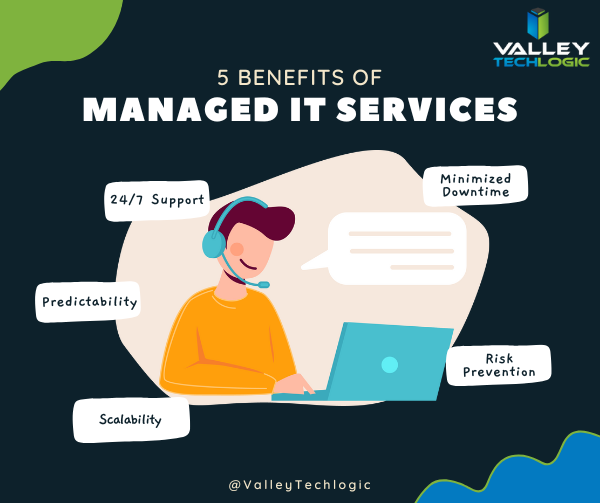
    So, we thought we would give you some food for thought about other reasons (besides potential disaster) you should consider outsourcing your IT:

    1. 24/7 Support: This one’s easy, with a Valley Techlogic service plan 24/7 support emergency support is available to you – at no additional cost and no more late nights for you.
    2. Minimized Downtime: Time is money, and with a service plan from us you will spend less time troubleshooting problems and more time on your business.
    3. Predictability: We utilize best in class software to maintain a consistent technical environment for all of our clients, including managing computer updates, anti-virus software and more.
    4. Risk Prevention: Speaking of anti-virus, our cyber security approach doesn’t just help you recover from a cyber threat – it helps prevent one from happening in the first place.
    5. Scalability: This is a big one if you’ve been doing your own IT. We have service plans to fit both businesses who already have an available IT resource or those who want us to be their primary IT – with flexibility to change if needed

    As you can see, many commonsense features are built into all of our plans, but we do offer customization as far as how much or how little we do for your business. If you would like to remain as the primary IT resource, we have co-managed plans so you can still benefit from our solutions and proactive maintenance while still remaining the lead IT person.

    If after utilizing us for a while you’ve reached a point where you would like us to handle it all, we can then change your plan to our “managed IT department” where we are your go to resource for everything IT, your users can even call us if there’s a problem and we’ll take care of it.

    Whichever plan you choose, you’ll still always be “in the know” thanks to our comprehensive reporting and annual or bi-annual Technology Business Review (TBR) meetings where we go over how things are going and formulate a plan together to continue improving the service to fit your needs.

    Interested in learning more? Schedule a consultation with us today.

    Looking for more to read? We suggest these other articles from our site.

    This article was powered by Valley Techlogic, an IT service provider in Atwater, CA. You can find more information at https://www.valleytechlogic.com/ or on Facebook at https://www.facebook.com/valleytechlogic/ . Follow us on Twitter at https://x.com/valleytechlogic.

  • Missing file? Don’t panic, 5 recovery tips for Windows devices

    Missing file? Don’t panic, 5 recovery tips for Windows devices

    I know this has happened to me before, I have a new Word document I’ve created sitting open (maybe I’m actively working on it) I mean to save it somewhere and I just don’t.

    Another scenario, someone requests an Excel spreadsheet I’d done some editing on and when I go to look for it, it’s nowhere to be found.

    Panic ensues, but then I remember Windows 10 (and 11) devices have a number of different ways of finding and retrieving lost documents – especially those that were created in the Office suite of software. Before trying any of these steps we suggest checking your recycle bin first just in case it was accidentally deleted.

    The easiest way (and possibly most obvious) is to just click the little magnifying glass on your taskbar and just search for what you can remember about the file name or the file contents. Windows search system is pretty powerful, and your search may end here. An extra tip for narrowing your options, up at the top of the search window you can narrow the options by type, such as Applications or Documents.

    If you tried searching for the document and came up empty, the next place you should look is the most recent files section in the document application you’re working with. In both Excel and Word you can find this section by going to the upper left hand section of the navigation panel and hitting the “File” button. From there you go to “Open”. In this section you’ll see all your most recent files.

    The recover unsaved documents button is here to save the day.

    If you strike out there don’t exit out yet, this is where tip number three comes in. At the bottom of this section, you may see a “Recover Unsaved Documents” button. Clicking that will bring up any documents that were closed without being saved and hopefully your missing document is found in this section because it starts to get a little trickier by step four and requires a bit of luck.

    If you have backups enabled on your computer you can follow these steps by first clicking the “Start” button followed by “Control Panel,” “System Maintenance” and then “Backup and Restore.” Once the backup has been restored, you can search it for your missing file.

    The final place to look is your temporary files folder, usually something like C:\Users\Owner\AppData\Local\Microsoft\Office\UnsavedFiles but individual file paths may vary.

    If you’re a Microsoft 365 OneDrive user you have a bonus recovery step available, you can try creating a file with the same name and file type as the missing document. After you’ve created the new file, select Properties, select the Previous Versions tab, and then hopefully a version appears there that you can restore.

    After trying all these steps if your wayward document is still missing, it may be time to call in the experts. Data recovery is a big part of what we do at Valley Techlogic, and to make sure our clients never have to go through the headache and stress of losing their very important documents and data backups are a core feature of all of our plans.

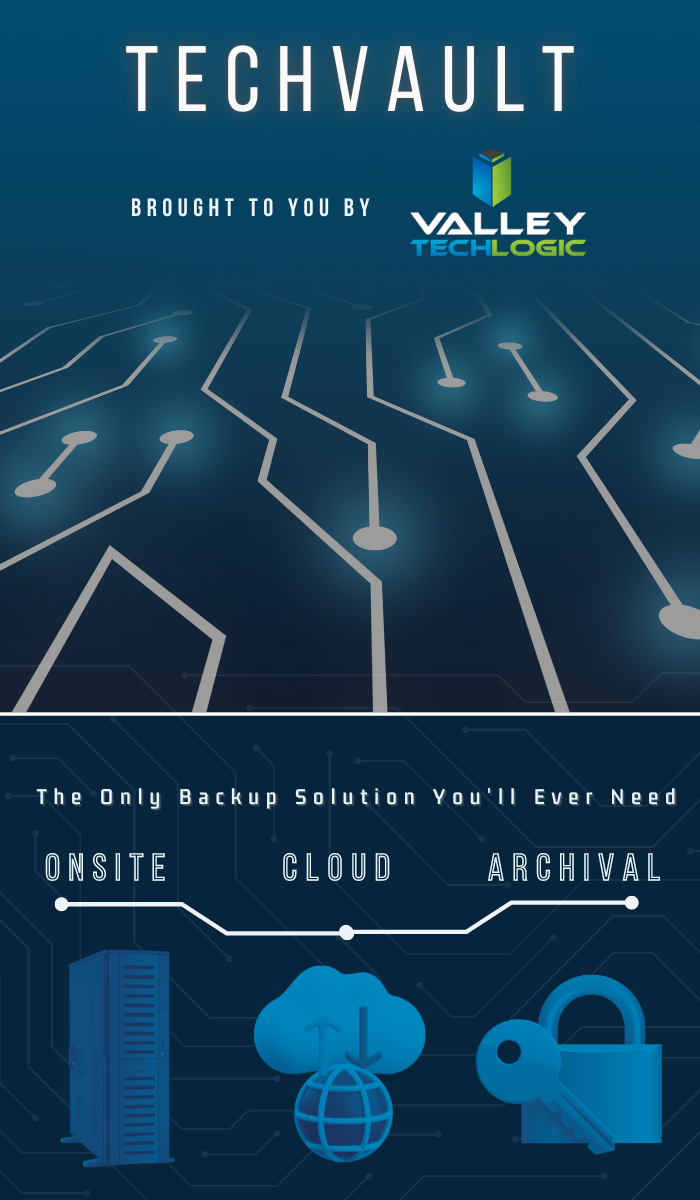
    Here’s an our backup program in a nutshell which we consider the gold standard for businesses:

    Click to learn more about TechVault.

    Want to learn more? Visit our calendar page to book a consultation.

    Looking for more to read? We suggest these other articles from our site.

    This article was powered by Valley Techlogic, an IT service provider in Atwater, CA. You can find more information at https://www.valleytechlogic.com/ or on Facebook at https://www.facebook.com/valleytechlogic/ . Follow us on Twitter at https://x.com/valleytechlogic.

  • Google blocked the largest DDoS attack ever, peaking at 46 million requests per second

    Google blocked the largest DDoS attack ever, peaking at 46 million requests per second

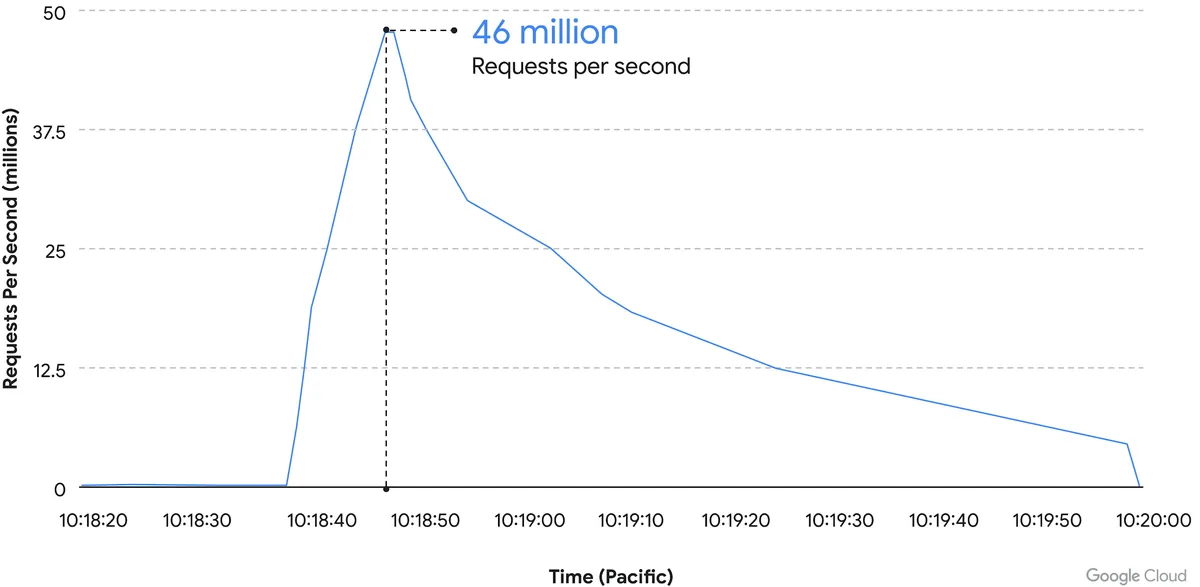
    While it’s just now being reported on, the DDoS attack on Google Cloud occurred on June 1st and lasted for 69 minutes – reaching a peak of 46 million requests per second.

    Source: Google Cloud

    We’ve covered Distributed Denial of Service (DDoS) attacks before in this blog, but the scale of this one is mind boggling. It’s nearly twice the size of Cloudflare DDoS attack from last year around this same time, which peaked at 26 million requests per second (sent from just over 5000 devices).

    If you’re wondering where the devices used in these attacks originate from, the answer in this case is unsecured devices. Specifically compromised Mikrotik routers.

    There’s been a number of articles regarding possible compromises to the Mikrotik brand of router including one instance that involved over 200,000 devices. Many in the security space wondered if there would be a fallout from that and now, we have our answer.

    However, what’s more impressive is not the scale of this attack, but the fact that it was successfully blocked by Google.

    Botnet attacks of this nature are not rare, it’s difficult to say exactly how many attacks occur per day but it has been noted they’re on the rise since the Russian invasion of Ukraine. A botnet is essentially an assembly of compromised devices that are used to attack a target. DDoS attacks are one of the most common uses, but they’re also used for phishing, cryptomining, or to bruteforce passwords just to name a few. The largest botnet ever recorded belonged to Russian BredoLab and consisted of 30,000,000 devices.

    Would be bad actors can even purchase DDoS as a service for as little as $5 per hour which should give you an indication how prevalent and common they are as an attack vector.

    Google blocked this attack by leveraging their Cloud Armor product, a network security service directly aimed at preventing DDoS attacks. If they were looking for a powerful case study for the effectiveness of this product, we can think of no better example then effectively blocking the largest DDoS attack in history (so far).

    Part of blocking a DDoS attack is early detection. DDoS attacks ramp up, if you can detect an incoming flux of peculiar traffic to your network you can block the attack before it’s able to scale up and cripple your network.

    Besides blocking potential attacks, the other side of the coin is not becoming an unwilling participant in a botnet through a compromised device in your home or business.

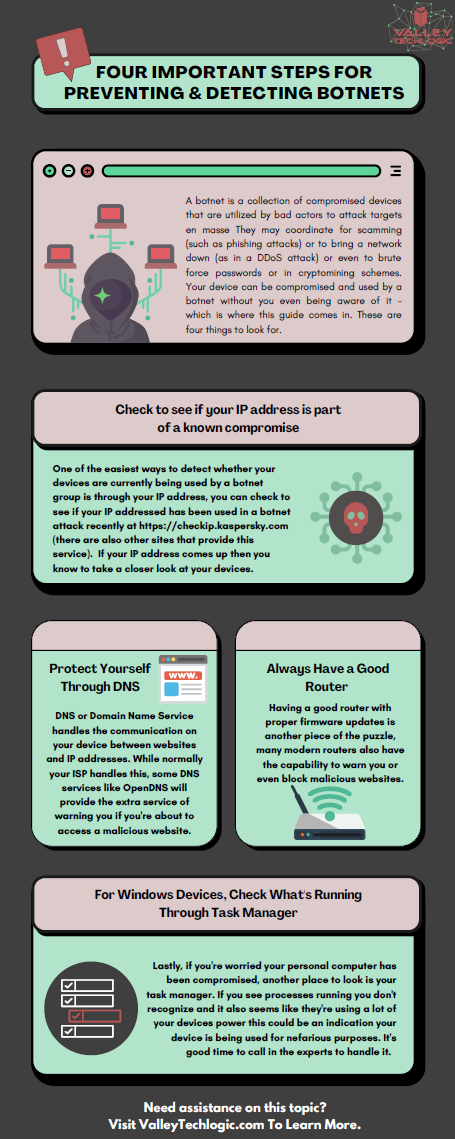
    The sinister part of it is you may not even be aware your device is compromised and it’s not just mobile devices and personal computers that can be affected, even IoT (Internet of Things) devices can be hacked. There are a few things you can do to prevent your devices from being taken over by hackers as we outline in the chart below:

    If your business needs assistance with protecting from any potential attacks or making sure your devices stay uncompromised, Valley Techlogic can help. All of our plans include robust cybersecurity protections at no additional charge, including assisting in your cyber security training goals (after all, human error is the #1 cause of data breaches). Schedule a consultation today to learn more.

    Looking for more to read? We suggest these other articles from our site.

    This article was powered by Valley Techlogic, an IT service provider in Atwater, CA. You can find more information at https://www.valleytechlogic.com/ or on Facebook at https://www.facebook.com/valleytechlogic/ . Follow us on Twitter at https://x.com/valleytechlogic.