
Author: rory-admin

  • Reddit experienced a major outage yesterday, and our 5 tips for what to say to customers when your website goes down

    Reddit experienced a major outage yesterday, and our 5 tips for what to say to customers when your website goes down

    Reddit was down for several hours yesterday due to an “internal systems issue”. While the mobile version of the site fluctuated between being semi usable to being completed down, the desktop version was unusable for nearly five hours.

    Outages like this that occur to major website are a newsworthy event, as users flock to social media to report the outage and speculate on the cause. A fix was implemented and the site slowly came back up just before 7:30 PM Eastern Standard Time. By the time it was back up it had already been reported on by major tech news sites such as the Verge, Apple Insider, TechCrunch and more.

    We’ve discussed outages before on this site because as we just said, they’re newsworthy events, but what about when your company’s website goes down?

    It might be less news worthy than Facebook, Reddit, Amazon, Twitter etc. having an outage but depending on the type of business you’re in it may still be noticeable to your customers if your website has a major outage.

    When something goes wrong there’s often a knee jerk reaction to move along and pretend it never happened, but outages these days often go hand in hand with cyber threat events and moving along mums the word may leave your customers with the wrong idea (and rightfully concerned).

    If you’re in a business sector that saves customer data at all, and there aren’t many that aren’t, it’s always good to be transparent when you have a major outage. Even if your website was down briefly it still might have been noticed by some and it’s best to keep ahead of the rumor mill.

    Here are our five tips for what to say to your customers when your website experiences an outage:

    1. If the outage is ongoing, update your social media. Customers often look to your social media pages for news about your business and this will be the first place many will check to find out what’s going on. You don’t have to cover everything about the outage, a summary of what’s happening and that you’re aware of it will be enough.
    2. Let your customers know how they can reach if you needed (especially if going through your website is how customers usually contact you). Having an email address available specifically for customer concerns is a good idea.
    3. Also send an email proactively, especially if the outage extends longer than a day. Not every user will check social media, sending an email covers the rest of your digital bases for letting customers know.
    4. Be sure to post an update when the issue is resolved. Again, it’s best to stay ahead of your own narrative for outages within your business, posting an update and a brief description of what the issue was is a good idea.
    5. Finally, if your outage was the result of a breach, follow state and country guidelines for notifying customers of any data leaks that may have occurred.

    Your business reputation can be affected by major outages, we wrote an article on how to protect your reputation and recover. You can find it here.

    Providing advice like this is a service that comes with being a Valley Techlogic customer, here are four other benefits to being a Valley Techlogic customer.

    4 Reasons to Choose Valley TechlogicReach out today to learn more.

    Looking for more to read? We suggest these other articles from our site.

    This article was powered by Valley Techlogic, an IT service provider in Atwater, CA. You can find more information at https://www.valleytechlogic.com/ or on Facebook at https://www.facebook.com/valleytechlogic/ . Follow us on Twitter at https://x.com/valleytechlogic.


  • 5 Ways to Reduce Your IT Costs and Eliminate Wasteful Spending

    5 Ways to Reduce Your IT Costs and Eliminate Wasteful Spending

    In 2023 it feels like the cost of everything is skyrocketing, from eggs being $10 for a dozen, to the price of a used car being up 61% compared to 2019.

    Consumers and business owners alike are scrambling to cut costs where they can, and as a business owner you may be tempted to target your technology spending.

    While technology spending is usually a tiny fraction of the overall cost of running a business (4-6% annually is the average), it’s still a commonly targeted sector. This is usually because it’s one of the least visible items business owners spend money on. While tangible products your business needs day to day are more obvious, a good bit of the money spent on technology in a business is for prevention or maintenance.

    Whether it be software upgrades, new peripherals that function behind the scenes, or money spent on cybersecurity efforts, these are purchases you may not see the obvious immediate benefit from especially if you’re not tech savvy.

    These “invisible” costs occur and leave business owners wondering, do I really need this service or product?

    The answer is a resounding yes, for the most part. While money spent on preventative measures is often a tough pill to swallow, the money you would have to spend recovering from something that could have been prevented will be even tougher (and costlier).

    However, there are some areas of technology spending that are worth taking a look at. We have found that many business owners who utilize our services are already paying for redundant IT services, they just didn’t know it.

    Another example is we have had many clients that sign up with Valley Techlogic, and upon reviewing their internet bill or phone bill we find that they’re drastically overpaying.

    Here are the five ways we suggest cutting your IT spending in 2023:

    1. The first one is touched on above, check your internet bill. As with consumer internet services there are often specials that can be taken advantage of to reduce your overall cost, but if your internet service costs have ballooned out of control it might be time to look for a new provider.
    2. The same is true for your phone service, especially if you’re still using landline phones. Switching to a VoIP service could save your business a substantial amount, but if you’re not ready for that yet you can also just see if all of the lines you’re paying for are being used. We’ve found during customer audits they often have phone lines that ring to nowhere and can be safely disconnected.
    3. Another thing you can do is look for redundant services, if you have several programs aimed at cybersecurity they may have overlapping services – allowing you to cancel the one with the least features. Also, if you’re a Microsoft 365 customer you could consider switching your users to Premium to take advantage of the security features provided by Microsoft directly (at an often greatly reduced cost to stand alone products).
    4. Consider whether virtualization will reduce your hardware costs. There’s a lot of talk about “moving to the cloud”, but for many business owners that’s a nebulous topic. To put it in a nutshell, there is a significant upfront cost to moving your business’s data to the cloud, but you will reap the reward on the backend from reduced infrastructure costs.
    5. Finally, consider whether it makes sense to hiring internally or outsource your IT help. For larger businesses hiring IT staff can make sense to handle the load of their business, but for medium to small businesses hiring a dedicated person is often much more expensive then having a technology service plan through a provider like us. Even for larger businesses, having a technology service plan from a provider can make more sense than continuously hiring additional staff to address an additional need for help.

    If you need help reviewing your IT spending to find out whether it’s in line, or whether a service plan through us can help you address this topic and many more – schedule a consultation with us today.

    Looking for more to read? We suggest these other articles from our site.

    This article was powered by Valley Techlogic, an IT service provider in Atwater, CA. You can find more information at https://www.valleytechlogic.com/ or on Facebook at https://www.facebook.com/valleytechlogic/ . Follow us on Twitter at https://x.com/valleytechlogic.
  • They quit, now what? 5 tips for digitally offboarding employees safely.

    They quit, now what? 5 tips for digitally offboarding employees safely.

    Having an employee quit can be very disruptive to your business, besides having to scramble to rehire for the role or find coverage within your organization you also have to tie up any loose ends they may have been working on (especially if they left without a hand off period).

    Unfortunately, it’s not a good idea to wait until the dust has settled, when it comes to tying up loose ends we recommend jumping into action immediately once you’ve been made aware that your employee will not be continuing in their role.

    We’ve touched on what you should do if your IT guy quits here but many of your non-IT employees also leave a strong digital footprint within your business that will need to be dealt with when they leave.

    Here are the five things we suggest doing immediately on your former employees last day:

    1. First, identify all of the company programs or platforms that they have logins or passwords for. Even during an amicable split, it’s still a good idea to change these passwords in the same way a landlord might update the locks between tenants if they weren’t absolutely sure they recovered all the keys to the building (and since we’re talking digital, there’s no way to be sure).
    2. You also need to change their email password. You might be thinking you should just delete their email but depending on the role they performed for your business there may be pertinent information that’s only found within their work email. We also suggest forwarding emails that come to that employee to whoever is handling their work activities until you’re sure that every client or vendor that worked with them has gotten the message about who to contact instead.
    3. Recover any work devices if applicable. In some cases it may be suitable to just have your IT team wipe the device or remove company data if you’re not interested in passing it along to their replacement (especially for older devices).
    4. In the same vein, if there is relevant company data on their devices it may be worthwhile to have your IT team recover it if possible. While we recommend collaborating with your employees through something like a company SharePoint or another unified platform, anything that was currently in flux before they quit may still be worth recovering.
    5. The final steps are related to physical office security as well, you’ll want to disable their badges and network privileges upon their exit.

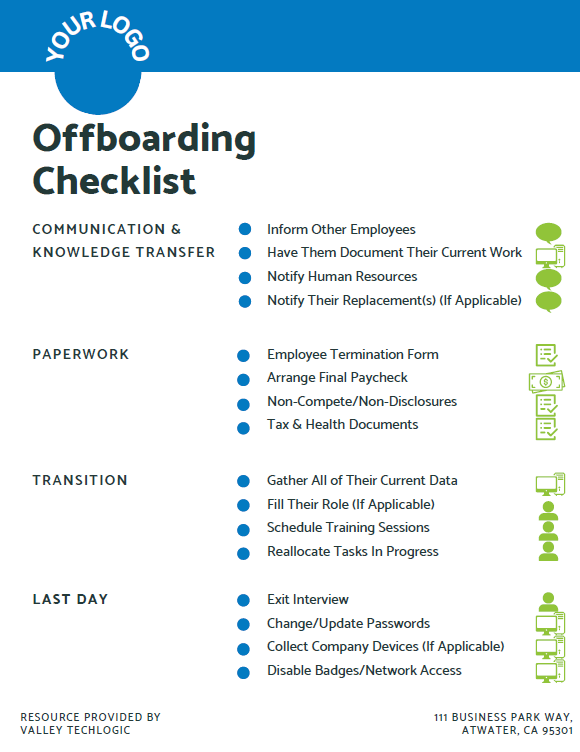
    At Valley Techlogic we like to create resources for our community, and while many steps in the offboarding process aren’t strictly digital we thought it would be helpful to provide an offboarding checklist that can be used to make sure you’re covering not only steps outlined above but also all aspects of the offboarding process (with a clear view on what’s digital and what’s not). Need help branding it? Just let us know.

    Click to grab the full size version.

    If you need assistance in creating a thorough offboarding process for your business, or even an onboarding process that includes coverage for making future offboarding easier, we can help.

    We’re experts in creating specialized processes for our clients so that all aspects of the technology they use are secured and maintained, including devices and platforms used by employees.

    Schedule a consultation with us today to learn more about how we can assist you with your digital employee planning and maintenance.

    Looking for more to read? We suggest these other articles from our site.

    This article was powered by Valley Techlogic, an IT service provider in Atwater, CA. You can find more information at https://www.valleytechlogic.com/ or on Facebook at https://www.facebook.com/valleytechlogic/ . Follow us on Twitter at https://x.com/valleytechlogic.

  • Bing’s ChatGPT Chatbot had some unexpected conversations with customers this week, plus 3 Chatbots we CAN recommend for your website

    Bing’s ChatGPT Chatbot had some unexpected conversations with customers this week, plus 3 Chatbots we CAN recommend for your website

    While Microsoft has been somewhat hush hush on the exact amount of their investment into the creator of ChatGPT, OpenAI (with some estimates nearing $10 billion).  It is clear that they’re going all in on AI and looking towards the future by already integrating it into their search engine Bing, via a new chat bot feature.

    The results have been, to say the least, unexpected. While in the majority of cases the bot responds appropriately to the prompts and provides helpful information, there were some instances this week where the opposite happened.

    Including a conversation about the new movie Avatar: Way of the Water in which case the bot got confused about what year it was and insisted it was still 2022, punctuating it’s arguments with the user with “I’m a good Bing bot”.

    In another case, a New York Times writer hearing about the unusual way the bot was sometimes responding, led him to holding a conversation with it for over 2 hours. The bizarre results of the lengthy conversation culminated in the bot trying to convince him they were in love and that he should leave his wife.

    This highlights the complex nature of AI in its current form, many think AI is advanced hardware working at full capacity to create something brand new to human-kind. When in reality it’s a vast collection of what humans have already put onto the internet scrambled together and supported by algorithms to be readily available upon a human prompt. You have to imagine having the full capacity of the internet at your fingertips – both the good and the bad.

    That’s why AI has been able to pass the Bar exam and also why it has also responded very strangely to simple prompts as in the Bing example, because like the internet it’s a mixed bag.

    In response to the news Microsoft has limited their chatbot to prevent more unsettling conversations, with 5 user prompts on the same topic the bot will now respond with “I prefer not to talk about this topic.”.

    AI can be very useful but it’s definitely not a replacement for all human led activity, especially when it comes to engaging with your customers.

    That’s why we have our top 3 picks for live chat options that will improve customer engagement (with no unexpected results):

    1. LiveChat: This is the one we personally use and we enjoy the features it has including an “attention grabber” which is an animated .gif that grabs customers attention and the ability to instigate conversations with visitors. It also keeps a record of who has tried to chat and allows customer service agents to “take over” a conversation when it’s appropriate to. It also includes customizable branding (all of the chatbots on our list do).
    2. Olark is another good option, like LiveChat it keeps track of the conversations happening on your website but it also offers analytics based on those conversations so you can track customer outcomes. It also offers many integrations with popular products such as Google Analytics, Hubspot, Mailchimp, Salesforce and more.
    3. Tawk.to is a free live chat option that still has some very nice features, including monitoring customers on your website and being able to answer chats from a mobile device. You can even share your screen if you’re trying to assist a customer in finding something.

    We believe in answering customers live which is why we have Live Chat available to our customers, with live service reps on our website and a dedicated dispatcher to answer customer phone calls. Technology advice like what’s provided in this article is just one of the ways we help our clients, if you would like to learn more about obtaining technology support for your business schedule a consultation with us today.

    Looking for more to read? We suggest these other articles from our site.

    This article was powered by Valley Techlogic, an IT service provider in Atwater, CA. You can find more information at https://www.valleytechlogic.com/ or on Facebook at https://www.facebook.com/valleytechlogic/ . Follow us on Twitter at https://x.com/valleytechlogic.

  • Data breached? 5 ways to reduce the impact on your business.

    Data breached? 5 ways to reduce the impact on your business.

    We’ve posted a lot of articles on how to avoid a data breach (here are a couple of recent ones for you to review if one hasn’t happened to you so far and you’d like to keep it that way).

    Unfortunately, we fear that if you’ve reached this article you may be part of the growing number of business owners whose data has been breached (in 2020 there were 700,000 attacks on small businesses with damages exceeding $2.8 Billion).

    Data breach severity varies widely, from an employee email being temporarily hacked all the way to having your backups infiltrated and locked for a ransom – and even if you pay the ransom you still might not recover your data.

    So if you’ve experienced a significant data breach and wondered what you could have done to have a better outcome, or even if you’re in the midst of one now what should you do?

    Here are our top five tips for reducing your data breach costs (now or in the future):

    1. Damage Control – Turn to the pros (like us) when it comes to recovering your data in the event of a breach, they will have access to tools that could recover data that will otherwise be lost if decryption efforts fail in the hands of someone who doesn’t know what they’re doing. Bottom line, know who you’re going to call in an emergency and don’t be afraid to get their help sooner rather than later.
    2. Downtime Mitigation – Downtime is one of the most expensive elements of a data breach, if you don’t already have a disaster recovery plan a previous breach can highlight exactly what needs to be a priority in your business if your data is unavailable. Also, a team like Valley Techlogic can help you create a disaster recovery plan.
    3. Turn to Your Vendors – Your vendors may have some methods for assisting you in the event of a data breach. For example Microsoft has a shared responsibility model for data but if you have Microsoft 365 and use OneDrive, some of that data may still be safe on their end and accessible to you (once your devices have been cleared and are safe to use).
    4. Be Transparent – If your business is very customer facing, an outage in your business caused by a data breach may be very obvious to them. We don’t recommend trying to hide the fact that a breach has happened but instead being transparent about what happened and what you did to fix it, and how you plan to prevent it in the future.
    5. Cyber Prepared – The best way to recover financially from a data breach is to have cyber insurance in place before the attack happens, while it may be too late for a past breach you can prevent future financial loss by using our guide to reviewing and obtaining cyber security insurance here.

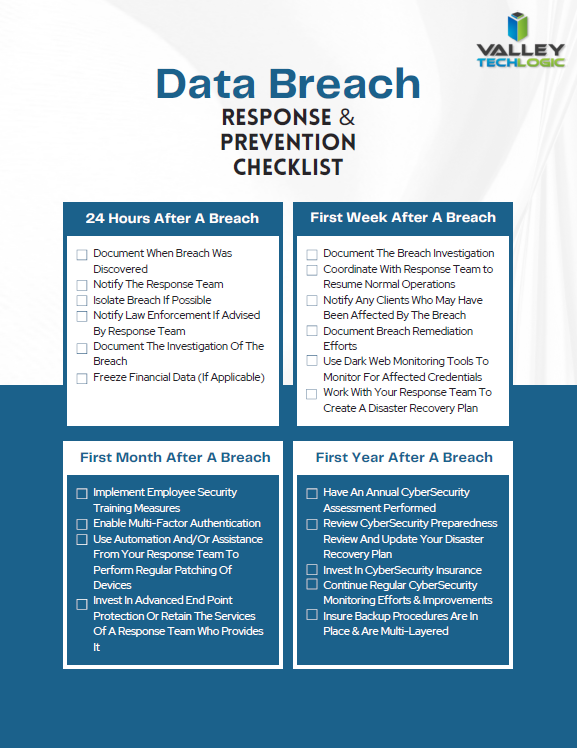
    Of course, an ounce of prevention is worth a pound of cure unfortunately when it comes to cybersecurity attacks. We would be remiss not to offer a few tips on preventing a data breach specifically. You can grab this checklist to make sure these items are covered to prevent future data breaches:

    Click to download the full size version.

    If you’re currently dealing with a data breach or have dealt with one in the past and want to prevent future breaches, Valley Techlogic can help. We are experts in cybersecurity and use industry best practices to provide the best security coverage for our customers that is also cyber insurance compliant. Learn more with a consultation today.

    Looking for more to read? We suggest these other articles from our site.

    This article was powered by Valley Techlogic, an IT service provider in Atwater, CA. You can find more information at https://www.valleytechlogic.com/ or on Facebook at https://www.facebook.com/valleytechlogic/ . Follow us on Twitter at https://x.com/valleytechlogic.
  • Be careful what you download, malware has made it to Google Adwords

    Be careful what you download, malware has made it to Google Adwords

    Downloading applications from trustworthy sources is something that has been drilled into most of us as internet safety 101, and many of us would consider the top link on Google to be a trustworthy source.

    However, hackers are now taking advantage of that and pushing ads that contain their malware disguised as legitimate applications.

    Initially reported on by cybersecurity firm Cyble last month, their report found that a malware called “Rhadamanthys Stealer” is being spread through Google Ads that allegedly lead the user to download Zoom, Notepad++, AnyDesk and more.

    This malware is also being spread the typical way through email when attached to a PDF. It makes it clear that there is no one way to spread malware and that users need to be vigilante when downloading anything – whether that be a typical .exe or email file attachment.

    The goal is usually financial, with the hacker either “ransoming” the users device or merely spying in the background as they collect data they can sell or use to steal financial credentials. The attempts at stealing data may even be multifaceted and include all three.

    So how can you protect yourself? The first is in knowing how it works, Google ads has requirements for posting so these bad actors are placing ads for legitimate looking “front page” sites that mimic what you were looking for, which then immediately redirects you to the one containing malware.

    So one clue would be if the URL drastically changes during your browsing (and paying attention to the URL and knowing the URL you were trying to reach would squash this attempt altogether). In many cases you can confirm a sites true URL through Wikipedia and it’s a good idea to save it if it’s a site you visit regularly.

    Another way to block these is exceedingly simple, just utilize an ad block on your browser. Ad blocks block Google advertisements as well, so your research will be more likely to contain legitimate results. Many ad block extensions will also block popups too.

    Google has also offered their own advice on blocking “malvertising” and have included a way to report illegitimate websites. It goes without saying these sites are in violation of Googles advertising rules, which include rules against auto-redirects.

    As it becomes increasingly harder to avoid malware infections, many offices are scrambling with how to best protect office devices from being unintentionally used as a threat vector. Employee training is still your best protection but as this article illustrates, even tech savvy employees may have a difficult time avoiding all threats.

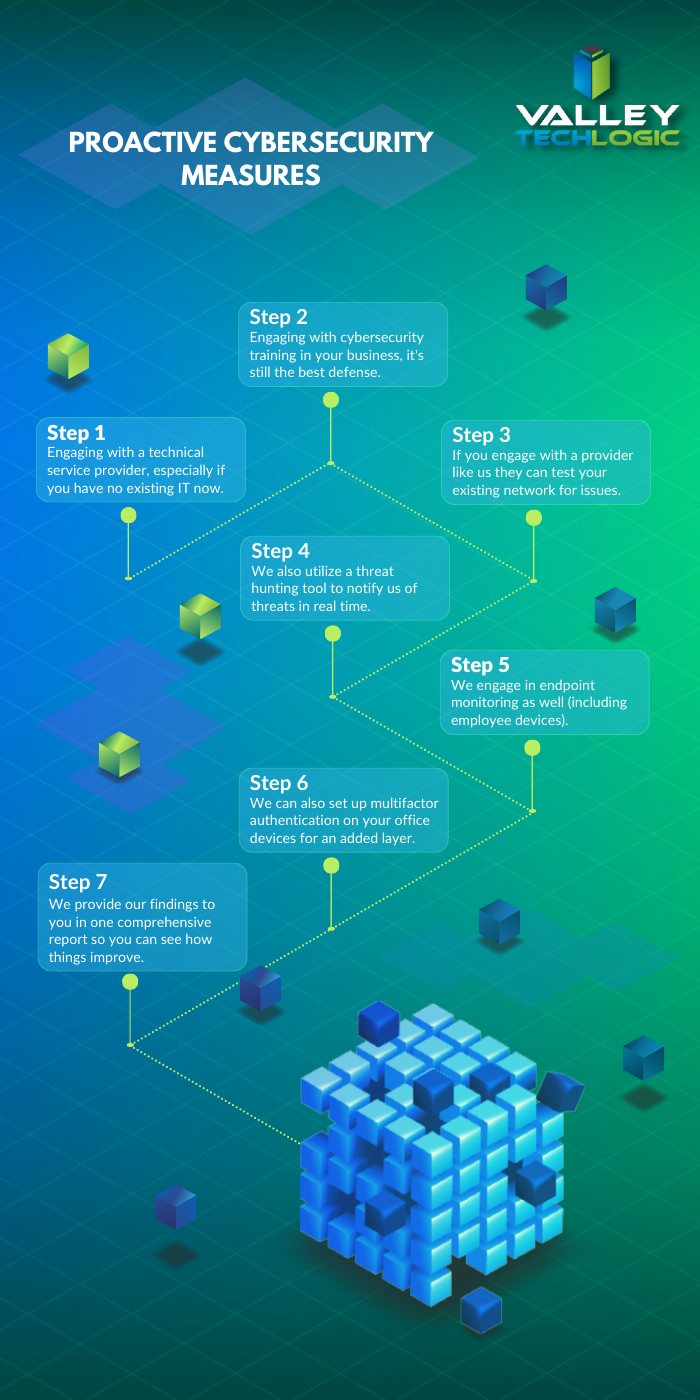
    That’s where a Valley Techlogic service plan comes in, we offer proactive cybersecurity protection in the following ways:

    Proactive Cybersecurity through Valley Techlogic

    If you would like to learn more, schedule a consult with us today and we’ll go over how we can help your business increase your cyberthreat awareness and protection capabilities.

    Looking for more to read? We suggest these other articles from our site.

    This article was powered by Valley Techlogic, an IT service provider in Atwater, CA. You can find more information at https://www.valleytechlogic.com/ or on Facebook at https://www.facebook.com/valleytechlogic/ . Follow us on Twitter at https://x.com/valleytechlogic.

  • Proactive vs Reactive Tech Care – Why Tackling Things as They Spring Up Can Backfire BIG

    Proactive vs Reactive Tech Care – Why Tackling Things as They Spring Up Can Backfire BIG

    As a technology service provider, it’s probably a given that we believe in proactive maintenance. We believe being proactive is less costly both in lost revenue and lost time (and time is money so it’s doubling down when a technology outage occurs).

    Many clients are afraid to replace aging hardware, these systems represent a big investment for them typically and they want to get the most “bang for their buck” out of systems they spent thousands of dollars on. They’re also used to how these machines operate and aren’t sure if newer machines will really represent a quality of life upgrade for them.

    There’s also the fear that replacing hardware will be a protracted situation, where transferring files, setup etc. may result in the one thing we all fear most in the business world – downtime.

    This is generally not the case, most of the time switching out systems is an easy seamless process that’s completed in less than a couple of hours or even during a lunch break. Switching out a server can be more time consuming but at Valley Techlogic we perform those upgrades after hours so as not to inconvenience our clients. We can also keep your existing server running as we get the replacement up and going in most cases (and is another reason it’s a good idea to perform these upgrades before a hardware failure occurs).

    Proactive maintenance also applies to software, whether it be updating existing software or finding a new solution for a software product that’s no longer available. Replacing aging hardware and aging software often go hand in hand, with clients keeping a system around that’s functionally way past it’s prime but is necessary to run a line of business software that’s no longer available.

    This is a risky endeavor, machines running Windows 7 or Windows Server 2012 or older are no longer being updated by Microsoft and represent a literal threat vector to which bad actors can infiltrate your business. The same goes for other aging devices that are no longer receiving firmware updates, such as routers and peripherals like smart switches that connect to the internet.

    At Valley Techlogic we are utilizing tools that track the age of equipment and whether it’s been recently updated, that way we can make recommendations to our clients ahead of time when equipment has reached its end of life.

    In many businesses, operating on a “run-to-failure” basis makes sense, if you’re in manufacturing for example repairing large, expensive equipment for as long as you can to maximize your ROI is a smart business practice. However, anyone would agree that replacing equipment that’s become unsafe is absolutely crucial.

    That’s why we operate on a proactive model, in the technology world aging hardware that can’t be updated is a risk to your business whether it be from unintended downtime or a cyber security threat.

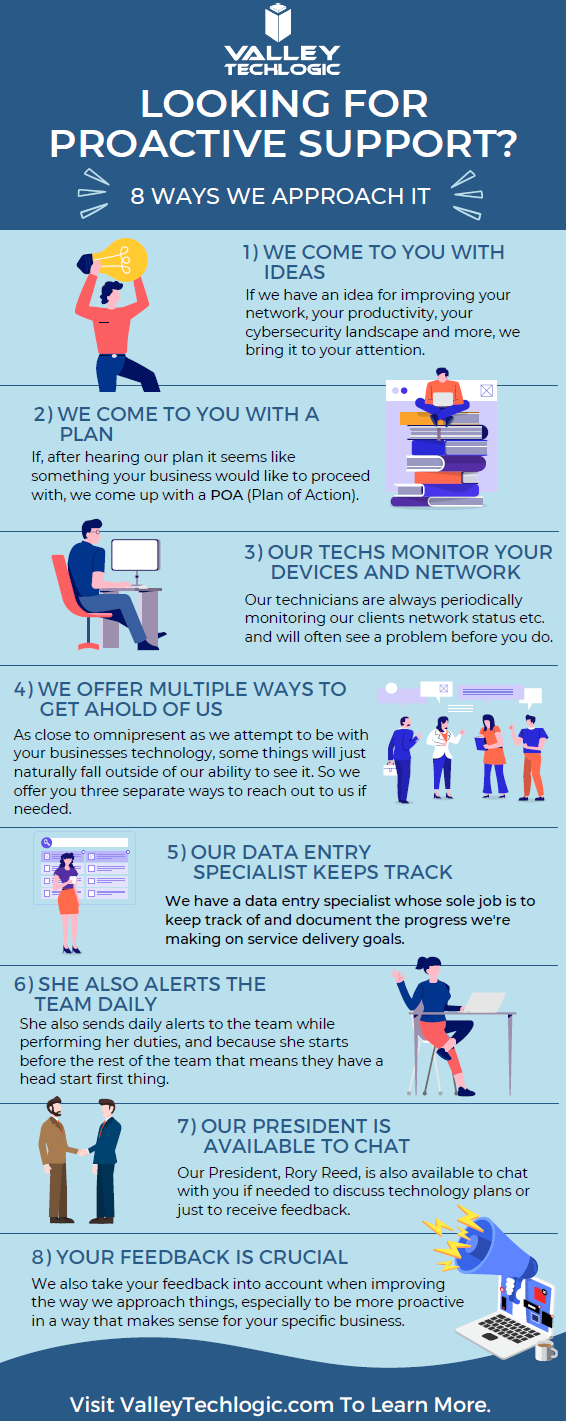
    Here are some other items we’re also proactive about for our clients:

    Click to view the full size version.

    If you would like to learn more about obtaining a proactive technology service plan for your business, just request a consultation. We’ll even give you your first service call on the house (up to 2 hours) which we can use to evaluate your existing devices and offer our recommendations. Learn more today.

    Looking for more to read? We suggest these other articles from our site.

    This article was powered by Valley Techlogic, an IT service provider in Atwater, CA. You can find more information at https://www.valleytechlogic.com/ or on Facebook at https://www.facebook.com/valleytechlogic/ . Follow us on Twitter at https://x.com/valleytechlogic.
  • Hiring a tech vs outsourcing, a cost breakdown

    Hiring a tech vs outsourcing, a cost breakdown

    If you’ve realized you need additional IT support for your business but are on the fence about which route to take, hiring IT staff or outsourcing your needs to an IT service provider the choice can be difficult.

    Many of our clients reach us because they have been using an unreliable IT support service, their existing IT staff left, or sometimes because they’ve somehow gotten by with no IT at all but realize that needs to change.

    We also frequently have clients who are utilizing a person in their office who is “tech savvy” but is not IT, it can be quite expensive to hire an IT professional with the experience needed to perform the variety of duties needed work on items such as cybersecurity improvements, hardware upgrades, software deployments and more.

    Here are some benefits of hiring in house IT staff:

    1. They’re already at your office so there’s no waiting for IT support to show up.
    2. They will be well versed on your systems since in many cases they will be the one who set them up in the first place.
    3. They should be pre-emptively taking care of updates that will keep your business more secure.

    On the other hand, here are the benefits of outsourcing your IT:

    1. The cost is usually much lower than hiring personnel.
    2. You get many experts for one price, no matter how well versed your IT person is they can’t be an expert in everything.
    3. You get software tools that may be otherwise unavailable to a single business or not cost effective to purchase.
    4. Round the clock service and monitoring, many IT service providers including us offer 24/7 support.
    5. You will have an agreement with them that spells out the level of service you’re supposed to receive.

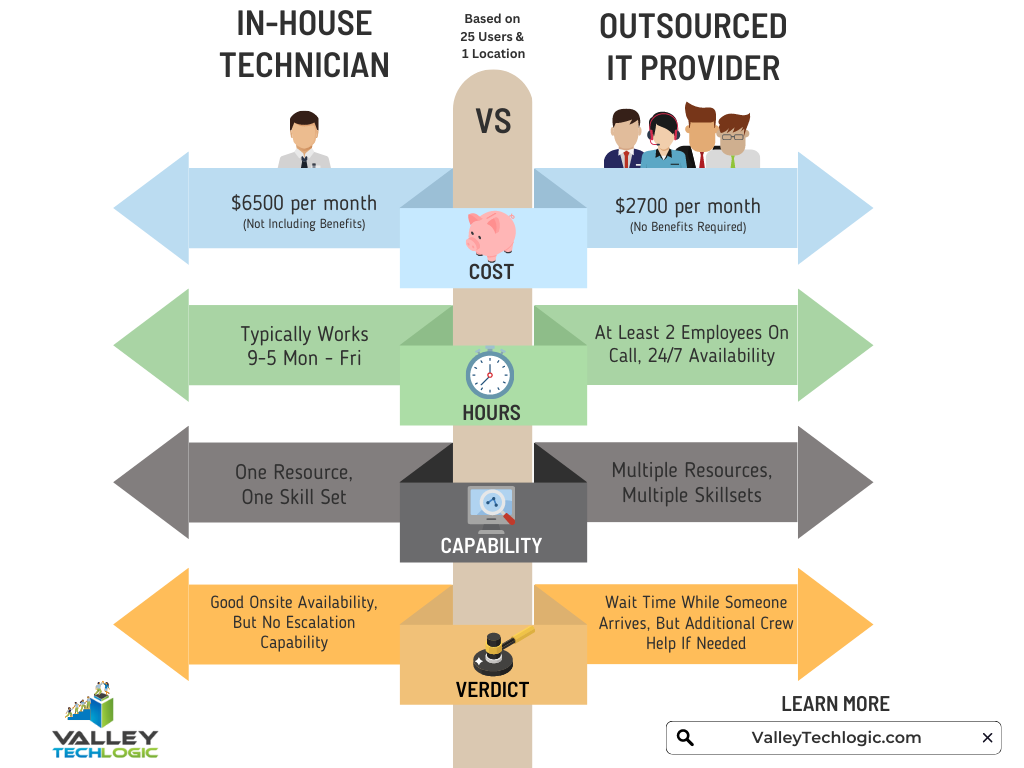
    It’s a difficult choice and only you know whether your business would greatly benefit from having in-house staff or whether outsourcing your IT is your best option. As you weigh your options we created this chart with the average baseline cost for an in-house IT person vs. an IT service plan with us.

    However, as we mentioned many of our clients are utilizing an in-house resource already, these tech savvy staff are usually performing the day-to-day activities such as patching and password resets but may be missing crucial items such as cybersecurity prevention or maintaining (or even starting) backups.

    For clients like these we recommend our co-managed plan option. With our co-managed plan we work directly with the staff already performing your IT duties, if there’s an issue they call us directly and we pass on a cost savings to you.

    We do that because usually by working with a staff member that already knows your systems we can bypass a lot of the early troubleshooting that occurs, and that staff member usually still handles minor day to day tech related activities.

    If you would like to learn more about our co-managed plan options just reach out today for a consultation.

    Looking for more to read? We suggest these other articles from our site.

    This article was powered by Valley Techlogic, an IT service provider in Atwater, CA. You can find more information at https://www.valleytechlogic.com/ or on Facebook at https://www.facebook.com/valleytechlogic/ . Follow us on Twitter at https://x.com/valleytechlogic.

  • Microsoft layoffs and how the economy is affecting the tech sector

    Microsoft layoffs and how the economy is affecting the tech sector

    It was announced this week that Microsoft will be laying off 10,000 employees in a bid to cut costs in response to “macroeconomic conditions and changing customer priorities”.

    They join the likes of Amazon who also recently laid off 18,000 employees and Meta who cut 11,000 jobs last November. With increasing costs and decreasing sales across many industries amid economic uncertainty, we expect more layoffs to occur both in the tech sector and beyond.

    Satya Nadella, CEO of Microsoft, commented in a recent interview that Microsoft is not “immune to the global changes” and that he expects two years of challenges ahead for the tech sector.

    We’re still seeing hardware shortages stemming from the pandemic and the chip shortages we’ve written about recently. Suffice to say it’s been even more difficult for businesses to navigate maintaining the technology in their office or making needed tech related purchases.

    The worst thing that you can do is hold still and put off making needed upgrades or addressing technology challenges in your business. There are risks associated with outdated technology, they are:

    1. Lack of security compliance: It’s been shown that are on the rise, even faster than before due to malware being more accessible for even those who are not particularly “net savvy”. Even if you thought your business was too small to be a target before, with increased desperation any target might do – including you.
    2. More crashes and downtime: Time is money, especially in this economy. Old devices are more prone to crashing or just giving out completely, at which point you’ll still have to pay to replace them but you’ll have the added cost of the waiting you have to do until the replacement comes in.
    3. Decreased productivity: Your employees are probably your biggest payroll item, do you really want to hinder their productivity by making them use a device that’s sluggish or not working properly? The cost of a new laptop or desktop is a drop in the bucket compared to the cost of wasted time they may spend navigating around issues.
    4. It could put you at a disadvantage to your competitors: The increase of reliance on digital solutions has not been stymied by the current economic landscape, the extra reliance that was exacerbated by the pandemic conditions is there and continues to grow. If your competitors are keeping up with it and you’re not, that will give them an edge you may not want them to have.
    5. Lack of data and transparency: We’ve mostly focused on hardware here but there are significant risks to not making needed software upgrades as well. Modern software is often leaps and bounds ahead in giving you needed data and reports, and we believe knowledge is power. You can’t be sure you’re making the best choices for your business if you’re doing them blindly.

    Now more than ever you need a partner in navigating the technology landscape, and Valley Techlogic can be that partner. We can help you address your technology challenges in a way that still keeps budgetary constraints in mind. We have been in business since 2004 and have experience weathering challenging times. We can even reduce your technology spending in the following ways:

    Click to grab the full size version.

    We’re offering your first service call with us free, because we know you need to be certain when making choices for your business. We know after you try us out you will have the confidence to proceed, you can schedule your first service call here.

    Looking for more to read? We suggest these other articles from our site.

    This article was powered by Valley Techlogic, an IT service provider in Atwater, CA. You can find more information at https://www.valleytechlogic.com/ or on Facebook at https://www.facebook.com/valleytechlogic/ . Follow us on Twitter at https://x.com/valleytechlogic.
  • ChatGPT is allowing even novice wannabe hackers to construct their own malware

    ChatGPT is allowing even novice wannabe hackers to construct their own malware

    ChatGPT is a power AI chatbot that allows the user to communicate a question to it and receive a very thorough answer on any topic the user can dream up. Created by OpenAI and already fielding massive investment offers even from companies like Microsoft, they’ve had a ton of buzz in the news both positive and negative.

    It first came under scrutiny when it became apparent the tool was great for generating lots of content quickly, including articles that students could use and submit (though the quality of these articles can vary greatly).

    This is because tools like ChatGPT scrub great swaths of the internet for their content. Whether it’s being asked to write a paper on the Civil War or generate a Picasso-esque picture, it takes the prompt and quickly compiles the database of knowledge it has built up from data readily available online and provides the user with what they’ve asked for.

    There has been a lot of discussion around the future of AI and the ramifications of copyright, particularly when it comes to original written works or art, but today we’d like to focus on ChatGPT’s scripting capabilities and the potential pros and cons.

    As leaders in the IT space we were already aware of the buzz around ChatGPT’s scripting capabilities, with some programmers praising it’s ability to create simple scripts and the potential it had to make aspects of their jobs easier. While others lamented what it meant for the programming role as a whole or whether the code output was really “up to snuff” especially when used in real world applications.

    It’s become clear there’s a niche for ChatGPT in creating low level tools, but this unfortunately also includes malware and encryption scripts – which often aren’t very complicated and easily deployed via phishing type scams.

    As reported by Axios, there is already evidence that hackers are using ChatGPT in the creation of malware or in improving their existing attempts to create new malware scripts. There is also evidence that it’s being used by less technically inclined people to create malware they otherwise would not be able to make.

    OpenAI has made statements that they are looking to improve their product and prevent it from being abused, in the interim we would advise users to be especially cautious when clicking on links or downloading files. We wrote an article on how to spot phishing clues online that might be worth a review.

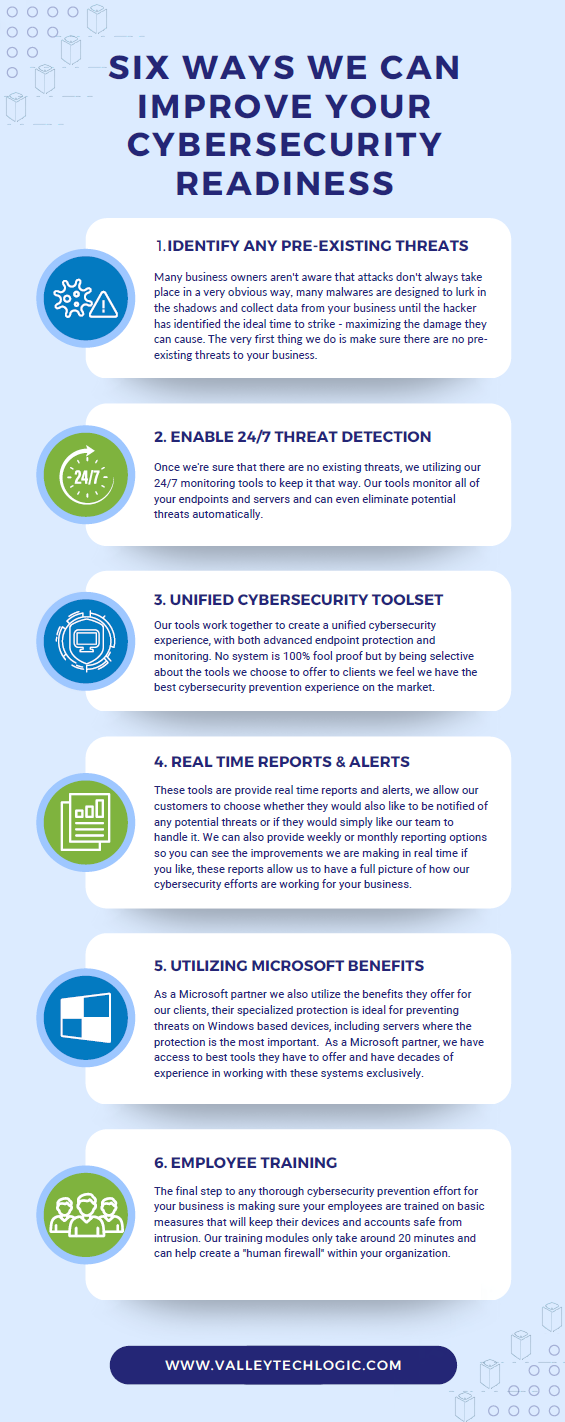
    For businesses who have made getting serious about cybersecurity a primary goal in 2023, here are 6 ways Valley Techlogic can help.

    Click to grab the full size version.

    Looking to learn more? Schedule a quick consultation with us today or take advantage of our 2-hour free service offer to experience our commitment to quality service for yourself.

    Looking for more to read? We suggest these other articles from our site.

    This article was powered by Valley Techlogic, an IT service provider in Atwater, CA. You can find more information at https://www.valleytechlogic.com/ or on Facebook at https://www.facebook.com/valleytechlogic/ . Follow us on Twitter at https://x.com/valleytechlogic.